LIFETIME DEAL — LIMITED TIME
Get Lifetime AccessLimited-time — price increases soon ⏳
AI Tools

TaroTap Review 2026: Free AI Tarot That Actually Works

Updated: April 20, 2026
5 min read
#Ai tool#Astrology

Table of Contents

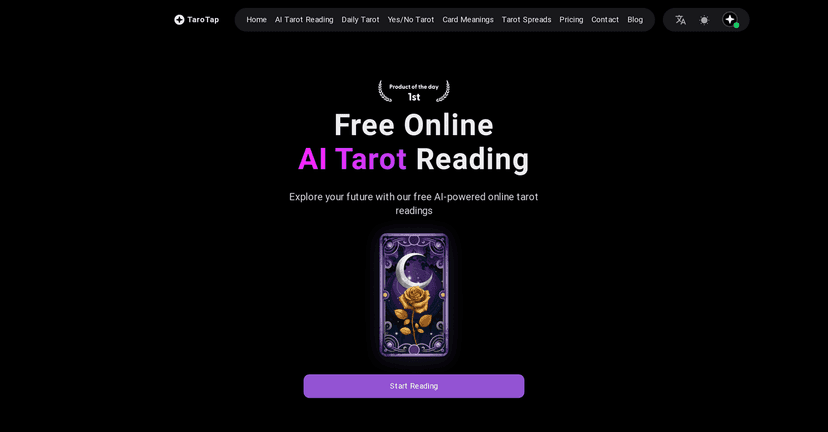
Ever wonder what you’d hear if you asked the tarot one simple question—and then actually got an answer right away? I tried TaroTap for a few days, mostly for love/relationship questions and quick “what should I focus on today?” checks. It’s a free online tarot experience that uses AI to generate readings whenever you want them—no appointments, no waiting around, and no awkward “come back next week” energy.

Tarotap

One thing I liked immediately: you can choose different reader personalities. That changes the vibe of the reading, so it doesn’t all feel like the same script every time. And if you’re the type who wants something fast, there are yes/no style prompts. If you’re more into longer, reflective reads, it also supports spreads and daily-style forecasts.

TaroTap Review

Let me be straight with you: I don’t expect AI tarot to feel exactly like sitting across from a human reader who can pick up on your tone, your hesitations, and the “pause” between sentences. But what I do want is something that’s quick, coherent, and actually gives me something I can reflect on. TaroTap checks a lot of those boxes.

Here’s what stood out in my testing:

  • It’s fast. I could go from question to reading without jumping through hoops. If I’m in the mood for a quick check-in, it scratches that itch.
  • The reader personality option helps. Even when the question is similar, the tone of the reading feels different depending on the style you pick.
  • It gives more than just “vibes.” The readings include interpretations and context (especially when you use spreads), not only a single-line answer.
  • Daily forecast style reads are easy to return to. It’s the kind of thing you can do in under 5 minutes when you don’t want a full deep-dive.

In other words, it’s not pretending to be a replacement for professional guidance. It’s more like a “tap-to-read” option for everyday curiosity.

Key Features

These are the features I actually used (and what they’re like in practice):

  1. 24/7 Tarot Readings for instant insights
    No schedule, no “limited slots.” I tested it at different times of day and it was consistent.
  2. Diverse Reader Styles for a more personalized experience
    You can pick the vibe. I noticed the same question can feel gentler or more direct depending on the reader style.
  3. Oracle Card Blessings for additional guidance
    When oracle cards show up, they add a softer, motivational angle that pairs nicely with tarot interpretation.
  4. Interactive Card Picking for an engaging experience
    It’s not just a static result. The interaction makes it feel more like a ritual, even if it’s digital.
  5. Daily Tarot Forecast for personalized insights
    This is the “quick check-in” feature. I found it works best when you keep your question broad: mood, focus, or obstacles.
  6. Yes/No Tarot Queries for quick advice
    If you want clarity fast, this is the most straightforward option. Just remember: yes/no works better for decisions than it does for complex life situations.
  7. Detailed Tarot Card Meanings for better understanding
    This helped me connect the reading to the card symbolism instead of treating it like a random fortune.
  8. Variety of Tarot Spreads for different queries
    Spreads are where the readings feel most “complete.” If you’re going to ask something bigger, use a spread instead of a tiny yes/no prompt.

Pros and Cons

Pros

  • Free access for basic tarot use. I didn’t hit any paywalls just to get started.
  • Instant availability. If you want an answer today (not “sometime next week”), it delivers.
  • Reader style variety. That tone change makes repeat readings feel less repetitive.
  • User-friendly interface. The flow is simple enough that you don’t need to be a tarot expert to get value.
  • Supports both quick and deeper reads. Yes/no for speed, spreads for more context.

Cons

  • No real human intuition. It can’t read your story the way a person can. If you want emotional nuance, you’ll miss that.
  • Interpretations can feel generic if your question is vague. I noticed that when I asked broad questions, the reading stayed broad too. Be specific if you want specifics.
  • Not meant for serious matters. Like most tarot tools, it’s not a substitute for medical, legal, or financial advice. (And you shouldn’t treat it like one.)

Pricing Plans

From what I saw, TaroTap is mainly free, which is honestly the biggest selling point. There may be premium features or professional consultations available, but the exact pricing details aren’t clearly spelled out on the page content I reviewed.

If you want the most accurate numbers, you’ll need to check the TaroTap site directly—especially the pricing section—so you’re not surprised later.

How I’d use TaroTap (quick tips)

  • Ask one question at a time. “What should I do about my relationship and my job and my money?” is a lot. Pick the main thread.
  • Match the question to the format. Use yes/no for decisions, and spreads for “why is this happening and what should I focus on?”
  • Do a follow-up. If the first reading doesn’t answer what you expected, try a narrower question like “What’s the obstacle?” or “What’s the next step?”
  • Use the card meanings. Don’t skip them. That’s where you start building your own interpretation.

Wrap up

TaroTap is a solid option if you want free, on-demand AI tarot that’s easy to use and quick to revisit. It won’t replace a human reader for deep, emotional work, but for everyday insight, it’s genuinely convenient. If you’re the kind of person who likes a little guidance while you’re cooking dinner or winding down for the night, this is the type of tool that fits.

Promote TaroTap

Stefan

Stefan

Stefan is the founder of Automateed. A content creator at heart, swimming through SAAS waters, and trying to make new AI apps available to fellow entrepreneurs.

Related Posts

CodeFlying Review – Effortless App Building with AI

CodeFlying Review 2026: AI App Maker That Actually Works?

CodeFlying in 2026, tested end-to-end: pricing, build speed, code quality, and real app results. Clear pros/cons and best alternatives. Read before you buy.

Stefan
Viddo AI Review – Transform Still Images into Videos Easily

Viddo.ai Review 2026: Photo-to-Video That Actually Works

Viddo.ai review 2026: we tested photo-to-video quality, speed, and pricing with real examples. Complete verdict + pros/cons. See if it’s worth a try.

Stefan
designrr reviews featured image

Designrr Reviews 2026: Is It Actually Worth It?

Designrr reviews 2026 with real tests: pros, cons, pricing, and who it's for. See if it actually saves hours on ebooks. Clear verdict - read now.

Stefan

Create Your AI Book in 10 Minutes