LIFETIME DEAL — LIMITED TIME
Get Lifetime AccessLimited-time — price increases soon ⏳
AI Tools

Postin Review – AI-Powered LinkedIn Copywriting Made Easy

Updated: April 20, 2026
5 min read
#Ai tool#Social Media

Table of Contents

If you’ve ever stared at a blank LinkedIn post box and thought, “I know what I want to say… I just don’t know how to say it,” you’re definitely not alone. I’ve been there. And the weird part? Even when I have solid ideas, the final post can come out too generic, too long-winded, or—worst case—so stiff it doesn’t sound like me.

That’s why I tested Postin, an AI-powered LinkedIn copywriting tool built to help you go from rough thought to something you can actually publish. In this Postin review, I’ll walk through what it does well, where it falls short, and whether it’s worth using for your own LinkedIn content.

Postin

Postin Review: What It Actually Does (and what I noticed)

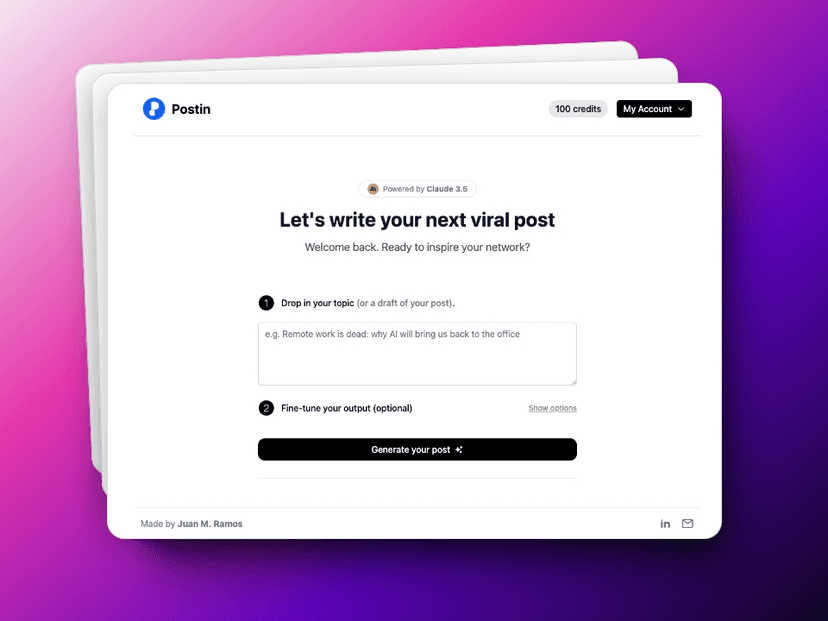
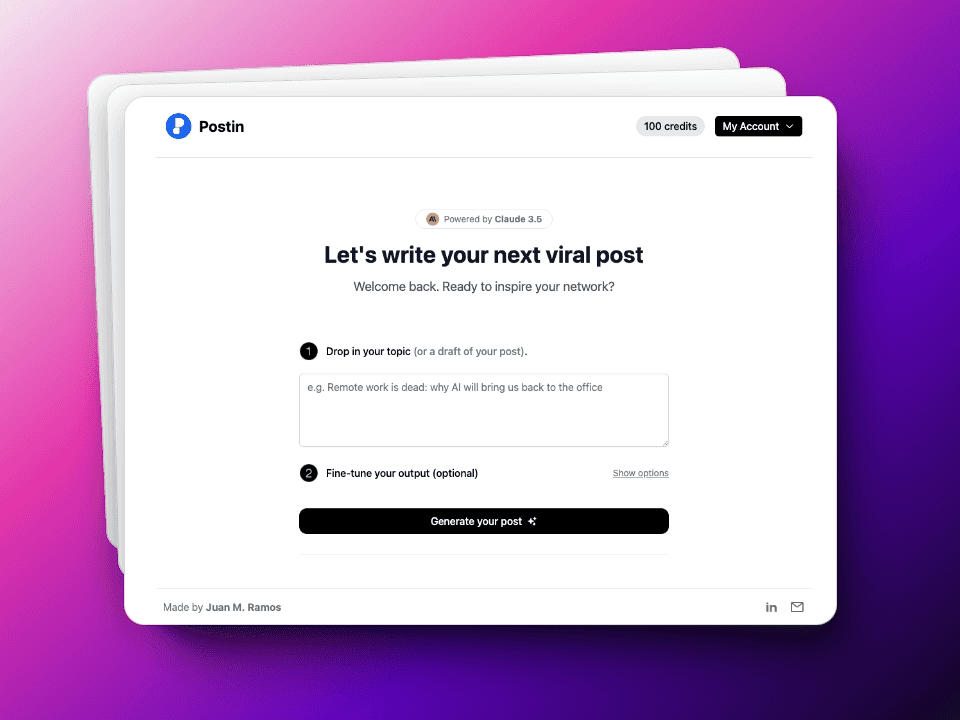
Postin’s whole purpose is simple: help you write better LinkedIn posts faster, even if you don’t consider yourself a “writer.” After signing in, you basically feed it a topic (or a messy draft) and it generates a complete post for you. The big selling point here is that it uses AI—specifically Claude 3.5—to produce content that reads more human than typical “robotic” AI drafts.

When I tried it, the first thing I noticed was how quickly it moved from prompt to publishable text. I didn’t have to babysit it or keep rewriting the same sentence 10 different ways. I typed a rough idea, hit generate, and got a post structure that included a hook, a few supporting lines, and a close that nudges engagement.

Now, I’ll be honest: it doesn’t magically make every post sound like you wrote it. You still need to review and tweak. But that’s normal. What surprised me is how little editing was required compared to other AI writing tools I’ve tested. The tone felt more “LinkedIn-ready” right away.

Key Features of Postin (the parts you’ll use)

  1. AI-generated post creation from your topic or draft
  2. 100 AI posts for $24.95 (pay-as-you-go style, so you’re not locked into a huge monthly plan)
  3. User-friendly interface for entering your topic without a bunch of formatting headaches
  4. Topic suggestions to help with brainstorming after you sign up
  5. A free post option so you can test the output before committing

What the workflow feels like in practice

Here’s the simple process I liked: I start with an idea that’s a little too broad (something like “lead generation lessons” or “what I learned from hiring”). Then I let Postin turn it into a post with clearer pacing and a more natural flow.

If you’ve ever written on LinkedIn before, you know the hard part isn’t “finding words.” It’s choosing the right angle and making it scannable. Postin helps with that structure. Still, I recommend adding one personal detail—something specific like a result, a mistake you made, or a lesson learned. That’s what makes the post feel real instead of generic.

Pros and Cons (my honest take after testing)

Pros

  • Fast output: I could generate a post in minutes, not hours.
  • Good value for multiple posts: The “100 posts for $24.95” pricing is pretty reasonable if you actually post consistently.
  • Easy to use: No complicated setup. You’re not fighting the interface.
  • Tone is more natural: Using Claude 3.5 shows up in the readability—less stiff phrasing than some alternatives.
  • Helps with brainstorming: The suggested topics were useful when I didn’t know what to post that day.

Cons

  • Sign-up required for topic suggestions: If you just want to browse ideas first, you can’t.
  • Limited free testing: You only get one free post, so you’ll need to commit to see how consistent it is for your style.
  • You’ll still want to edit: Even with good output, I didn’t copy/paste straight into LinkedIn every time. I adjusted hooks and swapped in my own wording.

One limitation I think people should expect

AI can give you a strong draft, but it can’t fully replace your perspective. If your posts rely on specific experiences (client stories, numbers, timelines, lessons), you’ll still need to inject that. In my experience, the best results happen when you treat Postin like a draft partner—not an autopilot.

Pricing Plans: Is Postin worth the money?

Postin’s main offer is straightforward: 100 AI posts for $24.95. It’s a pay-as-you-go setup, which I like because you’re not forced into a monthly subscription if you only post a few times a month.

That said, the “one free post” trial matters. If you’re the type who needs to test multiple prompts (different niches, different tones, different post lengths), one free generation might not be enough to feel confident. For me, it was enough to see the baseline quality, but I still had to refine a few drafts after that.

My final thoughts: Should you use Postin for LinkedIn copywriting?

If you want to publish more consistently and you’re tired of staring at a blank page, Postin can help. It’s especially useful if you’re good at having ideas but you struggle with turning them into a post that reads cleanly and feels LinkedIn-native.

Just don’t expect it to replace your voice. Use it to get unstuck, generate a solid first draft, and then make it yours with one or two personal details. That’s where the engagement usually comes from.

If you’re ready to test it for yourself, start with the free post and see if the style matches what you want to be known for—then decide if the 100 posts for $24.95 is a fit for your posting routine.

Promote Postin

Stefan

Stefan

Stefan is the founder of Automateed. A content creator at heart, swimming through SAAS waters, and trying to make new AI apps available to fellow entrepreneurs.

Related Posts

diy publication featured image

DIY Publication: Top 10 Most Searched Strategies for 2026

Discover the best DIY publication tips, tools, and trends for 2026. Learn how to publish, design, and promote your content independently today!

Stefan
kundenspezifische druckerfabrik in china featured image

Kundenspezifische Druckerfabrik in China: Top 10 Hersteller 2026

Entdecken Sie die führenden kundenspezifischen Druckerfabriken in China 2026. Erfahren Sie, wie Sie die beste Fabrik wählen und von maßgeschneiderten Drucklösungen profitieren.

Stefan
book cover design size featured image

Book Cover Design Size: The Ultimate Guide for 2026

Discover the latest standards and best practices for book cover design size in 2026. Learn how to choose the right dimensions for print and eBooks to boost sales.

Stefan

Create Your AI Book in 10 Minutes