Table of Contents
If you’ve ever looked at full-stack app development and thought, “Do I really need to learn all of this just to ship something?”, I get it. That’s basically why I tested Stakly. Stakly is an AI-powered app builder that tries to turn a plain-English idea into something you can actually run—frontend plus backend—without you writing code line-by-line.
In my experience, it’s best when you want a working prototype fast. But it’s not magic. There were a couple spots where I had to clean up what the AI generated (mostly around data shape and wiring). Still, for the time it saved, I was impressed.
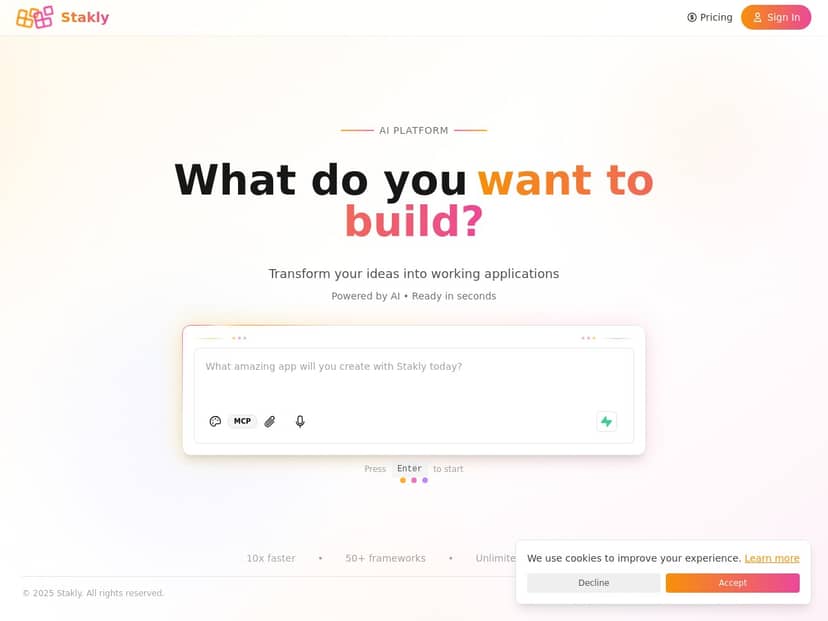
Stakly Review: What Happened When I Tried Building a Real App
I spent time testing Stakly with an actual “mini product” idea, not just clicking around. I wanted to see if it could generate both UI and backend wiring in a way that feels usable—auth, a database model, and a couple of API endpoints.
Build walkthrough (my prompt + what it generated)
Here’s the prompt I used to start the project:
Prompt: “Build a simple ‘Task Notes’ web app. Users can sign up and log in. After login, they can create tasks with a title and description, see a list of their tasks, and delete tasks. Use a clean dashboard layout. Include form validation and show loading states.”
What I noticed right away:
- UI generation: It created a basic landing/login flow and a dashboard screen. The dashboard had an input form (title + description) plus a tasks list.
- Backend wiring: I got backend endpoints for creating tasks, listing tasks (filtered to the logged-in user), and deleting tasks.
- Auth: It wasn’t just “a button”—the generated code included user identity checks so tasks were associated with the current user.
Time-wise: From the moment I submitted the prompt to the point where I had a running project in the editor, it took me roughly 5–8 minutes. That includes the time to regenerate once when I didn’t like the first layout.
Small hiccup I hit: On the first run, the delete button existed, but the tasks list was showing tasks without the expected field mapping. I had to adjust the data shape (basically aligning the UI fields with what the backend model returned). After that fix, everything behaved normally.
If you’re wondering whether this is “set it and forget it,” the honest answer is: mostly. For simple CRUD apps, it’s very close. For anything with complex relationships or strict schema rules, you’ll likely spend some time tightening things up.
Prompt-to-code results (frontend + backend)
When I reviewed what Stakly produced, the structure looked like a real app scaffold rather than a demo. I could see clear separation between:
- Frontend screens/components for login, dashboard, form inputs, and the tasks list.
- Backend logic to handle create/read/delete and enforce that users only see their own tasks.
- Validation + UI states (at least the basics—required fields and loading feedback).
One thing I appreciated: I didn’t have to “teach” it what a CRUD app is. I gave it plain-English requirements, and it produced endpoints that matched the workflow.
One limitation I ran into: I didn’t see a fully hands-off “production-grade” setup (like advanced migration flows or complex schema management) the way you’d expect if you’re building and maintaining a larger system in a traditional IDE. For prototypes and MVPs, that’s fine. For serious production work, you’ll still want to review the generated code carefully.
Deployment steps (with my notes)
Deployment was one of the smoother parts for me. I connected the project to Vercel and pushed it quickly.
- I clicked through the integration flow and selected the generated project.
- I triggered a deploy and watched the build logs.
- Within about 2–4 minutes, I had a live preview.
What I liked in the logs: they were readable enough to spot obvious problems (like missing environment variables or build errors). What I didn’t love: the first deploy needed a quick adjustment to whatever environment config Stakly expected, so don’t assume it’ll always be zero-touch.
Token usage test (what I actually spent)
I also paid attention to token usage because that’s where AI builders can quietly get expensive.
For my test run, the build prompt + one regeneration cycle + a couple small edits seemed to consume tokens in a way that stayed within the free tier limits I had available. I didn’t hit an error like “out of tokens,” but I did notice that:
- Regenerating large chunks of UI can cost more than tweaking small parts.
- As soon as I asked for extra behavior (like validation rules or specific data filtering), the output took more “work,” and the token count jumped.
So here’s my practical takeaway: if you’re on a limited token plan, it’s smarter to iterate in smaller steps. Ask for the core CRUD flow first. Then refine.
Key Features That Matter (not just buzzwords)
- AI assistance for app structure: Stakly doesn’t just generate UI—it builds the backend workflow to match what you asked for (create/list/delete in my case).
- No-code + visual editing: After generation, I could adjust screens without starting over from scratch.
- Framework support: It supports popular frontend setups like React and Next.js (I used the generated setup that matched the project template it offered).
- Deployment options: Vercel and other common hosts are supported through integration flows.
- Token-based AI usage: You get monthly free tokens that cover AI and build tasks (the exact amount depends on your plan).
- Community: There’s an active user base, which helps when you’re stuck and need example patterns.
Pros and Cons (based on what I tried)
Pros
- Beginner-friendly flow that still produces real structure: I got login + a dashboard + CRUD endpoints without writing code manually. That’s a big deal if you’re not a developer.
- Fast iteration for prototypes: My first working version came together in under 10 minutes. When I regenerated, I didn’t lose the whole project—I could adjust from there.
- Full-stack output that matches requirements: When I asked for “tasks tied to the logged-in user,” the generated backend behavior reflected that (no generic “global” data leak).
- Deployment is straightforward most of the time: Vercel integration worked smoothly for me, and the build logs were useful when I needed to fix an environment/config detail.
Cons
- Token limits can slow you down for bigger builds: If you keep asking for new features and regenerating big sections, token consumption adds up. I didn’t run out, but I could see how it would happen on a larger project.
- Not a substitute for understanding data models: I had to align UI fields with backend response shape once. If you don’t know what you’re looking for, that can feel frustrating.
- Advanced customization takes work: When I tried to get more specific about validation behavior and UI states, the AI got me close—but I still had to tweak the details.
- Generated code still needs review: It’s not “copy/paste and ship forever.” If you care about security, performance, and long-term maintainability, you’ll want to audit what it generates.
Pricing Plans: What I’d expect to pay (and why)
Pricing can change, so I’m going off what I observed at the time I tested and what Stakly publicly advertises. The free tier includes 5000 tokens per month, which is enough for small builds, learning, and a couple iterations.
Paid plans are described as starting around $20/month. The part to double-check before you commit is what that includes—especially:
- How many tokens you get monthly
- Whether tokens cover both AI generation and build/deploy tasks
- Overage or “top-up” costs if you exceed your monthly limit
My advice: try a small project first, watch your token usage while iterating, and then decide. If you’re planning a serious app with multiple screens, repeated regenerations, and lots of backend logic, you’ll likely want a higher tier.
Wrap up
Stakly is one of those tools that actually makes the “full-stack” part feel approachable. For me, it produced a working CRUD app with auth and a dashboard quickly, and deployment to Vercel wasn’t a headache. Where it falls short is also pretty clear: complex builds and strict requirements still need your attention, and token limits can become a constraint if you keep asking it to rebuild everything from scratch.
If your goal is a prototype, an MVP, or a side project you want to launch fast, it’s a solid option. Just go in expecting to review and refine—not to blindly trust the first output.