Table of Contents
If you’ve ever tried to pull together lead lists or company background info from scratch, you already know how annoying it gets. Tabs everywhere. Spreadsheets half-finished. And somehow you still end up with missing phone numbers or outdated job titles. That’s why I wanted to test Myko Assistant—because it’s built around one simple idea: do the research by sending an email request and get organized results back.
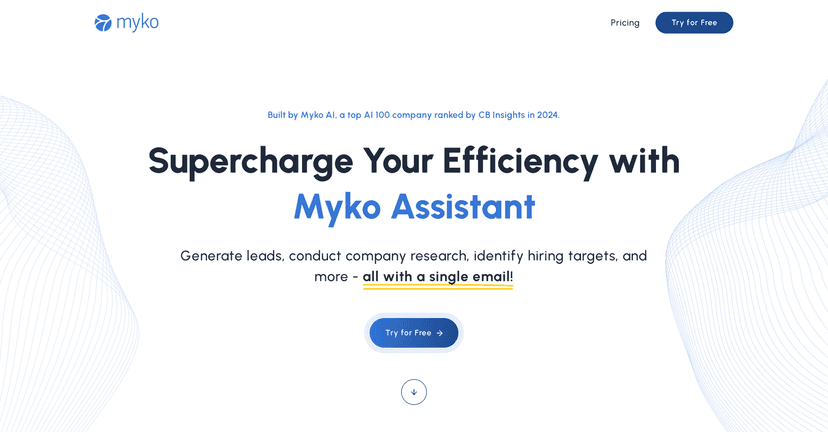
Myko Assistant is positioned for lead generation, company insights, and even hiring-related research. In my experience, the “email in, answers out” flow is the part that feels most practical. Instead of hunting around for the right person, you tell the assistant what you need, and it returns compiled info (like profiles and job listings) in a more structured way than a typical search session.
Now, I’ll be real—AI tools can sound impressive on paper, but the real question is: does it actually help you move faster without creating extra cleanup work? Keep reading and I’ll break down the features I looked for, what I liked, and where I think you’ll want to be careful.
Myko Assistant Review
Myko Assistant is built for people who need research output fast—especially for lead generation and company or hiring research. The core workflow is simple: you send your questions through email, and it returns organized results.
What I found most useful is that it isn’t just “here’s some links.” It’s more like “here’s the info you asked for, compiled.” For example, if you’re trying to build a list of target prospects, you don’t want a bunch of random search results—you want names, roles, and supporting details you can actually use.
Myko also focuses on verified professional profiles and job listings. That matters because the biggest time sink in research is double-checking whether what you pulled is real, current, and relevant. If the assistant is truly pulling from verified sources, it can cut down the back-and-forth you’d normally do manually.
That said, I’d treat it like a research assistant—not a magic button. You’ll still want to skim and sanity-check anything you plan to send to a customer or put into a sales pipeline. AI can be helpful, but you’re the one responsible for accuracy.
Key Features
- Email request system that lets you submit research questions directly (so you’re not constantly bouncing between tools).
- Fast responses with detailed answers—the goal is to get you something you can work from right away.
- Verified information aimed at accuracy and completeness, especially for professional profiles and related data.
- Profile finding to retrieve work experience and contact info (the kind of details you’d usually gather manually).
- Job listing search to find postings across different platforms—useful if you’re tracking hiring signals.
- Extensive data retrieval for company and employee information, so you can build context instead of starting from zero.
Pros and Cons
Pros
- Feels easier than manual research. If you’re already good at asking the right questions, the workflow is straightforward.
- More structured than “search results”. In my experience, that saves time because you’re not copy-pasting from 20 different pages.
- Good for productivity when you’re doing repeated tasks like building prospect lists or gathering company background.
- Trusted positioning—it’s described as using AI from a well-known company recognized by CB Insights, which at least gives some credibility to the underlying approach.
Cons
- It depends on your email prompt. If your request is vague (“find me contacts”), you’ll get weaker results. You’ll want to be specific about titles, company size, location, and what you consider a “match.”
- Some features are locked behind paid plans. In particular, things like personal email and phone number retrieval may not be available on the free tier.
Pricing Plans
Myko Assistant offers a free trial so you can test whether the output quality matches what you need. From what’s described, some functionality—including personal email and phone number retrieval—is exclusive to paid plans.
One thing I recommend (and this is the part that actually helps you decide): use the free trial for a realistic sample task. For example, try requesting profiles for a specific role at a specific type of company (like “Head of Marketing at 50–200 employee SaaS companies in the US”), then see whether the returned details are complete enough to skip manual follow-up.
Pricing details aren’t listed here, so the best move is to start the trial, test the features you care about most, and only then decide if the paid plan is worth it.
Wrap up
Myko Assistant is a solid option if your job involves recurring research—lead lists, company context, hiring signals, and profile gathering. The email-based system is genuinely convenient, and the “verified profile” angle is exactly what I want when I’m trying to avoid wasting time on outdated info.
Just don’t expect it to replace your judgment. If you want clean results, you’ll need to ask good questions. When you do, though, it can save you a noticeable chunk of time compared to doing everything manually.
If you’ve been thinking about trying something like this, I’d say go for the free trial and run one or two real requests before you commit.