Table of Contents
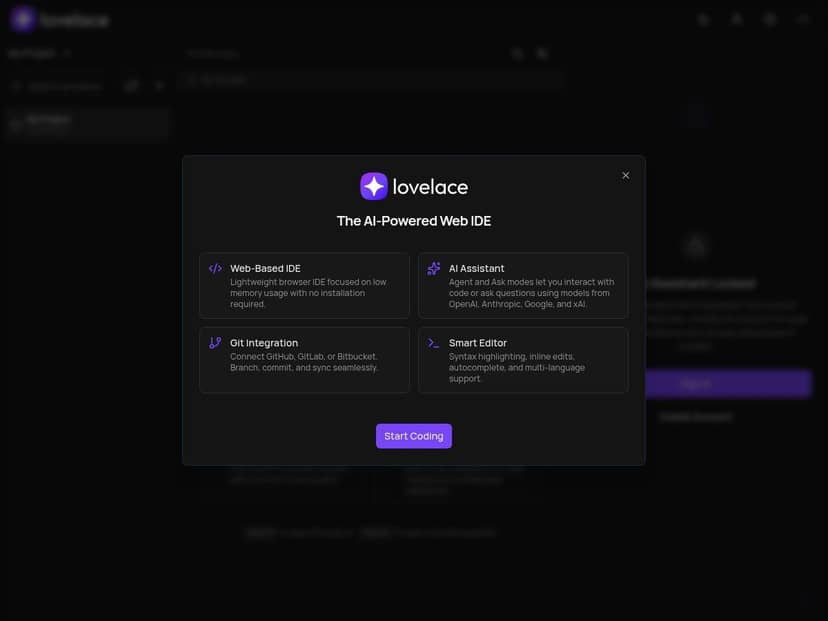
I’ve used a handful of browser-based IDEs over the last couple years, and most of them either feel too “thin” (missing the stuff you actually need) or too “heavy” (setup and workflows turn into a chore). Lovelace is different in a few ways. It’s genuinely quick to get going—open the browser, load the workspace, and you’re writing code without installing anything locally.
What I wanted to figure out is simple: does Lovelace’s AI actually help, or is it just a nice demo? And when you move from “small edits” to real projects with dependencies and builds, does it hold up? After testing it, here’s what I noticed—good, not-so-great, and the parts I’d double-check before you bet a whole workflow on it.
Lovelace Review
Here’s the honest baseline: Lovelace feels like a real IDE, not just a code viewer. I tested it by spinning up a workspace and doing the kinds of tasks I normally do in cloud environments—editing multiple files, running commands, and asking the AI to help me move faster on repetitive code changes.
Setup experience: the “no downloads” part is legit. There was no local install, no IDE setup wizard, no “why won’t this compile on my machine?” moment. I could go from a blank workspace to writing code quickly. That matters, because cloud IDEs that take 20 minutes to get to a first run usually lose me.
What the AI actually did (and didn’t): I used both an “Ask” style workflow (where I describe what I want) and an “Agent” style workflow (where the tool tries to take actions toward a goal). On smaller, well-scoped tasks—like generating a helper function, refactoring a small module, or explaining a section of code—the results were fast and pretty accurate. On trickier tasks (more on that below), the AI was still useful, but I had to be more specific and double-check what it changed.
Collaboration: I also tried the real-time collaboration side with another person editing the same project. What I liked was that it didn’t feel like you were “sharing a screen.” You could actually see activity and keep working while someone else made changes. That’s a big deal for teams who don’t want to coordinate through chat every time someone touches a file.
The part to watch: Lovelace shines when your workflow is mostly “edit + run” and your dependencies behave predictably. Where I hit friction was with more complex local build processes—projects that rely heavily on environment-specific setup, custom tooling, or a very particular local directory structure. In those cases, the platform can still help, but you’ll likely spend more time aligning environment variables and build steps than you would in a fully local setup.
Key Features (with real examples)
- AI-powered code assistance with Agent and Ask modes
- In my testing, Ask worked best when I gave the AI a clear target. For example: “Review this function and suggest how to handle edge cases for empty input” or “Explain why this loop is skipping items and propose a fix.” It was good at reasoning through code and giving actionable suggestions.
- Agent was more useful when I wanted the tool to take steps toward a goal—like implementing a change across multiple files or wiring up a feature end-to-end. I noticed it performs best when the goal is specific (what files to touch, what behavior you want, and any constraints). If you’re vague, it can still help, but expect to review changes carefully.
- Web-based, lightweight browser interface
- The “just open the browser” experience is the point here. I didn’t need to deal with IDE version mismatches or local machine constraints. If you’ve got a team that bounces between laptops or travels a lot, this is where Lovelace earns its keep.
- Supports multiple programming languages
- I tested it with common workflows where language support matters (editing, running, iterating). The editing experience felt consistent across languages, and the AI assistance was available in the same environment—so you’re not constantly switching tools.
- Seamless GitHub, GitLab, and Bitbucket integration
- Integration is more than “it can connect.” In practice, it helped me pull in a repository, work in the workspace, and keep my changes aligned with the remote source. I didn’t have to jump through hoops to move between branches or keep project history organized.
- Real-time collaboration tools
- I had two editors working in the same project. What stood out was how quickly we could coordinate without constantly asking “did you change that file?” The presence indicators made it obvious who was doing what, and it kept momentum during iterative work.
- One thing to clarify: if your workflow depends on very specific PR review steps or code comment tooling, you’ll want to verify how Lovelace maps collaboration to your existing Git workflow. It’s strong for editing together, but like any cloud IDE, the depth of PR-native features can vary.
- Strong privacy and data sovereignty measures
- This is one of the areas I pay attention to because it affects whether I can recommend a tool to teams with compliance needs. Lovelace positions itself with a privacy-first approach, and it’s not just marketing fluff—it’s part of the product story, not an afterthought.
- Responsive design for any device
- I used it on a couple screen sizes. The UI didn’t feel like it was “broken down” into unusable tiny buttons. It’s still an IDE, so it’s not magic on a phone, but for laptops and normal monitors it works well.
- Project management integrations
- If your team links code work to tickets, this kind of integration saves time. I didn’t treat it like a full replacement for a dedicated PM tool, but it helped keep context while I was working.
- Dark and light mode options
- Simple, but I appreciate it. Long sessions are easier when the theme matches your preference.
- Planned features include deployment options and offline mode
- Offline mode is the one I’m most curious about. Right now, you shouldn’t assume you can “disconnect and keep coding” the way you can with a local IDE. If your team needs true offline dev, treat that as a future expectation and plan accordingly.
Pros and Cons (what I’d actually tell a friend)
Pros
- Fast start: no installation, no local setup. That’s huge if you switch machines often.
- AI that’s genuinely usable: for common tasks like refactors, explanations, and scoped code generation, it can reduce the “blank page” feeling.
- Collaboration is real: it supports simultaneous teamwork without turning work into a coordination nightmare.
- Security/privacy focus: the privacy-first positioning is a meaningful differentiator for teams that care about where data goes.
- Works across languages: you don’t feel like you’re locked into one stack.
- Clean UI: it’s not cluttered, and navigation feels straightforward.
Cons
- Can feel overwhelming at first: not because it’s “bad,” but because there are more moving parts than a plain text editor. If you’re brand new, you’ll likely want a quick onboarding checklist (what to connect, which mode to use, how to run commands) rather than figuring it out by trial and error.
- Some advanced features aren’t fully mature: I ran into moments where I could tell certain workflows were still evolving—especially around deeper automation and more complex project lifecycles.
- Offline capabilities are limited: don’t count on offline editing or offline execution. If you lose connectivity, your ability to keep working drops quickly.
- Complex local build processes may need extra attention: I found that projects with heavier local assumptions (custom scripts, environment setup, and dependency quirks) can require more troubleshooting than expected. You may need to align environment variables and ensure the workspace runtime matches your expectations.
Pricing Plans
Here’s what I can confirm from what I saw and experienced: Lovelace includes a free tier for getting started with basic functionality. For paid plans, pricing starts at $16 per month and scales up based on the limits you need.
What I’d look at before choosing a tier:
- AI usage limits: if you plan to lean on Agent/Ask heavily, check what’s capped (and how quickly you hit it).
- Higher workspace/team limits: paid tiers are typically where collaboration and larger projects become smoother.
- Integrations and advanced capabilities: some integrations and features tend to unlock or expand at higher levels.
If you’re evaluating for a team, I’d also compare the plan limits against your expected number of active users and how often you run AI-assisted workflows—not just “how many seats,” but how much usage you’ll generate.
Wrap it up
Lovelace is one of the more convincing cloud IDE options I’ve tried. The browser-first setup is genuinely convenient, the AI features are more than window dressing, and collaboration feels built for actual teamwork—not just “look, we support sharing.”
That said, I wouldn’t treat it like a drop-in replacement for every local workflow. If your project relies on complex environment-specific builds or you need true offline development, you’ll want to test your exact commands and dependency setup first.
If you want a browser-based IDE for remote work, quick iteration, and AI-assisted coding, Lovelace is worth a real try.