Table of Contents
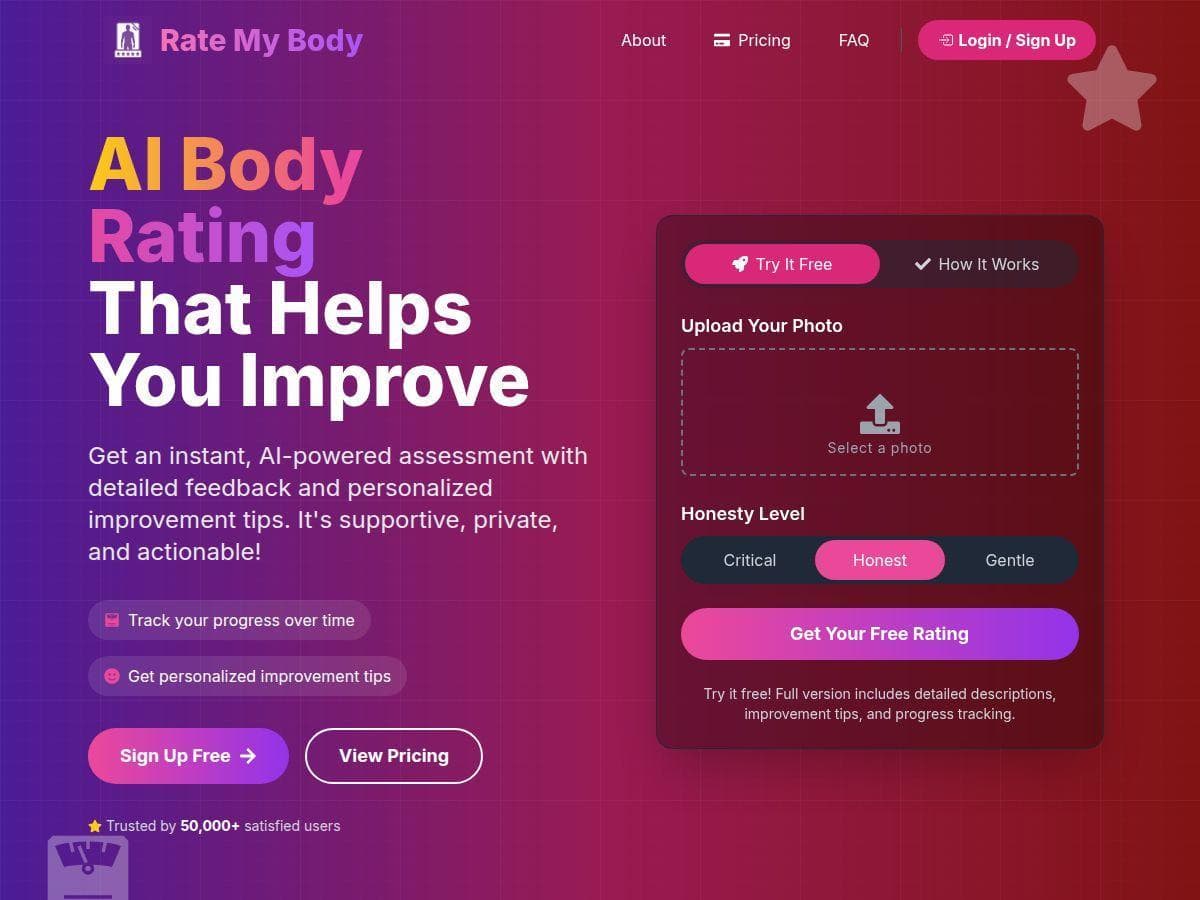
If you’re trying to stay consistent with training, it’s tempting to look for quick feedback that doesn’t require a coach appointment. AI Rate My Body is one of those apps that promises fast, AI-based physique feedback from photos—and yeah, I was curious if it was actually useful or just “motivational fluff.”
In my experience, the big win is how quickly it turns your photos into something you can act on (and the way it nudges you to take progress photos consistently). The part that didn’t fully impress me? Accuracy depends a lot on how the photo is taken. Get the lighting/angle wrong, and the numbers feel less trustworthy.

AI Rate My Body Review
Here’s what I actually did: I tested AI Rate My Body by uploading a front-facing photo and then a second photo from a different angle. I didn’t overthink it, but I also tried to be consistent—same room, similar lighting, and I kept the camera at roughly chest-to-head height.
How fast was it? Pretty quick. The analysis didn’t take minutes. I remember waiting long enough to blink and then the results screen loaded. The app immediately broke things down into multiple areas (muscle tone, body fat estimate, and symmetry) instead of giving one vague score.
What I saw in the results. The output wasn’t just “you look X.” It felt more like a structured report. I got a summary of:
- Muscle tone (described in plain language)
- Body fat percentage (presented as an estimate)
- Symmetry (basically a comparison of left vs right)
- Recommendations that were tied to the goal I selected
Recommendations: This is where it surprised me. It didn’t just say “work out.” It leaned into specifics like focusing on strength work to improve tone and making nutrition adjustments to support the fat-loss direction. The tone options mattered too—I picked the more gentle setting first because I didn’t want the feedback to feel harsh.
Progress tracking (the part I cared about most). Over the next couple of weeks, I uploaded additional progress photos. What I noticed is that the app seems to use your earlier photos as a baseline. When I kept the lighting similar, the trend looked more believable. When I used a darker photo (windows closed, overhead lights only), the numbers shifted more than I expected—even though my real-world routine hadn’t changed that much.
That’s the main limitation I’d flag: AI body estimates are sensitive to photo conditions. If you want repeatable results, you can’t treat it like a “random selfie generator.” Use the same angle, similar distance, and consistent lighting. Otherwise, you’ll end up arguing with the app instead of using it for motivation.
Also, just being honest: I wouldn’t use the fat % estimate as a medical metric. It’s a photo-based guess. If you have calipers, DEXA, or even a consistent scale + measurements routine, those will still be more grounded for decision-making.
Key Features
- AI-Powered Physique Analysis: Upload photos and the tool breaks the assessment into muscle tone, fat estimate, and symmetry. In my results, the app showed these as separate categories (not one blended score), which made it easier to pick what to focus on next.
- Personalized Improvement Tips: Based on your selected goal, it generates improvement suggestions. What I liked is that the advice read like fitness guidance (strength training emphasis, nutrition habits) instead of generic “be healthy” messaging.
- Progress Tracking: You can upload multiple photos over time. The app then helps you see changes across uploads. In practice, I found it most motivating when I followed the same photo setup each time (same stance, similar lighting, similar framing).
- Customizable Feedback Tone: You can choose how direct the feedback feels. I used the gentler option first, and it made the experience less stressful. If you’re prone to getting discouraged by harsh language, this is actually a useful feature—not just a cosmetic one.
- Privacy and Security: The app claims photos are processed securely and deleted after analysis. I can’t independently verify deletion on my end, but the privacy messaging is clear and the workflow doesn’t feel like it’s designed for sharing publicly.
- Health-Focused Insights: The feedback isn’t only aesthetics. It frames recommendations around fitness/wellness priorities, which I appreciated because it keeps the output from feeling purely superficial.
Pros and Cons
Pros
- Fast results—the output appears quickly, and you don’t have to wait around for a long analysis cycle.
- Clear category breakdown—muscle tone, fat estimate, and symmetry are presented separately, so you can target what matters.
- Recommendations feel actionable—in my case, it nudged me toward strength-focused and nutrition-focused habits instead of vague tips.
- Progress tracking helps consistency—the trend view made it easier to stay consistent with taking photos on a schedule.
- Feedback tone control—this genuinely changes how the experience feels day-to-day.
- Motivation without judgement—it’s private and structured, which is a big deal if you don’t want to share progress publicly.
Cons
- Photo quality can throw off the estimate. I saw bigger swings when lighting and camera angle weren’t consistent.
- Fat % is still an estimate, not a measurement tool. Treat it like a directional indicator, not a precise number.
- Scientific backing isn’t fully transparent in the way I’d expect. It’s not that it gives “bad advice,” but it doesn’t clearly spell out the methodology or study citations in a way you can easily verify.
- Sensitive topic for some people. Body evaluation can be uncomfortable. If you’re in a fragile mental space, consider using the gentler tone option and avoid comparing daily fluctuations.
- Free access is limited. You’ll likely hit a wall if you want lots of uploads and full trend/history features.
Quick tip from my testing: If you want more reliable comparisons, take photos like you’re doing a “measurement session.” Same spot, same distance, same time of day if possible, neutral posture, and consistent clothing (or no clothing if the app supports that—just keep it consistent). Then compare trends, not one-off outputs.
Pricing Plans
Pricing can change, so I can’t pretend it’s the same forever. When I checked, the setup looked like this: you can start with a free tier/trial that gives basic analysis, and then you’d upgrade for deeper features like more detailed assessments, personalized recommendations, and expanded progress tracking.
What I recommend: don’t rely on memory—check the current numbers on the official Rate My Body page for the most up-to-date price (it can vary by region and platform). If you’re trying to budget, look for whether the plan is monthly vs yearly and what “unlimited tracking” actually includes.
So… is AI Rate My Body worth it?
For me, AI Rate My Body is best as a motivation + consistency tool. It’s not a replacement for a coach, and it’s definitely not a medical body-composition device. But if you want quick feedback, a structured breakdown, and a way to track progress privately, it does a solid job—especially when you take photos consistently.
If you’re someone who gets thrown off by fluctuating body image thoughts, use the gentler feedback tone and don’t obsess over day-to-day changes. Use it like a weekly check-in instead.
Give it a try with good photo habits, and you’ll get more value out of it. Treat the estimates as directional, follow the recommendations that match your goal, and let the trends—not the single numbers—do the heavy lifting.