LIFETIME DEAL — LIMITED TIME
Get Lifetime AccessLimited-time — price increases soon ⏳
AI Tools

AI Ease Review – Create Stunning AI Headshots for Free

Updated: April 20, 2026
4 min read
#Ai tool#headshots

Table of Contents

If you’ve ever tried to update your LinkedIn photo and thought, “I don’t have time (or budget) for a studio session,” I get it. A good headshot still matters, though—especially when recruiters and clients are judging you in seconds.

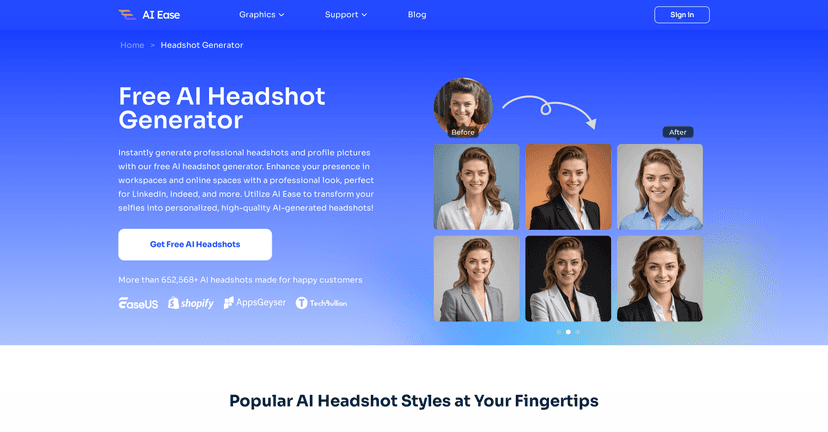
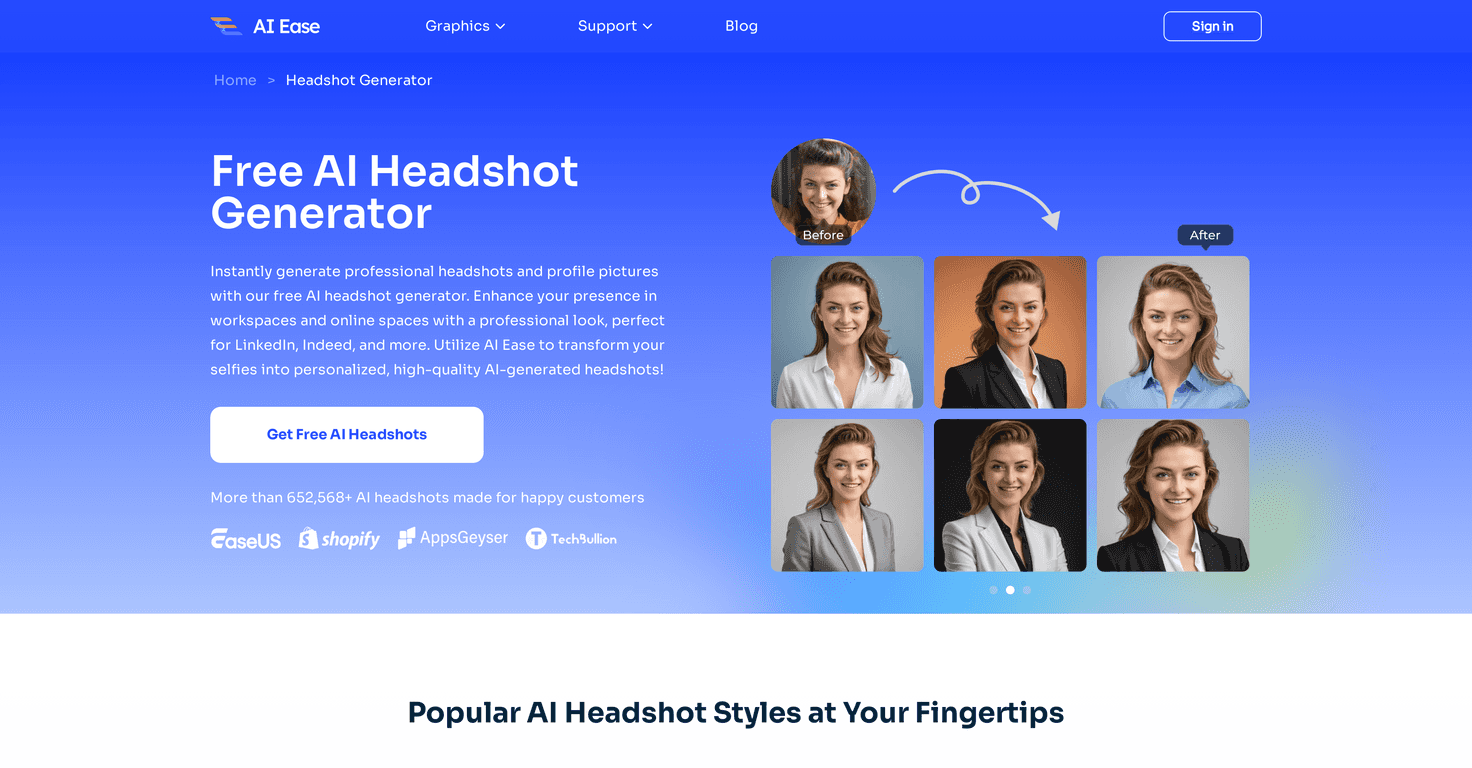
That’s where AI Ease comes in. I tested it with a normal selfie (not a professional photo shoot), and I was honestly surprised by how quickly it produced usable headshots. You upload a photo, pick a style direction, and you get results fast—without paying for a photographer or signing up for some expensive plan.

Ai Ease

Table of Contents

AI Ease Review (What I Noticed After Testing It)

AI Ease is built for speed and simplicity. In my experience, the whole process is pretty quick—upload a selfie, wait less than a minute, and you’ll get headshot options you can actually use.

Here’s what surprised me: the tool doesn’t just spit out one generic portrait. It generates different styles, so you can go for something more traditional (great for business profiles) or something more creative (better for social media). If you’re trying to match the vibe of your industry, that flexibility helps.

One big thing, though: results depend heavily on your input photo. If your selfie is blurry, angled, or has harsh lighting, the output won’t magically fix it. The best results I got came from a clear, front-facing image where my face was well-lit and centered.

Also, privacy matters. AI Ease claims a privacy-focused approach (no storage or leaking of uploaded photos). I can’t verify that from the outside, but it’s a reassuring detail—especially if you’re uploading personal images.

Key Features That Matter (Not Just Buzzwords)

  1. Instant generation of AI headshots — you’re not waiting around for hours.
  2. Multiple input formats — supports JPG, PNG, JPEG, BMP, and HEIC, so you shouldn’t have file-type issues.
  3. Professional + creative style options — useful if you want a “LinkedIn-safe” look and a “fun online” look.
  4. Fast turnaround — results are generated in less than one minute in typical use.
  5. Privacy-focused approach — positioned as not storing or leaking uploaded photos.

Pros and Cons (Realistic Expectations)

Pros

  • Completely free to use — no paywall moment mid-process.
  • Quick processing — I didn’t feel like I was “waiting for the computer to think.”
  • Simple workflow — upload selfie, generate, download. That’s it.
  • Quality can look studio-level — when your input photo is clear, the output is surprisingly polished.
  • Multiple styles — you can generate options for different platforms instead of being stuck with one look.

Cons

  • Your upload quality really matters — if your photo is off-angle or poorly lit, the results won’t be as strong.
  • Style variety may feel limited — depending on what you’re going for, you might want more niche looks (like very specific backgrounds or industry-specific themes).

Pricing Plans (Is It Actually Free?)

AI Ease is completely free for generating AI headshots. In my testing, I didn’t hit any subscription prompts or hidden-fee surprises. If you’re looking for a no-cost way to refresh your photo, this is one of the cleaner options I’ve seen.

That said, “free” tools sometimes come with limits (like usage caps or quality throttling). If you run into any restrictions, it’s worth checking what’s allowed on the site before you upload a bunch of photos.

Wrap up

Overall, my take on AI Ease is pretty positive. It’s fast, easy to use, and it can generate headshots that look professional enough for LinkedIn and other social profiles—especially when you start with a clear, front-facing selfie.

Just don’t expect it to fix a bad photo. If your original image is blurry or dark, your results will reflect that. But if you’re starting with something decent, this is a solid way to get a fresh headshot without paying for a photographer.

If you’re overdue for an update, why not try AI Ease and see which style fits you best?

Stefan

Stefan

Stefan is the founder of Automateed. A content creator at heart, swimming through SAAS waters, and trying to make new AI apps available to fellow entrepreneurs.

Related Posts

are quotes public domain featured image

Are Quotes Public Domain: Complete Guide

Learn everything about are quotes public domain. Complete guide with practical examples, expert tips, and actionable strategies.

Stefan
self published books that made it big featured image

Self Published Books That Made It Big: Success Stories & Tips

Discover how self-published books achieved massive success in 2026. Learn from top authors, key strategies, and industry insights to boost your publishing journey.

Stefan
diy publication featured image

DIY Publication: Top 10 Most Searched Strategies for 2026

Discover the best DIY publication tips, tools, and trends for 2026. Learn how to publish, design, and promote your content independently today!

Stefan

Create Your AI Book in 10 Minutes