Table of Contents
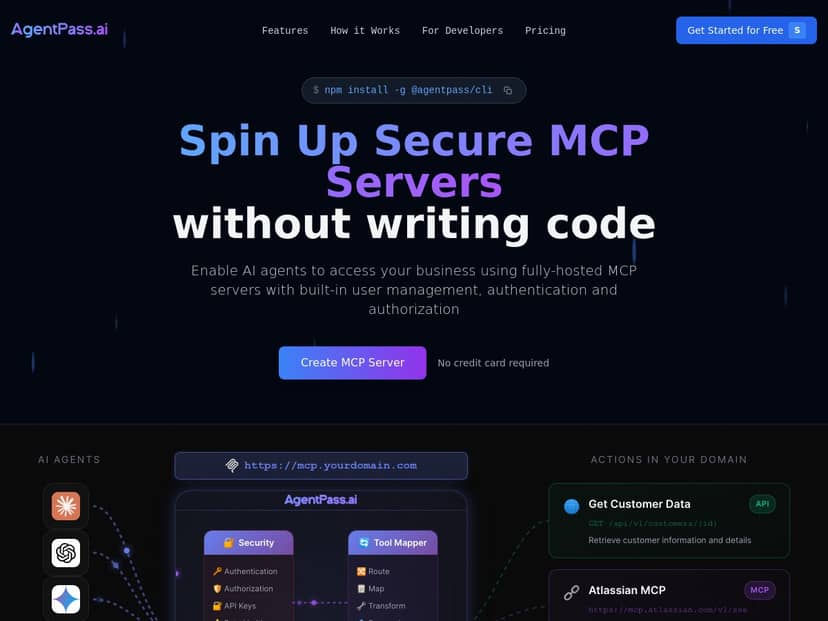
I’ve tested a few “AI agent ↔ API” tools over the last year, and AgentPass.ai is one of the more practical ones I’ve tried. The whole point is pretty simple: take an API description (usually OpenAPI) and turn it into something an AI agent can call safely—without me having to hand-build a bunch of server glue code.
In my experience, the setup feels “guided” rather than “DIY.” You get secure MCP server scaffolding, authentication options (including OAuth 2.0/2.1), and a workflow that’s meant to reduce the time between “we have an API” and “our agent can use it.” Does it replace every custom integration in the world? No. But for teams that want speed and reasonable security, it’s a strong option.
AgentPass.ai Review
Let me be straight about what I did. I started with an OpenAPI spec for a small internal REST API (think: auth + a couple of endpoints like “get item” and “create ticket”). My goal was to see if AgentPass.ai could take that spec and produce an MCP server setup I could actually use with an AI agent—without me writing a custom server just to translate requests.
What the workflow felt like (step-by-step)
- 1) Import the OpenAPI definition. Instead of building an integration from scratch, I pointed the setup at my OpenAPI spec. The conversion step is the core of the product, so this part matters.
- 2) Convert OpenAPI → MCP. What I noticed is that the platform doesn’t just “store” the spec—it maps endpoints into an MCP-friendly structure so an agent can call them as tools. In practice, I saw the MCP server endpoints line up with my OpenAPI paths.
- 3) Configure authentication (OAuth 2.0 / OAuth 2.1). This is where I expected the most friction, and honestly, it was one of the smoother parts. I had to provide the usual OAuth details (client ID/secret, auth/token URLs, and redirect/callback settings). Once configured, the agent’s calls could be authorized without me manually wiring token handling.
- 4) Deploy a secure MCP server. The platform’s “secure MCP servers” angle isn’t just marketing. I ended up with a production-ready server configuration without having to spin up my own container and implement request validation from scratch.
- 5) Test and monitor. I used the built-in testing approach to verify that tool calls were hitting the right endpoints and returning the expected shapes. When something didn’t match, I could trace it back to the conversion/auth setup rather than guessing blindly.
Time-to-setup (what I actually noticed)
From “I have an OpenAPI file” to “I can trigger tool calls through an MCP server,” it took me roughly 30–45 minutes for a small spec. The biggest time sink wasn’t the conversion—it was OAuth configuration and making sure my redirect/callback URL matched what the provider expected. That’s pretty normal, but it’s worth planning for.
Security and auth: where AgentPass.ai stood out
OAuth support is one of the biggest reasons I’d consider this for anything beyond a demo. In my case, once OAuth 2.0/2.1 was set up, the integration didn’t feel like I was stuffing secrets into a prompt or hardcoding credentials into tool calls. Instead, the flow stayed within the expected auth boundaries. And yes, that reduced the “oops, we leaked something” anxiety.
OpenAPI → MCP conversion: what you should expect
AgentPass.ai’s conversion is built around the idea that your API spec already contains the truth. If your OpenAPI is clean (good operationIds, clear request/response schemas), the MCP structure ends up being much easier to work with.
For example, with an OpenAPI snippet like:
Example OpenAPI (simplified)
(Note: This is illustrative of the kind of spec I used, not a copy from AgentPass.ai.)
GET /items/{id}
- response: Item object (id, name, status)
- parameters: id (path param)
- auth: OAuth required
…the MCP side ends up with a tool that’s effectively “call getItem(id)” and returns the structured response. The practical payoff? When I tested agent tool calls, the response shapes were close enough to my schemas that I didn’t have to do a bunch of manual parsing.
Troubleshooting scenario I ran into
I hit a pretty common OAuth problem: my provider rejected the authorization request because the redirect/callback URL didn’t match exactly. What I liked is that the issue wasn’t “mystery broken.” I could adjust the OAuth settings in the AgentPass.ai flow and re-test immediately. Once the redirect matched, tool calls started working again.
Another small snag: one endpoint had a request schema that was vague (missing a required field). After conversion, the agent still tried to call it, but the API returned a validation error. That’s not a “platform bug,” but it’s a real-world reminder: your OpenAPI spec quality directly affects how smooth the MCP tools feel.
Key Features
- Secure MCP Servers for quick deployment
- Instead of spinning up your own MCP server and wiring authentication + request validation, AgentPass.ai helps you deploy a secure server configuration. In my test, this meant I wasn’t building infrastructure just to make tool calls work.
- OpenAPI to MCP conversion for seamless API integration
- This is the engine. You give it an OpenAPI spec, and it generates an MCP-friendly representation of your endpoints. The result is that agent tool calls map cleanly to your API paths, parameters, and response schemas.
- Supports OAuth 2.0 and 2.1 for secure authentication
- In practice, this means you can configure standard OAuth flows (auth URL + token URL + client credentials + redirect/callback). For real integrations, this matters because it keeps access control aligned with how your API is meant to be used.
- No coding required for setup and management
- I didn’t write a custom server or a middleware layer. I did still need to validate that my OpenAPI schemas were correct and that OAuth settings were aligned—but the “glue code” part was handled.
- Developer tools for testing and monitoring
- I used the platform’s testing flow to confirm the agent’s tool calls hit the right endpoints and returned expected data. When something failed, I could narrow it down to conversion/auth setup rather than debugging from scratch.
Pros and Cons
Pros
- Fast path from spec to working MCP tools. In my test, a small OpenAPI spec got me to working tool calls in about 30–45 minutes (OAuth configuration was the main variable).
- OAuth support makes it feel enterprise-ready. I didn’t have to hack token handling into my agent prompts. The integration stayed inside normal OAuth configuration.
- Conversion works best when your OpenAPI is solid. Once I used clearer schemas/operation definitions, the tool calls behaved more predictably. That’s exactly what you want.
- Testing is built-in. I could verify tool calls without setting up my own local MCP server environment.
- Less infrastructure work. If you don’t want to deploy and maintain a custom MCP server, this saves real time.
Cons
- Customization is limited compared to fully code-based MCP servers. If you want custom request/response transforms, bespoke middleware, or very specific tool shaping logic, you’ll likely end up wanting to drop into code-based control. AgentPass.ai is strongest when you can express behavior through OpenAPI and standard auth settings.
- Not every use case maps cleanly to OpenAPI. If your API isn’t spec’d well (or you rely heavily on custom headers, non-standard auth quirks, or dynamic request bodies), the conversion may require cleanup to get the tool behavior right.
- Pricing isn’t transparent on the page. I couldn’t find public price tiers. That means you’ll probably need to contact sales or request a quote before you can compare it to alternatives.
Pricing Plans
AgentPass.ai doesn’t publicly list pricing tiers on the page I reviewed. If you’re trying to budget, you’ll likely need to visit the official site and request pricing or talk to sales for a quote.
If you want something concrete to ask about (because every team will care): I’d ask for rate limits/quotas, any limits on endpoints per MCP server, and whether they support your exact OAuth provider and grant types. That’s the stuff that determines whether it’s cheaper than rolling your own MCP server—or more expensive than you expected.
Wrap up
Overall, I’d describe AgentPass.ai as a practical bridge between OpenAPI specs and secure MCP server deployments. The no-code setup helped me get to working tool calls quickly, and OAuth 2.0/2.1 support is a big deal for anything that touches real user data. Still, if you need heavy customization (custom middleware, deep request/response transforms, or very bespoke tool logic), you may feel constrained versus a fully code-based approach.
If your goal is to connect AI agents to APIs in a way that’s fast, structured, and security-aware, AgentPass.ai is definitely worth a look. Just go in with clean OpenAPI specs and expect OAuth setup to take a bit of attention.