Table of Contents
If you’ve ever tried to bolt AI features onto an existing web app, you already know the pain: docs are scattered, APIs don’t match your expectations, and suddenly you’re spending more time wiring things up than building the actual product.
That’s exactly why I looked at Yugo. I wanted to see whether it really helps developers integrate AI faster—or if it’s just another “AI wrapper” that sounds good in marketing copy.

Yugo Review
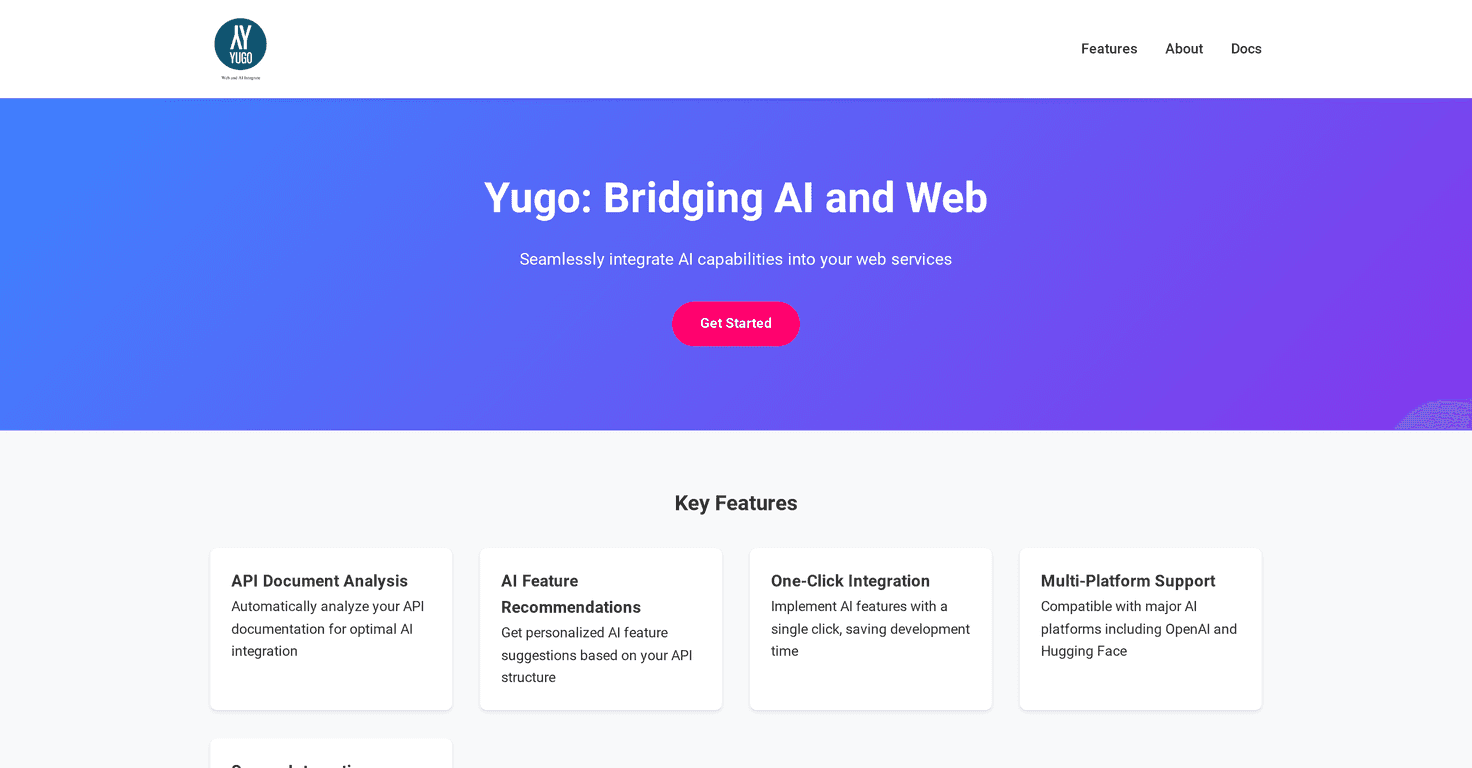
Yugo positions itself as an AI + web integration platform. The big idea is pretty simple: instead of you manually digging through API docs, deciding what AI features make sense, and then writing the integration code from scratch, Yugo tries to do that “discovery” work for you.
In practice, what I like about that approach is that it cuts down on the early-stage thrash. When you’re integrating AI, the first few hours are usually spent answering questions like: Which endpoint should I call? What does the payload look like? Where do I plug in retrieval, summarization, or classification? Yugo’s promise is that it automatically examines API documentation and suggests AI features that fit those APIs.
Then comes the part that matters most to developers: implementation. Yugo claims one-click integration, so the recommended AI features can be added with minimal manual wiring. If you’ve ever had to stitch together a prompt, an API call, error handling, and retries, you know how quickly that turns into a “small task” that eats a whole weekend.
Yugo also mentions support for popular AI providers like OpenAI and Hugging Face. That’s important, because teams rarely want to be locked into a single model vendor. And since this is an integration tool, you’ll also want to pay attention to security. Yugo says it focuses on data security during integration—something I always look for, especially when your app touches user data.
That said, I don’t think you should expect magic. If your API docs are messy, incomplete, or use a totally non-standard format, you might still need to do some cleanup. More on that in the pros/cons.
Key Features
- API Document Analysis
- AI Feature Recommendations
- One-Click Integration
- Multi-Platform Support
- Secure Integration
What “API Document Analysis” actually means for developers
In a lot of AI integration projects, the bottleneck isn’t the model—it’s understanding your own APIs. Yugo’s analysis step is meant to read the documentation and infer what it can support. For example, if your API has endpoints for search, tickets, or knowledge articles, Yugo should be able to suggest AI features like summarization, classification, or Q&A workflows.
One thing I’d recommend: before you rely on any integration recommendation, skim what it suggests. Even when tools are smart, the best integrations come from developers double-checking the assumptions.
AI feature recommendations (and how to judge them)
Recommendations are only useful if they’re practical. When I evaluate a tool like this, I look for three things:
- Relevance: does the suggested AI feature actually match the endpoints you have?
- Effort: does it reduce your work, or just add another layer of configuration?
- Control: can you adjust prompts/behavior when you need to?
Yugo’s pitch is that it helps choose “the best AI features for integration.” That’s great—just remember you’ll still want to review the final setup, especially if you’re building something user-facing with quality expectations.
One-click integration: the part you’ll feel immediately
This is where I think Yugo could save real time. If it truly generates the integration with one click, you’re skipping a lot of repetitive steps like:
- Mapping inputs from your app to the AI step
- Wiring the AI output back into your API response
- Handling edge cases (missing fields, empty results, timeouts)
- Setting up provider-specific configuration
Even if you still refine prompts afterward, shaving off the initial setup is a win. The biggest question is whether the generated integration is easy to modify when your app’s requirements don’t match the “happy path.”
Multi-platform support (OpenAI + Hugging Face)
It’s not uncommon for teams to test multiple providers before committing. Yugo’s mention of OpenAI and Hugging Face matters because it reduces friction when you want to compare results, costs, or latency. In my experience, model choice can affect everything from response style to how you handle system prompts and tool usage.
If you’re already using one of those ecosystems, you’ll likely feel less resistance adopting Yugo.
Secure integration: what to look for
“Secure” is one of those words that can mean a lot of different things. Yugo says it maintains a high level of data security during integration. When you’re evaluating it for a real project, I’d ask questions like:
- How is sensitive data handled during requests?
- Is there support for redaction or minimization?
- What logging is enabled by default?
- Can you configure where data is stored or how long it’s retained?
Even a great integration tool won’t help if you can’t confidently meet your security requirements.
Pros and Cons
Pros
- Less setup time: if the one-click integration holds up, you’ll spend less time on the boring wiring work.
- API docs → AI feature suggestions: it can reduce the initial “what should we build?” brainstorming based on your actual API surface.
- Works with major AI providers: OpenAI and Hugging Face support is a practical choice for teams that want flexibility.
- Security focus: Yugo specifically calls out data security, which is a big deal for developer adoption.
Cons
- Customization may be limited: if you need very specific prompt logic, tool routing, or custom workflows, you might have to do extra work after the initial integration.
- Docs aren’t always consistent: automatic analysis can struggle with poorly formatted or incomplete API documentation. If your docs are outdated, the recommendations could miss the mark.
- No pricing clarity (at least publicly): that’s not a technical con, but it affects planning. More on that below.
My honest take
Tools like Yugo can be genuinely useful when you’re trying to move fast and you don’t want to reinvent integration patterns every time. But I wouldn’t treat it as a “set it and forget it” solution.
In my experience, the best results come when you use the recommendations as a starting point, then tune the final behavior for your product. If you’re building an app where accuracy, tone, and latency matter, you’ll still want to test everything end-to-end.
Pricing Plans
Yugo doesn’t clearly list pricing plans on its website (at least based on what’s publicly shown). If you’re considering it for a real project, I’d suggest checking their documentation or reaching out directly for current pricing and any usage-based costs.
One practical tip: before you contact sales/support, write down what you need—things like the number of endpoints you’ll integrate, expected request volume, and which AI provider(s) you want to use. That way, you’ll get a more useful answer and avoid back-and-forth.
Wrap up
Yugo looks like it’s built for developers who want to integrate AI without spending forever decoding API docs and writing the same glue code repeatedly. If its API analysis and one-click integration work the way it claims, it can genuinely cut down the time from “idea” to “working AI feature.”
Just keep expectations grounded: customization and documentation quality will matter. If your API docs are solid and you’re okay treating the generated setup as a foundation (not a final answer), Yugo could be a fast, practical way to add AI to your web services.