Table of Contents
I’ve been bouncing between AI tools for a while, and one thing I always run into is this: you don’t just want one chatbot—you want the right one for the job. That’s exactly what Web Copilot by ChatPlayground is going for. Instead of opening a bunch of tabs, you can chat with multiple models (including ChatGPT and Google Gemini) from one place and compare how they handle the same prompt.
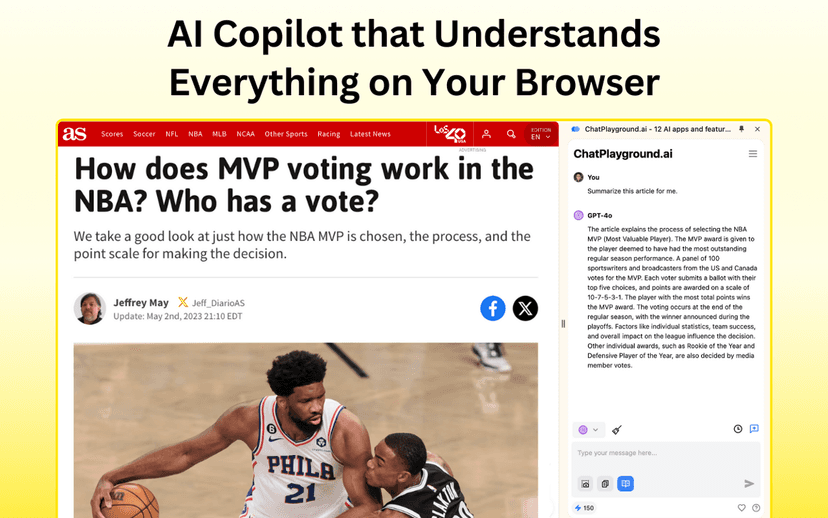
What I noticed right away is how “interactive” it feels compared to a single-chat interface. You can ask something, then quickly re-ask (or refine) without losing your flow. And because it includes real-time web access, you’re not stuck with generic, “I think the answer is…” style responses—at least not as often. When the tool can pull up fresh info, the output tends to feel more current.
It’s also not just chat for chat’s sake. There’s a prompt library, document interaction, and image generation, which is where things start to get genuinely useful if you’re doing anything practical—research, content planning, brainstorming, or even just experimenting.
Still, it’s not perfect. The biggest limitation is the obvious one: you need a stable internet connection. If your service is spotty, the experience can get frustrating fast. And if you’re new to AI tools, having multiple bots available can feel a little overwhelming at first. It took me a few tries to figure out which model I liked for what (and honestly, that’s normal).
Bottom line? If you like comparing outputs and you want web-enabled, multi-model chatting in one interface, Web Copilot is worth a look.
Web Copilot by ChatPlayground Review
If you’ve ever tried to solve a problem with one model and then thought, “Wait… what would a different one say?”—this is for you. Web Copilot is basically a multi-bot workspace. You can switch between chatbots quickly, and you can use the same prompt to see where each model shines.
Here’s how that shows up in practice: say you’re researching a topic and you want a quick summary plus a few updated points. With real-time web access enabled, the tool can pull current information instead of relying purely on whatever the model learned in training. That matters when you’re dealing with things that change—pricing, product updates, policy changes, and so on.
And then there are the “non-chat” features. The prompt library is helpful if you have recurring tasks (like writing intros, generating outlines, or turning notes into bullet points). Document interaction is also a big deal if you don’t want to copy/paste everything manually. Image generation rounds it out for people who want visuals without leaving the same workflow.
Plus, multilingual support is a real plus. If you’re not writing in English, you still get a usable experience. I’m not saying it replaces native-level writing tools, but it’s definitely more accessible than a lot of single-language AI interfaces.
Just keep expectations realistic: it’s still AI. You’ll still want to fact-check anything important, especially if you’re using it for research or decision-making. And because it’s web-connected, poor connectivity will affect results.
Key Features
- Multiple Chatbot Interaction: Use different models (like ChatGPT and Google Gemini) in one interface so you can compare responses faster.
- Real-time Web Access: Helps the tool fetch current information instead of only using older knowledge.
- Prompt Library: Save and reuse prompts for common tasks so you’re not rebuilding your workflow every time.
- Image Generation: Generate visuals directly through the platform when you need something more than text.
- Document Interaction: Work with documents without constantly copying and pasting everything.
- Multilingual Support: Supports over 100 languages, which is great if you write or think in languages other than English.
- AI Learning Companion: A guided-style feature aimed at helping you learn and get better at prompting over time.
Pros and Cons
Pros
- You can access multiple advanced AI models from one interface, which makes comparisons much easier.
- Real-time web access can improve relevance when you need up-to-date info.
- Supports over 100 languages, so it’s not limited to English-only users.
- Document and image interaction features make it more than just a chat box.
Cons
- It depends on internet connectivity—if your connection is unstable, the experience suffers.
- With so many bots available, it can feel a bit overwhelming for beginners.
- If you’re brand new to AI chat tools, there’s still a learning curve to figure out what to ask and which model to use.
Pricing Plans
Standard Subscription is $105/month for up to 6 chatbots. If you want the AI Document Editor functionality, it’s $20/month. The AI Learning Companion is $15/month.
One practical tip: if you’re only using one or two models most of the time, it might be worth checking whether you truly need the “up to 6 chatbots” setup before committing.
Promote Automateed

Wrap up
Web Copilot by ChatPlayground is one of those tools that feels especially good if you like experimenting—because you can compare multiple models without redoing your whole setup. The real-time web access, prompt library, document interaction, and image generation are the parts I’d actually use day to day.
Just remember the trade-offs: you’ll want reliable internet, and beginners may need a little time to get comfortable choosing between bots and crafting better prompts. If that doesn’t scare you off, it’s a solid, versatile platform for both casual AI users and people who take their prompting seriously.