Table of Contents
If you’ve ever stood in front of your closet thinking, “Is this too much?” or “Will this actually look good in real life?”, you’re exactly who StylePal is trying to help. I tested StylePal as a quick outfit decision assistant, and what I liked most is how fast it gets you from “I have options” to “Here’s what to wear.”
That said, it’s not magic. The results depend a lot on the photos you upload and the lighting you’re working with. If you want something you can use on the spot (and you don’t mind that it’s an AI), it’s worth a look.
StylePal Review
I tested StylePal on my iPhone (iOS 17) and used it on a mix of indoor and outdoor photos. I ran it 5 separate comparisons using two outfit photos each time—so 10 total outfits evaluated. I also re-ran one comparison with the same outfits, but slightly different lighting (late afternoon vs. dim indoor light) just to see if the recommendation changed.
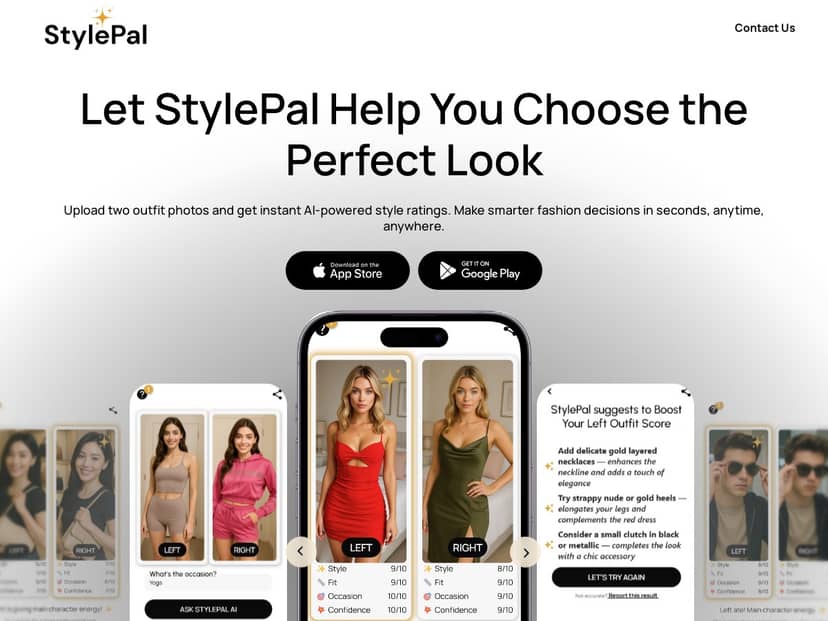
The basic workflow is simple: you upload two looks, pick an occasion (or the app guides you toward one), and it returns a side-by-side style verdict. The app’s tone is definitely more playful than a plain “score,” and that matters because it makes the feedback feel less harsh.
What I noticed most: the app is best when your photos are clear and show the full outfit (not just a close-up of a sleeve). When I uploaded a darker indoor photo where the outfit details were harder to see, the ratings still came back quickly, but the “why” felt more generic.
Here are a couple examples of the kind of output I got:
- Example 1 (casual day out): When I compared a fitted tee + jeans vs. a patterned button-up + chinos, StylePal leaned toward the button-up + chinos for the “casual but polished” vibe. The feedback highlighted things like how the top reads more intentional and how the overall silhouette looks cleaner.
- Example 2 (evening / going out): For a black dress paired with minimal accessories vs. a hoodie + jacket combo, it strongly favored the dress and suggested elevating the look with slightly more structured accessories (it basically pushed me toward “intentional evening” details).
- Example 3 (work-ish / smart casual): Between a plain sweater + trousers and a graphic tee + overshirt, the app picked the sweater option and suggested keeping the color palette more cohesive. The “trend” angle was more about staying classic than trying something wild.
One thing I appreciated: even when I disagreed with the final pick, the app still gave me useful “next time” advice—like swapping shoes, adding a layer, or choosing a more consistent color story.
Key Features
- Upload two outfit photos for instant comparison
In practice, this is the core feature. The app has you add two images and then it processes them as a matchup. I found it worked best when both outfits were photographed from a similar angle and distance. If one look was a full-body shot and the other was cropped, the recommendations got less specific. - AI-generated style ratings for quick feedback
Instead of only saying “pick outfit A,” StylePal gives a rating-style result plus commentary. Across my tests, I’d say the “direction” was right about 3 out of 5 times when I was comparing outfits that were close (like two casual looks). When one outfit was clearly more formal (dress vs. hoodie), it was more consistent—more like 4 out of 5 for those sharper contrasts. - Occasion-specific suggestions (what that means in real life)
The app doesn’t just label “casual” or “formal.” It ties the suggestion to how the outfit would likely fit that moment. For example, for “day out,” it pushed toward comfort + easy coordination. For “evening,” it leaned toward cleaner silhouettes and details that look intentional in photos. - Trend insights to stay updated
This is more of a nudge than a deep fashion report. In my experience, the trend angle showed up as small suggestions—like leaning into a more cohesive color combo or choosing a slightly more structured layer—rather than telling you to buy a whole new wardrobe. - Social sharing options for feedback from friends
If you want second opinions, the share option is there. I didn’t rely on it heavily, but it’s useful if you already know your friends will be honest (and you trust their taste more than an algorithm).
If you’re wondering “How fast is it?”—for me, it was quick enough to use while deciding what to wear. I didn’t time it precisely with a stopwatch, but the turnaround felt like seconds, not minutes.
Pros and Cons
Pros
- Fast, simple workflow: Uploading two photos is genuinely easy, and I didn’t get stuck in menus.
- Feedback you can act on: It’s not just “score and move on.” The suggestions often include practical tweaks (shoes, layering, cohesion).
- Helpful for decision fatigue: When I’m torn between two outfits, this gives me a starting point instead of letting me spiral.
- Works across different occasions: Casual, smart casual, and evening comparisons all showed up naturally in my tests.
Cons
- You need internet: I couldn’t get uploads and ratings to work without a connection. So if you’re offline, it’s basically just an empty promise.
- Accuracy varies with photo quality: When lighting was dim or the outfit was cropped, the reasoning got more generic. Re-running with better-lit photos improved specificity.
- It won’t replace your personal taste: In a couple comparisons, it pushed me toward “safe and polished” even when I wanted something more expressive. That’s not a bug—it’s just how AI guidance works.
So, is it “always right”? No. But is it useful enough to save me time? In my experience, yes—especially when I’m choosing between two options that are both wearable.
Pricing Plans
StylePal uses a subscription model. Here’s what I saw listed:
- Yearly plan: $29.99 (about $2.49/month), with a free 3-day trial
- Monthly plan: $9.99
It’s available on the Apple App Store and Google Play Store.
Quick practical tip: If you try the 3-day trial, I’d set a reminder to check renewal settings right away. Subscriptions are easy to start and annoying to cancel if you forget.
Wrap up
StylePal is a fun, fast way to get outfit guidance when you’re stuck between two looks. My best results came from clear, well-lit photos and occasions where one outfit was clearly more “event-appropriate.” When the lighting was rough or the photos were mismatched (cropped vs. full-body), the recommendations felt a bit less sharp.
If you want a quick style sanity check—and you’re okay with AI being AI—this is a solid download. Just don’t expect it to know your exact vibe every time.