Table of Contents
If you want to build a real web app without spending weeks wiring up auth, pages, and API routes from scratch, Solid is the kind of tool that sounds almost too good. I tried it to see if it’s actually useful beyond the hype—because “AI app builder” can mean anything from toy demos to something you could ship.
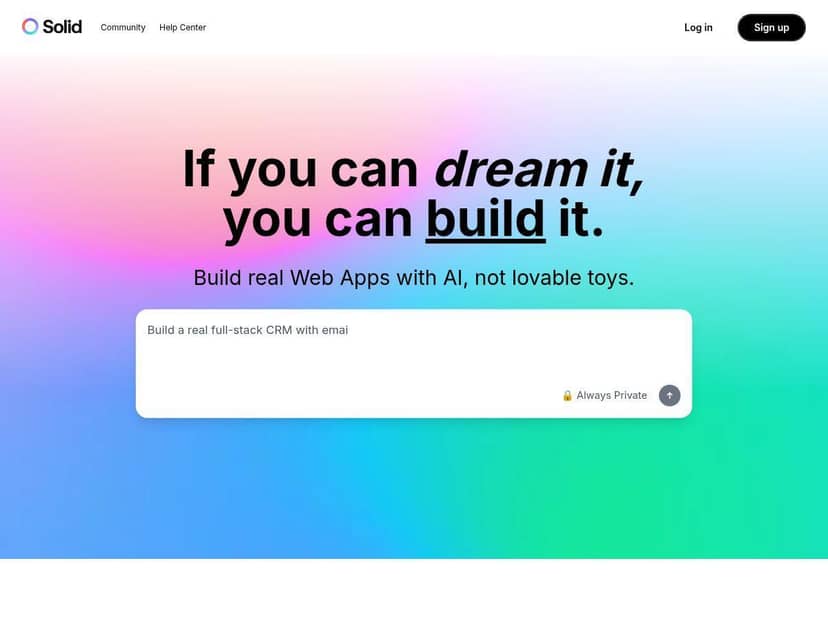
Here’s what I did (and what I noticed) when I built my first project. I’m not going to pretend it was magic—I did have to make a couple decisions—but the workflow felt genuinely guided. First, I signed in, picked an app type, and then followed the prompts to define the screens and features. The UI didn’t feel cluttered, and the “next step” approach kept me from getting stuck.
For the stack, Solid generated code that leaned on familiar, production-friendly tech: React for the frontend, Node.js/TypeScript on the backend, and a structure that made it easy to tweak things later. I could open the generated files, adjust components, and change the logic without feeling like I was fighting a black box.
What surprised me most: the boring parts happened fast. Backend setup (auth + API endpoints), wiring the frontend to those endpoints, and getting the project running locally all felt like they were handled in the background. Then it gave me a starting point I could actually edit—so I wasn’t stuck with an unchangeable scaffold.
So… does it deliver “production-ready apps”? In my experience, it gets you to a working baseline quickly, and then it’s up to you to finish the last 10–20%: polish UI, tighten edge cases, and verify the security assumptions. Still, for getting something real off the ground, Solid impressed me.
Solid Review: What I Built, How It Worked, and Where It Falls Short
I went into Solid with a pretty clear goal: build a small full-stack app with a login flow and a couple core screens, then verify it actually behaved like a real product (not just a demo). I didn’t try to recreate a giant SaaS. I wanted something I could test quickly and then iterate.
My build workflow (step-by-step)
After signing in, I selected an app type and then used the guided prompts to define the feature set. The flow basically went like this:
- Choose an app template/type (so the UI and backend scaffolding started in the right direction)
- Define features (screens + what actions users can do)
- Generate code and review the structure before making changes
- Run locally and confirm the frontend talks to the backend correctly
- Tweak generated files (UI text, layout details, and a couple logic rules)
- Deploy and do a quick sanity check as a “real user”
One thing I liked: the steps weren’t vague. I wasn’t just asked to “describe your app.” I was guided into choosing what screens I needed and what should happen when users interact with them.
What Solid actually generated (the parts I checked)
When I looked under the hood, the generated code wasn’t just a single blob. I specifically checked for the usual full-stack pain points:
- Auth flow: I looked for login/signup wiring and how protected routes were handled.
- Backend endpoints: I verified the API routes existed for the actions I defined (create/read/update flows where applicable).
- Frontend integration: I checked that the React pages/components were calling the backend correctly and handling responses cleanly.
- TypeScript types: In my experience, the generated types made it easier to safely adjust things without breaking everything.
Did it eliminate all bugs? No. But it did give me a working baseline fast enough that I could spend time fixing real issues instead of building the foundation from scratch.
Security + “is it safe enough?”
I won’t claim Solid automatically makes an app secure in the way a security engineer would review it. What I did notice is that the generated setup included the kind of basic protections you’d expect in a production-style starter:
- Auth-based access patterns (so endpoints and/or pages weren’t wide open)
- Separation of concerns (frontend UI vs backend logic was clearly structured)
- Reasonable defaults that reduced the chance of leaving obvious holes
My practical test was simple: I tried to access protected areas without being logged in, then logged in and repeated the same actions. That’s not a full security audit, but it’s the kind of check you can do in 10 minutes and immediately catch “oops, it’s public” problems.
Deployment: what was smooth (and what I had to watch)
Deployment felt straightforward. I didn’t hit any major “it won’t run in production” surprises. The app came up, the pages loaded, and the API calls worked.
That said, I did have to pay attention to the usual things you can’t outsource to AI:
- Environment variables (making sure any required keys/config matched what the app expected)
- Edge cases (empty states, invalid inputs, and error messages)
- UI polish (fonts, spacing, and copy tweaks)
In other words: Solid got me to “launchable.” I still had to make it “good.”
Time savings: the part that felt real
Here’s the honest part. If I were coding this manually, I’d spend a lot of time just getting the scaffolding right: routing, auth wiring, API wiring, and making sure the frontend and backend agree on data shapes.
With Solid, those pieces were already in place. I didn’t measure it with a stopwatch, but I did notice the difference immediately: I was iterating on features instead of wrestling with setup. That’s the biggest win—less setup time, more building.
Key Features That Matter (Not Just Buzzwords)
- Full-stack app generation with both frontend and backend code (so you’re not stuck gluing pieces together)
- AI-powered guided building that walks you through screens and feature definitions
- Production-style code output using Node.js, React, and TypeScript patterns I could actually edit
- Integration-friendly structure (it’s easier to add new endpoints/components because the project isn’t a mystery)
- Security-minded defaults around auth and protected access patterns
- Community/support resources (helpful when you hit a “why is this failing?” moment)
Pros and Cons (The Specific Stuff I’d Tell a Friend)
Pros
- Beginner-friendly without being childish: the UI felt approachable, and the prompts helped me avoid blank-page syndrome.
- Big speed boost on the “plumbing”: auth wiring, API routes, and frontend-backend integration were generated in a way that saved a ton of setup time.
- Generated code is editable: I wasn’t forced into a no-code box. I could tweak components, update logic, and adjust types.
- Works well for standard app patterns: CRUD-style features and multi-page flows were the easiest for it to get right.
- Guided steps reduce mistakes: I didn’t have to guess what files to create or what order to do things in.
Cons
- Advanced customization can get messy: if you want very specific routing/state management patterns or unusual database schemas, you may need to refactor parts of the generated output.
- Non-tech users may still struggle: it’s not “no thinking required.” People who don’t understand basic concepts (like protected routes or request/response flow) may feel lost.
- Customization is limited by the template style: in my tests, when I tried to deviate heavily from the default flow, I ended up spending time aligning everything back to what the scaffold expected.
- Security confidence isn’t automatic: it helps with defaults, but you still need to test access control and validate inputs like you would with any app.
Pricing Plans (What I Could and Couldn’t Verify)
I can’t reliably quote exact Solid prices from the info provided in this page, because pricing can change and I don’t want to guess. The best move is to check the official Solid pricing page (or the Solid dashboard) right before you commit.
That said, here are the cost/limit implications I’d pay attention to with any AI app builder like this:
- Usage caps: generation runs (or longer generations) are often limited by plan—so if you’re building multiple apps or iterating daily, the cap matters.
- Deployment options: some plans restrict where/how you can deploy (or how often you can redeploy).
- Team seats / collaboration: if you’re building with others, check whether you’re paying per user or per project.
If you want, tell me what you’re building (and roughly how many screens/features). I can help you figure out what plan limits to look for so you don’t get surprised mid-project.
Wrap up
Solid is one of those tools that actually earns its place: it gets you to a working full-stack baseline quickly, and the generated React + Node/TypeScript structure is something you can edit without feeling trapped. My favorite part was how fast I could go from “idea” to “running app,” especially around auth + endpoint wiring.
Where it won’t feel perfect is when you need highly customized architecture, very specific state/routing patterns, or deep domain logic that doesn’t match the template style. In those cases, you’ll spend some time refactoring the scaffold.
If you’re building a real app and you want speed without giving up control, Solid is worth a serious look. Just go in expecting to review, test, and polish—because that’s still the job (even when the AI helps a lot).