Table of Contents
Have you ever sat down at a restaurant, stared at the menu for a full minute, and thought, “I hope I’m not about to order something weird”? I’ve been there—especially when I’m traveling and the menu is in a language I don’t speak. That moment of uncertainty can kill the vibe.
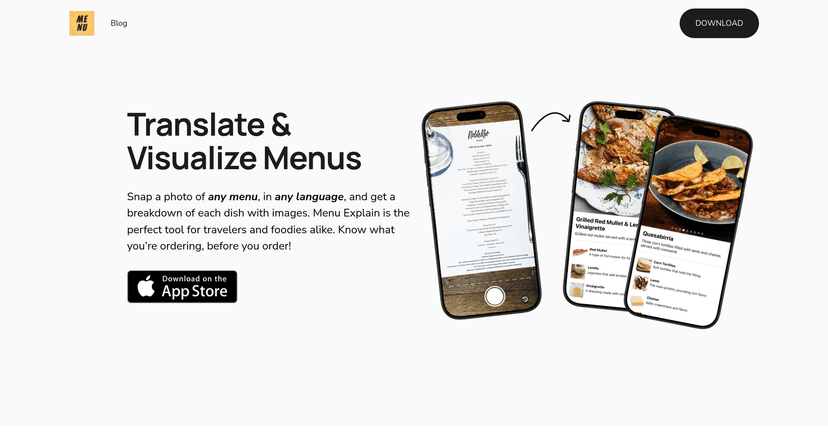
That’s why I was interested in Menu Explain. The idea is simple: take a photo of the menu, and the app translates it and shows you what the dishes actually are (not just a basic word-for-word guess). In my experience, it makes ordering feel a lot more confident—like you’re not relying on luck or a rushed server to interpret everything.
Menu Explain Review: Does It Actually Help You Order Faster?
The first thing I noticed about Menu Explain is how quickly it turns a “mystery menu” into something you can actually read. You snap a photo, and the app translates the text right away. Then it goes a step further by giving dish descriptions—so you’re not just seeing a translated name that still doesn’t tell you what it tastes like or what’s inside.
In a lot of restaurants, that’s the real problem. A translated dish name can still be vague. For example, “stew” might be translated correctly, but you still want to know if it’s spicy, whether it comes with rice, or what the main ingredients are. Menu Explain’s descriptions and visuals help close that gap.
Another detail I liked: the app doesn’t feel cluttered. It’s easy to tap through what you scanned without digging around in menus or settings. When you’re hungry, you don’t want a complicated interface. You want answers—now.
And yes, scan history matters more than I expected. If you’ve got a trip planned, you’ll probably go back to the same restaurant or at least the same type of cuisine. Having a record of what you scanned means you can revisit options you liked without retaking photos or trying to remember that one dish you almost ordered.
One more thing: the app supports multiple languages, which is exactly what you want if you’re hopping between countries (or even just different regions). It basically acts like a bridge between you and the menu—so you can explore more confidently instead of sticking to the “safe” items every time.
Key Features I’d Actually Use
- Instant menu translation from a photo
Snap the menu, get the translation quickly, and keep moving. - Dish descriptions (not just words)
In my experience, this is the difference between “I think this is a soup” and “Okay, I know what this is and I want it.” - Visual dish aids
These images make it easier to spot what you’re choosing, especially when the menu text is dense. - Scan history
So you can revisit previously scanned menus later—handy for repeat visits or comparing options across restaurants. - Multi-language support
Useful if you travel a lot or dine in places where menus aren’t in your native language.
Pros and Cons (Real Talk)
Pros
- Better confidence when ordering — especially for international travelers who don’t want to guess.
- Visuals help you “get it” faster — pictures + descriptions reduce the mental load.
- Simple, user-friendly flow — you’re not stuck learning an app while you’re trying to eat.
- Scan history is genuinely useful — it’s convenient for repeat visits and remembering what you tried.
Cons
- You’ll need an internet connection for translations. If you’re in a spot with spotty Wi-Fi or no data, this becomes a lot less helpful.
- Not every menu will be perfect — menu formats vary, and some dishes or sections might be harder for the app to interpret depending on layout.
- Image quality affects results — if the photo is blurry, too dark, or taken at an awkward angle, translations can be less accurate. I learned to take a cleaner shot rather than rushing.
Pricing Plans: What I Could (and Couldn’t) Confirm
From the info available here, there weren’t any specific pricing details listed for Menu Explain (even though it’s available to download via the App Store). Since pricing can change and apps often add subscriptions or trial periods, I’d recommend checking the official website for the most up-to-date numbers.
If you want to start exploring right away, you can find Menu Explain at Menu Explain.
Wrap Up
Menu Explain is the kind of app that makes restaurant experiences feel smoother. If you travel, eat out in unfamiliar spots, or just hate guessing what something is, it’s a solid tool to have on your phone. The instant translation plus the dish descriptions and visuals are what really make it worth using—not just the fact that it translates text.
Just keep the limitations in mind: you’ll want decent photo clarity, and you’ll need internet access. Other than that, it’s a pretty practical way to order with confidence and spend less time wondering and more time enjoying your meal.
Promote Menu Explain