Table of Contents
If you’ve ever gone down a research rabbit hole—switching between Google results, random blog posts, and half-working docs—you already know how exhausting technical searching can be. I’ve been there, especially when I’m trying to answer something specific like “How do I structure a Kubernetes deployment for zero downtime?” or “What’s the cleanest way to handle React state updates without creating a mess?” That’s where Gurubase caught my attention.
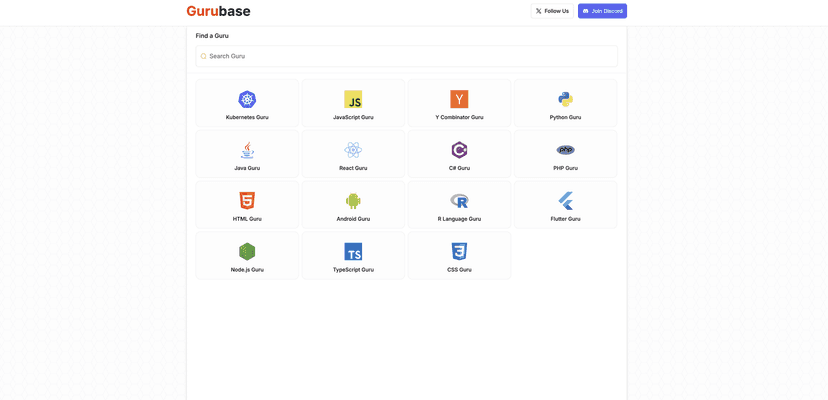
Gurubase is basically a specialized search place for technical resources. Instead of hunting across the entire internet, you can search within a tech-focused setup and (in my experience) get to usable information faster. It’s not trying to be a full replacement for official documentation, but it can save you time when you just need the right starting point—quickly.
Gurubase Review: Does It Actually Help With Tech Research?
Let me be upfront: I don’t want another “tool” that just rearranges the same search results I already get elsewhere. What I look for is speed, relevance, and a workflow that doesn’t make me think too hard. With Gurubase, the big idea is that it focuses on technical resources so you’re not bouncing between unrelated topics.
When I tested it, the interface felt straightforward. You type a query, you get results, and you don’t have to fight to find the signal. That matters when you’re working under time pressure—like when you’re debugging a production issue or trying to prepare a quick explanation for a teammate. Instead of spending 15–20 minutes scanning, you can often narrow down faster.
It also seems to target a wide range of users. If you’re brand new, you can still search for basics (like “what is Kubernetes deployment?”). If you’re more experienced, you can search for practical topics like Kubernetes manifests, React patterns, or workflows you’d normally look up in documentation and technical blogs.
Key Features That Stand Out
- Search functionality built for technical queries
I like that the search is meant to be direct. You’re not guessing which search operator to use or trying to decode vague results. For example, if you search for a framework topic (React, Node, etc.) or an infrastructure concept (Kubernetes, deployment, services), you’re more likely to land on relevant material quickly. - Categorization by technical subjects
This is one of those features that sounds simple, but it makes a difference. When results are grouped by topic, you don’t have to open five links just to realize they’re all about the wrong thing. - User-friendly interface
In my experience, the UI doesn’t feel cluttered. It’s the kind of layout that works whether you’re on a quick break or doing deeper research. - Fast access to answers and resources
You won’t always get a single “final answer” (because tech topics are rarely that simple), but you can reach useful resources faster—which is what most people actually need.
Pros and Cons (The Honest Version)
Pros
- Good coverage across multiple tech areas
From beginner-friendly topics to more advanced subjects like Kubernetes and React, it feels like the platform tries to serve more than one audience. - Search results are easy to navigate
The experience doesn’t feel like you’re drowning in irrelevant pages. That’s a big deal when you’re trying to move quickly. - Useful for both quick lookups and deeper dives
If you just need a starting point, it helps. If you’re building out a learning path, categorization makes it easier to keep momentum.
Cons
- Pricing details aren’t clearly shown here
This review doesn’t include specific pricing info, and that’s a real limitation if you’re trying to decide whether it’s worth paying for. I’d check the official Gurubase site before committing. - Like most web tools, you’re dependent on your internet connection
If your connection is unstable, the experience can slow down. It’s not a dealbreaker, but it’s something to keep in mind if you work on the go.
Pricing Plans: What I Could (and Couldn’t) Find
In the document I reviewed, specific pricing plans weren’t detailed. So I can’t give you exact numbers or tiers from this page alone. If pricing transparency matters to you (it usually does), I recommend checking the latest info directly on the official Gurubase website before subscribing.
Wrap up
Overall, I think Gurubase is most useful when you want to cut down the time you spend searching for technical resources. It’s simple, it feels focused, and it’s the kind of tool you can use whether you’re learning something new or trying to solve a practical problem fast. Just don’t expect pricing details to be fully spelled out in this review, and remember it’s still a web-based tool—so your internet connection matters.
Promote Gurubase