Table of Contents
If you’ve ever stared at the Twitter/X bio box for way too long, you already know the problem: you want it to sound like you, but you also want it to be clear, catchy, and not cringey. I’ve been there. That’s why I tried BioIt—to see if it could help me get from “blank page” to “okay, this actually works” faster.
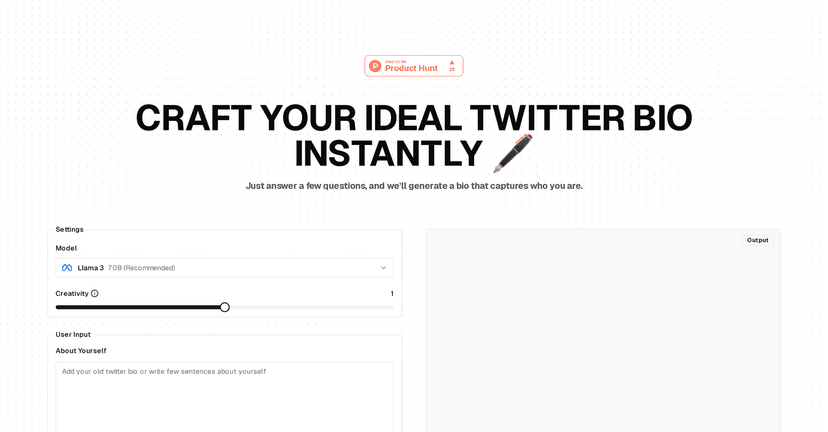
My first impression? It’s simple. You don’t have to be tech-savvy or a copywriting wizard. You just answer a handful of questions, and BioIt generates bio options you can review right away. And honestly, that preview step matters—because the bio you generate in your head is never the same as what looks good in a real profile.
BioIt Review: Does It Actually Help With a Better Twitter Bio?
Here’s what I did. I started with a pretty normal profile: my niche, what I do, and the vibe I wanted (friendly, slightly professional, not robotic). Then I generated a few bios and compared them like I’d compare drafts from a freelancer—what’s clear, what’s memorable, and what sounds like me?
What I noticed right away is that BioIt doesn’t just spit out one generic line. It gives you options, and you can steer the direction. That’s huge, because most bio tools I’ve tried either:
- produce something that sounds “AI-ish” no matter what you type, or
- only work if you already know exactly what you want to say
With BioIt, the output felt more usable. The tone and creativity controls (more on that below) helped me dial in something that felt closer to my actual voice. I also liked that I could tweak details instead of starting over from scratch.
Key Features That Matter (Not Just Buzzwords)
- AI-driven Bio Generation for quick drafts
- This is the core feature, and it does what it says: you answer questions, and you get bio suggestions fast. In my case, the “wait time” wasn’t the issue—the real benefit was having a starting point I could actually edit.
- Customizable settings (creativity, tone, type, emojis)
- I tested a few combinations. When I lowered the creativity and kept the tone more straightforward, the bios felt cleaner and less “try-hard.” When I bumped creativity up a notch, I got more personality—sometimes with emojis that worked, sometimes with emojis that were better left out. Either way, you’re not stuck with one style.
- User-friendly input flow
- The interface is built around guiding you through the basics. If you’re not great at writing bios, you don’t need to overthink it—you just provide the info and make a couple choices. That’s the kind of friction-free experience I like.
- Preview output so you can sanity-check immediately
- This is what saves you from embarrassment. You can quickly scan how the bio reads and whether it actually fits the vibe of your profile. If something feels off, you can adjust settings and regenerate.
Pros and Cons From My Experience
Pros
- It saves real time. If you’re rewriting your bio every few months (or you’re rebuilding after a niche change), this cuts the “drafting” part down a lot.
- Better results when you give clear inputs. I got noticeably stronger outputs when I was specific about what I do and who I’m for.
- Customization feels practical. The tone/creativity controls aren’t just cosmetic—they actually change the feel of the bio.
- Preview makes editing easier. Instead of guessing, you can immediately see what you’ll publish.
Cons
- Garbage in, garbage out (to a point). If your answers are vague—like “I like tech and growth”—the bios will also be vague. You’ll need to provide a little substance.
- Twitter/X-focused. It’s designed around Twitter/X bios, so if you want something for Instagram, LinkedIn, or TikTok, you’ll likely need to adapt the wording.
- You still have to pick the winner. BioIt helps you generate options, but you’ll still want to choose the one that matches your brand and remove anything that doesn’t sound like you.
Pricing Plans (What I Could and Couldn’t Confirm)
BioIt’s pricing details weren’t clearly listed in the content I reviewed. So instead of guessing (and guessing wrong), I’d recommend checking the BioIt platform directly for the most up-to-date plans. If you’re comparing tools, keep an eye on whether you’re paying for:
- free generations vs. paid unlimited use
- advanced customization options
- any limits on how many bios you can generate or export
If you want tailored pricing, the best move is to use the platform’s contact or pricing page and ask what’s available for your use case.
Wrap up
So, is BioIt worth trying? In my opinion, yes—especially if you want a faster way to get a Twitter/X bio that actually looks like it belongs on your profile. It’s not magic, and you’ll still need to provide decent inputs. But it’s genuinely helpful for turning “I have no idea what to write” into something you can publish (or at least quickly edit into shape).
If your current bio feels outdated or just… bland, give BioIt a shot. You might be surprised how quickly you can get to something that sounds like you.