Table of Contents
If you’ve ever tried to build a form and ended up tweaking the same fields for an hour… yeah, I’ve been there. Wellcare is a form-building platform that leans hard into AI assistance, but it’s not just “type a prompt and hope.” What I liked most is that it still feels like you’re designing a real workflow—fields, logic, responses, and a dashboard that helps you see what’s going on.

Wellcare Review (What It’s Like to Build With It)
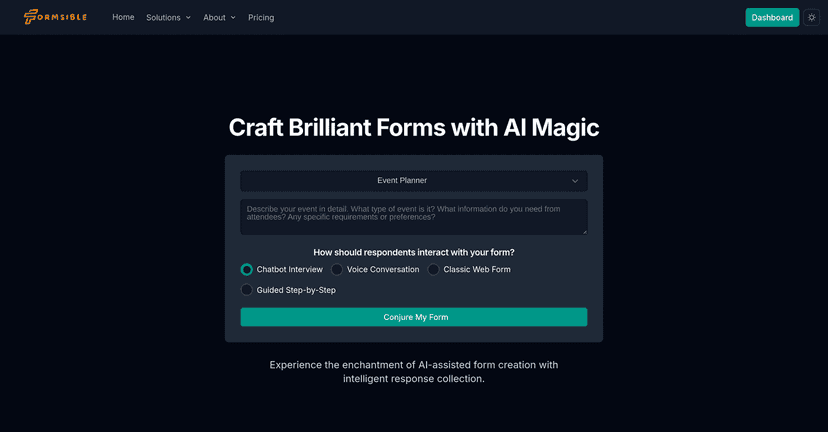
Wellcare is built for people who want dynamic forms—things that don’t just collect answers, but also respond, route users, and even use AI logic behind the scenes. When I tested it, the big difference versus basic form builders was how quickly I could go from “blank page” to something that actually behaves like a mini experience.
Here’s what stood out to me:
- It feels approachable. Even if you’re not technical, you’re not stuck staring at complicated settings. The interface keeps you moving.
- AI is integrated into the workflow. Instead of treating AI like a gimmick, it’s used to help generate or support form structure and logic.
- You get insights, not just submissions. There’s a live dashboard and response tracking, which matters when you’re running something like an event intake or a lead capture.
And yes—forms can be used for more than “name, email, submit.” Think event planning, customer onboarding, internal requests, surveys with branching logic, or even collecting file uploads. If you’ve got a process you want to standardize, that’s where tools like this start to pay off.
Key Features That Matter in Real Use
- AI-driven agents to assist in form creation — I found this most useful when I wanted a quick starting point for questions and structure.
- Diverse input types (text, files, YouTube links) — You can collect more than plain answers. File upload is a big deal if you’re doing applications or document requests.
- Multiple response methods (voice and chatbots) — If you’re building something conversational, this is where Wellcare can feel more “interactive” than standard forms.
- Language support for a global audience — Helpful if you’re targeting people in different regions and don’t want to run separate forms manually.
- Dynamic user flows — Branching logic means users don’t all follow the same path. That’s the difference between a survey and an actual guided process.
- Advanced computational logic (computed and GenAI nodes) — This is the “power user” layer. It lets you do calculations or AI-assisted steps inside the flow.
- Customizable themes for branding — I care about this more than I expected. Matching your colors and style makes the form feel like part of your site.
- Mobile app for on-the-go responses — If your team is collecting info in the field, mobile support is a practical advantage.
- Live dashboard for real-time monitoring — You can watch responses roll in, which is handy during events or time-sensitive campaigns.
- Seamless integrations with AI providers and business tools — The integrations matter when you want the form to feed into your existing stack.
- File upload + cloud storage options — This is usually the make-or-break feature for applications and internal documentation workflows.
- Privacy settings for enhanced data security — You’ll want this if you’re collecting sensitive info or working with compliance requirements.
One quick tip from my own setup: before you build everything, decide what your “routing” rules are. For example, if someone selects “Vendor” you might ask for documents and a different set of questions than if they select “Customer.” Planning that upfront saves a lot of rework later.
Pros and Cons (My Honest Take)
Pros
- AI-assisted building is genuinely helpful. It speeds up the early stages and reduces the blank-page problem.
- Engagement options go beyond the basics. Voice/chatbot-style responses can make forms feel like a real conversation.
- Branding controls are solid. Custom themes help the form look like it belongs to your business.
- Real-time monitoring. The live dashboard makes it easier to keep track while you’re actively collecting responses.
- Integrations can reduce manual work. If you’re connecting to other tools, it’s less “copy/paste everything” and more “send data where it needs to go.”
Cons
- Free plan limitations can be frustrating. If you’re a small team trying to test multiple flows, the restrictions may slow you down.
- Ads on forms (free plan). This is a deal-breaker for anything client-facing. You probably won’t want your brand next to ads.
- Higher tiers cost more than basic form tools. If you only need simple questionnaires, you might feel like you’re paying for features you won’t use.
Honestly, I think Wellcare is best when you need dynamic logic, richer inputs (like files), and some level of AI-driven behavior. If your needs are purely “collect emails,” there are cheaper options out there.
Pricing Plans (What You Get at Each Level)
Wellcare uses a tiered pricing model, starting at a free option and moving up as you need more features and fewer limitations:
- Community Plan: $0/month — limited responses and ad-supported forms.
- Starter Plan: $8/month — ad-free forms and custom branding.
- Professional Plan: $20/month — advanced logic and analytics.
- Business Plan: $50/month — advanced integrations and compliance-focused features.
- Enterprise Plan: custom pricing — unlimited responses and options for larger organizations.
If you’re deciding between tiers, here’s how I’d think about it: start with Starter if you need branding and you’re planning to share forms publicly. Move to Professional when your forms start getting more complex—branching logic, computed steps, and deeper reporting. And if you’re integrating with other systems (CRM, internal tools, AI providers), the Business tier is where it starts to make more sense.
Wrap Up
Wellcare isn’t trying to be the simplest form builder on the internet. It’s more like a platform for building interactive, logic-driven experiences—especially when AI steps are part of your workflow. If you want dynamic forms with real routing, live monitoring, and options like file uploads and conversational responses, it’s worth a serious look.
Just be aware of the free plan trade-offs (ads and limitations). For anything client-facing, I’d skip straight to a paid tier. Then again, if you’re building more than a basic questionnaire, you probably already know you’ll outgrow “simple” pretty fast.