Table of Contents
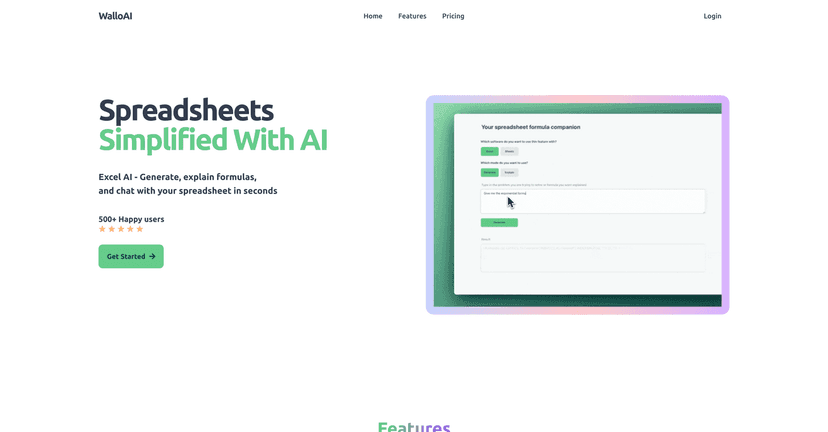
I’ve spent more time than I’d like to admit wrestling with Excel formulas that “should be simple.” You know the feeling—everything is close, but one tiny detail is off and suddenly you’re debugging for 30 minutes. That’s why I was interested in WalloAI: it’s an AI assistant built specifically to help with spreadsheets, not just generic chat.
What I like right away is the premise. You can chat with your spreadsheet in plain language, generate formulas without memorizing syntax, and get explanations when something already exists. And yes, it’s genuinely helpful when you’re staring at a formula and thinking, “Okay… but what does this actually do?”
In my testing, the biggest win was formula generation. Instead of jumping between documentation and trying to translate your intention into something Excel understands, I just described what I wanted. WalloAI then produced a formula I could actually paste in and tweak. The explanation feature also helps a lot because it turns “mystery meat formulas” into something you can learn from.
Another feature I didn’t expect to use as much as I did is the support for VBA scripting. If you automate recurring tasks in Excel, having an assistant that can help with VBA can save real time. Plus, file upload support makes it easier to get more tailored help than you’d get from a generic formula generator.
WalloAI Review: What It’s Like to Use for Excel & Google Sheets
Let me be straight with you: if you already know your way around formulas, WalloAI won’t magically replace your brain. But if you’re like me—occasionally competent, occasionally confused—this tool feels like a helpful “second pair of hands.”
The chat-first approach matters. Instead of hunting for a specific function, you can ask in normal language. For example, I tried prompts like “calculate totals for each row based on a condition” and “explain what this IF statement is doing.” The responses were usable right away, and the explanations made it easier to adjust the formula without breaking everything.
Here are a few things I noticed during use:
- Formula generation is the main event. I could describe the outcome I wanted and get a formula back that matched the intent.
- Explanations help you learn. When I asked “what does this do,” I didn’t just get a vague summary—I got a clearer breakdown of the logic.
- VBA support is a real plus. If you do automation in Excel, having assistance for VBA scripting is exactly the kind of feature that saves time.
- File uploads make it more practical. When you’re working from an actual sheet, it’s easier to get guidance that fits your structure.
One thing to keep in mind: like any AI helper, you still need to sanity-check results. If your ranges, column names, or logic are slightly different than what the AI expects, you may need to tweak. That’s not a deal-breaker—it’s just reality.
Key Features That Actually Matter
- Chat with your spreadsheet for more intuitive interaction
- Effortless formula generation by describing what you need (instead of memorizing syntax)
- Formula explanation that helps you understand existing formulas, not just replace them
- Support for VBA scripts to help with Excel automation
- Easy file uploads for more customized analysis and guidance
If you’re using Excel or Google Sheets at work, these features cover the most common pain points: figuring out the right function, understanding what you already have, and speeding up repetitive tasks.
Pros and Cons (My Honest Take)
Pros
- Friendly interface. It doesn’t feel like you need to be an Excel “power user” to get started.
- Chat makes formula work less painful. Being able to describe your goal in plain language is a big time saver.
- Formula explanation is genuinely useful. I actually used this to understand logic instead of just copying/pasting.
- VBA support for automation-minded users. If you write macros or automate workflows, this is a meaningful feature.
Cons
- Free tier limitations. If you’re testing it, you may hit walls pretty quickly depending on what you need.
- You might still need basic spreadsheet knowledge. For example, you’ll get better results if you know your columns/ranges and can describe them clearly.
- Internet dependency. It’s not an offline tool, so you’ll need a connection to use it.
Overall, the “AI assistant” angle works best when you treat it like a collaborator. Ask clearly, paste your formula or describe your sheet structure, and then adjust what it gives you.
Pricing Plans (Free, Basic, Pro)
WalloAI offers three tiers: a Free Plan at $0/month with limited features, a Basic Plan at $5/month for enhanced access, and a Pro Plan at $19/month that includes unlimited features and support.
If you’re only doing occasional formula help, the free or basic plan might be enough. But if you’re building spreadsheets regularly or want deeper support (especially for more complex tasks), the Pro tier is where it starts to feel worth it.
Wrap up
WalloAI is one of those tools that makes spreadsheets feel less intimidating. For me, the biggest value is the combination of formula generation and formula explanation—that’s the part that helps you move faster and learn at the same time. Add VBA scripting support and file upload guidance, and it becomes more than just a gimmick.
If you’re constantly stuck on formulas, tired of guessing, or just want a faster way to get unstuck, WalloAI is absolutely worth trying.
Promote WalloAI