Table of Contents
Ever have one of those “I’ll remember this later” thoughts… and then it’s gone the second you sit down? Yeah, me too. VoiceTaking is the kind of app I reach for when my brain is moving faster than my typing finger. I tested it for capturing ideas on the fly, and the whole point is simple: hit record, talk it out, and don’t lose the thought.
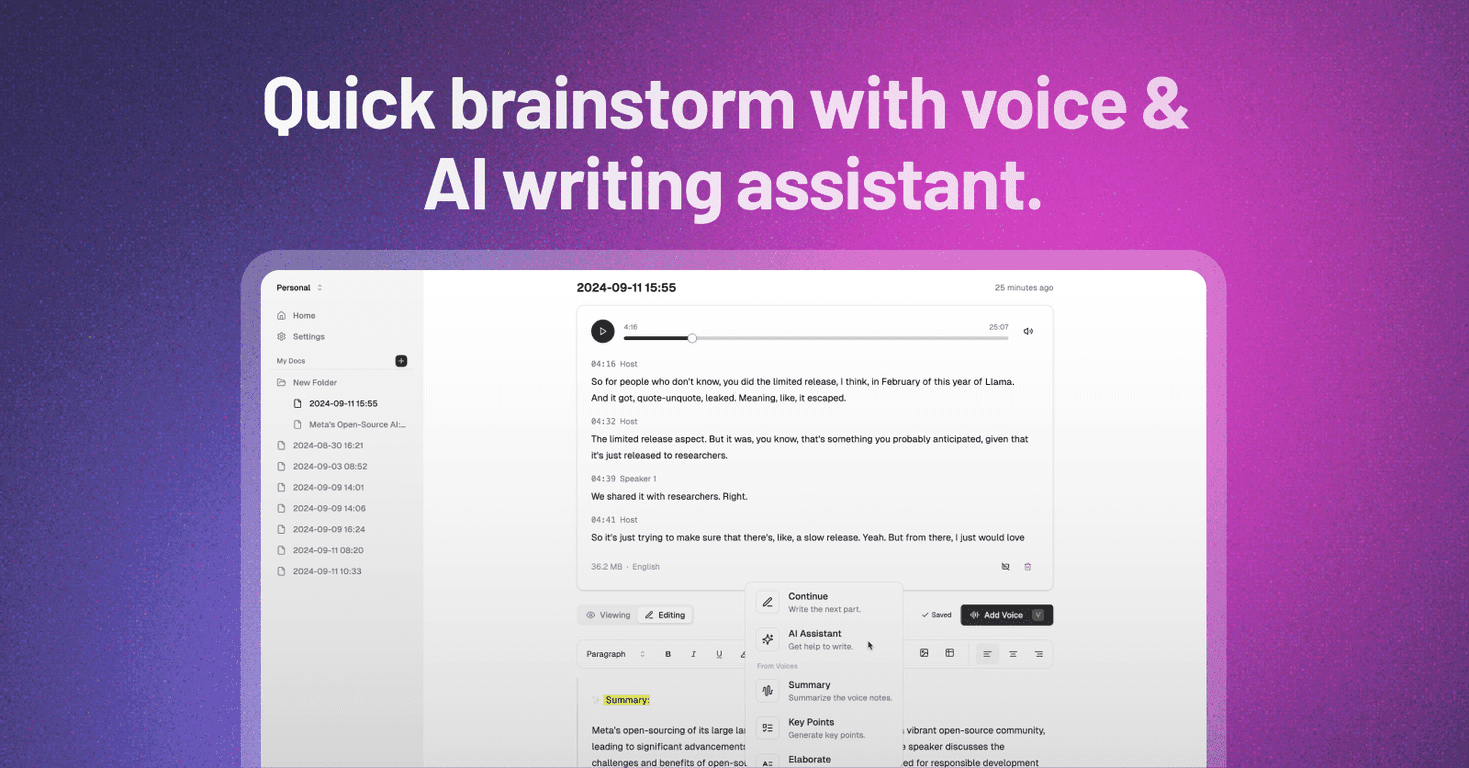
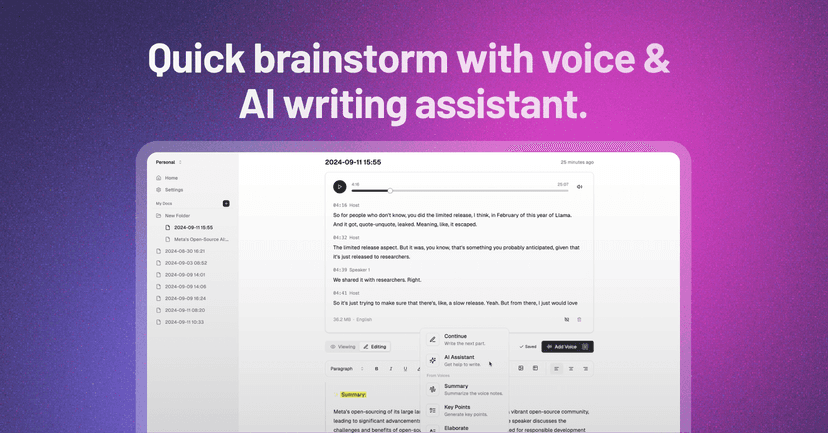
VoiceTaking lets you create voice notes, then turns those recordings into text using AI transcription. That part matters more than people think—because once your ideas are in written form, it’s way easier to search, edit, and reuse them later.
What I liked most is that it doesn’t stop at transcription. There’s also an AI writing assistant that can help you summarize what you said, expand on it, or clean it up so it reads more like something you’d actually want to keep. If you’re brainstorming, this is the difference between “notes I’ll never look at again” and “notes I can turn into something.”
And if you work with other people, VoiceTaking’s collaboration features are a big plus. I’m not going to pretend collaboration is magically perfect in every app, but being able to share and organize notes in one place is genuinely useful when you’re planning projects, running standups, or collecting feedback.
That said, there are some real-world limitations. Recording length and audio size can be a factor—so if you like doing super long brainstorming sessions, you may need to split them up. Also, transcription quality depends heavily on the audio itself. Background noise, a quiet room, or talking too far from the mic can make results inconsistent. It’s not “set it and forget it” in every situation.
VoiceTaking Review: Does It Actually Help You Capture Ideas?
Here’s my honest take: VoiceTaking is built for speed. If you’ve ever tried typing while walking, commuting, or thinking out loud, you already know how pointless that can feel. Recording a voice note is faster, and the app’s AI transcription makes it useful instead of “just audio I’ll never organize.”
In my experience, the workflow goes like this: you record → you get text back → you use the writing assistant to tidy it up. That last step is what keeps the notes from staying messy. Without it, voice notes often turn into a pile of raw thoughts. With it, you can summarize, elaborate, or edit into something more structured.
For team use, the collaboration layer is where this becomes more than a personal note app. Sharing ideas, keeping notes together, and having a common place to reference decisions is a real time-saver—especially when multiple people are contributing. I also appreciate that smart organization features help reduce the “where did I put that?” problem.
One thing to watch: if the app enforces audio limits (duration/size), you’ll want a habit of splitting long recordings into smaller chunks. I’d rather do two 3–5 minute notes than one long recording that risks losing clarity or cutting off mid-thought.
And yes, transcription quality is affected by your environment. In a quiet room, the text comes out clean. In a noisy setting, you’ll likely need to do a quick edit. That’s normal for transcription tools, but it’s still worth mentioning because it changes how much you’ll trust the output.
Key Features That Stand Out
- Voice Recording for on-the-spot idea capture: Record quickly without needing to type out every detail right away.
- AI Transcription for easy text conversion: Turn voice notes into searchable text so you can revisit ideas later.
- AI Writing Assistant for note refinement: Summarize, elaborate, or edit your notes into clearer writing.
- Collaboration Tools for team productivity: Share and work with notes as a group, not just as isolated personal files.
- Smart Automation for efficient organization: Helps keep your ideas cataloged so you’re not hunting through recordings.
If you’re the type who likes to capture ideas in bursts—like “quick thought” → “record now” → “clean it later”—this feature set fits that style really well.
Pros and Cons (What I’d Tell a Friend)
Pros
- Fast and simple interface: It’s easy to start recording without thinking too hard.
- AI transcription makes voice notes actually usable: Once it’s text, reviewing becomes way easier.
- Helpful AI writing support: The summarize/expand/edit tools reduce the “unfinished thought” problem.
- Works for individuals and teams: Collaboration features are a genuine benefit if you brainstorm with others.
- Organization helps: Automation and note management reduce the clutter that usually comes with voice-only tools.
Cons
- Long recordings may be limited: You might need to split longer sessions into shorter clips.
- Transcription depends on audio quality: Background noise and mic distance can lead to errors you’ll want to fix manually.
- AI output still needs a quick review: Even when it’s good, I wouldn’t copy/paste blindly—especially for important details.
Pricing Plans: What You Need to Check
VoiceTaking’s pricing wasn’t clearly listed in the info I reviewed. In cases like this, I usually expect either a free trial, a limited plan, or occasional promotional discounts. The best move is to check their pricing page directly (or sign up for updates) so you don’t get surprised later.
For the latest details, visit the pricing section on their site and confirm what’s included—especially anything related to transcription limits, collaboration features, and recording duration.
Wrap up
Overall, I think VoiceTaking is a solid idea-capture tool—especially if you hate typing when inspiration hits. Recording voice notes is quick, transcription turns them into something you can actually work with, and the AI writing assistant helps you clean up the mess. For teams, the collaboration and organization pieces make it even more useful.
Just don’t expect perfect transcription in every environment, and plan for possible recording limits if you like long brainstorming sessions. If you’re ready to stop losing ideas and start turning them into usable notes, VoiceTaking is worth a try.
Promote VoiceTaking




