Table of Contents
I’ve learned the hard way that “just speak more” doesn’t magically fix your communication. You can practice for weeks and still sound rushed, unclear, or flat—especially when you’re stressed. That’s why I was curious about Voice Coach. It’s an AI-powered practice tool that focuses on the exact moments most people avoid: interviews, debates, and those uncomfortable conversations you can’t really rehearse with a friend.
After spending some time with it, what stood out to me wasn’t just that it “listens.” It actually tries to break your speech down and give you feedback you can act on. The whole setup feels built for repetition—like you’re running mini drills instead of just talking into a void.
Voice Coach Review: Does It Actually Help You Sound Better?
Let me be straight with you: if you’re expecting a magic “sound like a professional” button, you’ll probably get disappointed. Voice Coach is more like a practice partner. And in my experience, that’s the right kind of tool for improving communication—because it helps you notice patterns you’d normally miss.
For example, I tried a few practice scenarios that felt uncomfortably realistic. You know the type—where you have to answer quickly, stay coherent, and not ramble. The platform pushes you to speak through those moments instead of just reading tips.
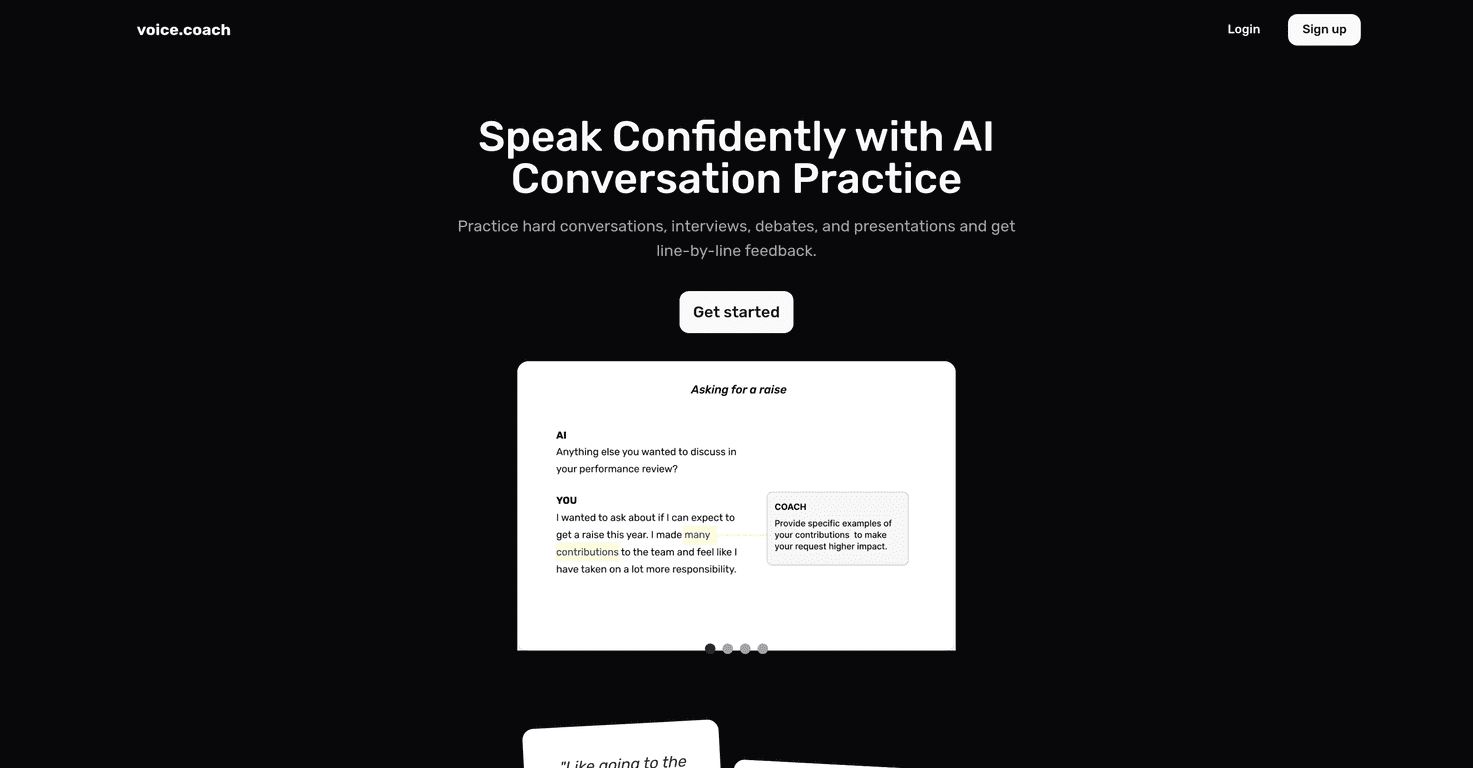
The biggest thing I noticed was the line-by-line feedback. Instead of generic advice like “speak more clearly,” it points out what you said and where it could be stronger. That matters because most people don’t need motivation—they need clarity on what to change next rep.
It also includes daily topic suggestions sent via email. I actually like this more than I expected. If I have to decide what to practice every day, I’ll procrastinate. With daily prompts, I can sit down for 10–15 minutes and just go.
And yes, it’s designed to feel user-friendly. The flow is simple enough that you don’t lose your focus fiddling with settings. You can just start practicing.
Key Features
- AI conversation practice for real scenarios
You’re not only practicing “generic speaking.” The scenarios are meant to mirror things like interviews, debates, and important conversations—stuff where tone and structure both matter. - Line-by-line feedback on what you said
This is the feature I keep coming back to. It helps you see where your wording gets messy, where you repeat yourself, or where your message could land more clearly. - Challenging conversation practice
If you struggle with difficult topics or you tend to get stuck when you’re put on the spot, these drills are useful. I found it easier to think on my feet after a few sessions. - Daily topic suggestions via email
This helps you stay consistent. It’s not just “come back whenever.” It nudges you with something specific to practice. - Performance scoring to track improvement
Having a score makes it easier to tell whether you’re actually getting better. It’s not the same as a human coach, but it gives you something to measure. - User testimonials
You’ll find stories from other users about how it helped them. I treat testimonials as a starting point, not proof—but it’s still good context.
Pros and Cons (What I Liked vs. What Could Be Better)
Pros
- It pushes you to practice the situations you actually fear. Interviews and debates are hard to rehearse alone. Voice Coach gives you a reason to practice anyway.
- Feedback is specific enough to change your next answer. In my experience, the biggest improvement came from adjusting wording and structure after seeing the breakdown.
- Practice topics feel relevant. Instead of random prompts, you get scenarios that match real communication goals.
- Confidence builds faster when you repeat under pressure. After a few tries at the same type of scenario, I noticed I was less “blank” when it was time to answer.
- Simple interface. I didn’t feel like I needed a tutorial just to start.
Cons
- You’ll want stable internet. Like most AI voice tools, a shaky connection can mess with responsiveness and make practice frustrating.
- Results depend on how you practice. If you rush through sessions without reviewing the feedback, you won’t see much change. It rewards attention.
- Pricing details aren’t clear in the info I received. I’d rather know the plan options upfront before recommending it to someone with a budget.
Pricing Plans
When I looked for explicit pricing in the information provided, it wasn’t included. If you want the most accurate and current numbers, it’s best to check the official Voice Coach website or contact their support team directly.
Quick tip: before you sign up, I’d recommend asking (or checking) whether the feedback and scoring features are included on the plan you’re considering—those are the parts you’ll actually use day to day.
Wrap up
Overall, I think Voice Coach is a solid option if you want structured practice and actionable feedback to improve how you communicate. It’s especially helpful for interview prep, debate practice, and anyone who gets tongue-tied during important conversations. Just don’t expect it to replace a human coach entirely—think of it as a consistent practice engine that helps you improve between real-life opportunities.
If you’re willing to put in a little repetition (like 10–15 minutes a few times a week), it’s the kind of tool that can genuinely make your next conversation feel easier.
Promote Voice Coach