Table of Contents
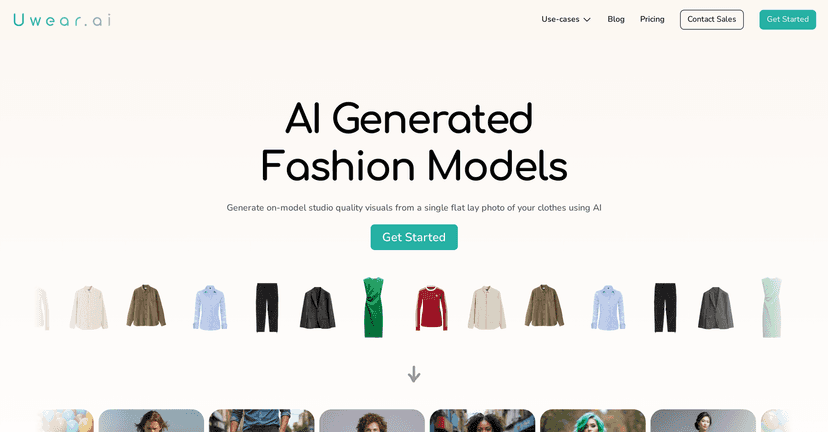
I’ve tried a bunch of “AI product image” tools over the years, and Uwear.ai is one of the few that actually feels built for fashion marketing—not just generic mockups. The core idea is simple: you upload a flat-lay photo of your clothing item, and Uwear generates realistic images of models wearing it.
What I noticed right away is how fast it is. In my experience, you can go from upload to usable visuals in under two minutes (assuming your input photo is clear). That speed matters when you’re launching a drop, testing ad creatives, or updating your website seasonally.
Another thing I like: it supports different model sizes and a range of ethnicities. If inclusivity is part of your brand voice, that’s not a small detail—it affects whether your visuals feel “on brand” or like an afterthought.
Uwear Review: Does It Actually Help With Fashion Marketing?
Uwear.ai is an AI-driven platform aimed at clothing brands that want better visuals without the usual photoshoot headaches. Instead of booking models, studios, and stylists (and paying for all of that up front), you start with your own product photo.
Here’s the workflow I found most realistic for day-to-day marketing:
- Take a clean flat-lay photo of the garment (more on how to do this well below).
- Upload it to Uwear.ai and choose the model options you want.
- Generate the images and review the output quickly.
- Use the best ones for product pages, ads, email banners, or social posts.
And yes—Uwear really does aim for quick turnaround. When your input is solid, you’re not waiting around for hours. That’s huge if you’re running multiple campaigns or just trying to keep your store looking fresh.
One more point: the generated results are designed to keep the clothing details fairly consistent. In other words, you’re not just getting random “AI outfits.” You’re trying to preserve patterns, shapes, and overall garment identity so your marketing doesn’t look mismatched to the product customers will receive.
Key Features I Care About
- AI model generation from flat-lay photos
You upload a flat-lay of the clothing item and Uwear generates model-worn visuals. This is the whole value proposition, and it’s where the results either shine or fall apart. - Diverse model options
You can select different model sizes and ethnicities. I think this is one of the strongest parts for brands that want inclusive marketing without always needing a full casting process. - Fast image creation (often under two minutes)
If you’re testing creatives, speed matters. It lets you iterate instead of settling for the first output. - Clothing detail consistency
Uwear aims to keep patterns and garment structure accurate. No AI tool is perfect, but the goal is fewer “weird hallucinations” compared to generic generators. - Free credits to try it
You can test before committing, which I always recommend—especially if you’re producing a lot of images. - Flexible payment options
There are pay-as-you-go and subscription-style plans depending on how frequently you generate images.
Pros and Cons (Realistic Take)
Pros
- It’s genuinely easy to use
The interface doesn’t feel like a science project. I could upload, generate, and review without needing a tutorial spiral. - Less dependence on photoshoots
If you’re a small team or you don’t shoot content every week, this can fill the gap fast. - More marketing options than “one hero image”
You can generate multiple model variations, which helps when you’re building ad sets or updating product pages. - Better inclusivity support
Having different model types available makes it easier to match your audience and brand values.
Cons
- Input photo quality really matters
If your flat-lay is blurry, poorly lit, or the garment edges are hard to see, the output will suffer. Garbage in, garbage out—just with AI. - Customization can be limited
There may be character limits on item descriptions (or how much detail you can add), so you won’t be able to micromanage every aspect. - Speed isn’t always consistent
Sometimes processing can feel slower than expected, especially if the platform is busy or you’re generating several images at once.
Pricing Plans: What You’d Likely Pay
Uwear.ai offers a few different ways to pay, which is good because fashion teams don’t all generate images at the same pace.
- Free tier / free credits
Good for testing the workflow and seeing if the output matches your product photos. - Pay-as-you-go
Nice if you only need images occasionally—like for a seasonal launch or a one-off campaign. - Monthly subscriptions
Better if you’re generating content regularly and want predictable costs.
If you’re trying to decide what makes sense, here’s what I’d do: start with the free credits, generate a few models for one garment, then estimate how many images you need per month. If you’re doing dozens every month, subscriptions usually feel more worthwhile than paying for everything individually.
Quick Tips to Get Better Results
If you want Uwear to nail your product visuals, don’t skip the prep. These are the small things I noticed make a difference:
- Use bright, even lighting (avoid harsh shadows across the garment).
- Keep the flat-lay straight so the AI has a clear silhouette to work with.
- Make sure patterns are visible—especially prints, stripes, or logos.
- Use a clean background so the garment edges are easy to detect.
Wrap up
Overall, I think Uwear.ai is a solid option if you need fashion visuals quickly and want more variety than traditional single-photo marketing. It’s not magic—your flat-lay quality still matters, and you may hit limits on fine customization—but the speed and inclusivity options are genuinely useful.
If you’re a brand that wants consistent content without running a full photoshoot every time, it’s worth giving Uwear a real test with a few of your best product photos.