LIFETIME DEAL — LIMITED TIME
Get Lifetime AccessLimited-time — price increases soon ⏳
AI Tools

TripOffice.com Review – Perfect for Digital Nomads

Updated: April 20, 2026
5 min read
#Ai tool#travel

Table of Contents

I’ve worked from a laptop in a lot of places—some great, some… not so great. The hardest part is usually the same: finding somewhere that doesn’t just have Wi-Fi, but actually gives you a usable setup. That’s where TripOffice.com caught my attention. It’s built for remote workers and digital nomads who want a real workspace (desk, chair, and the kind of ergonomics you’ll notice after a few hours).

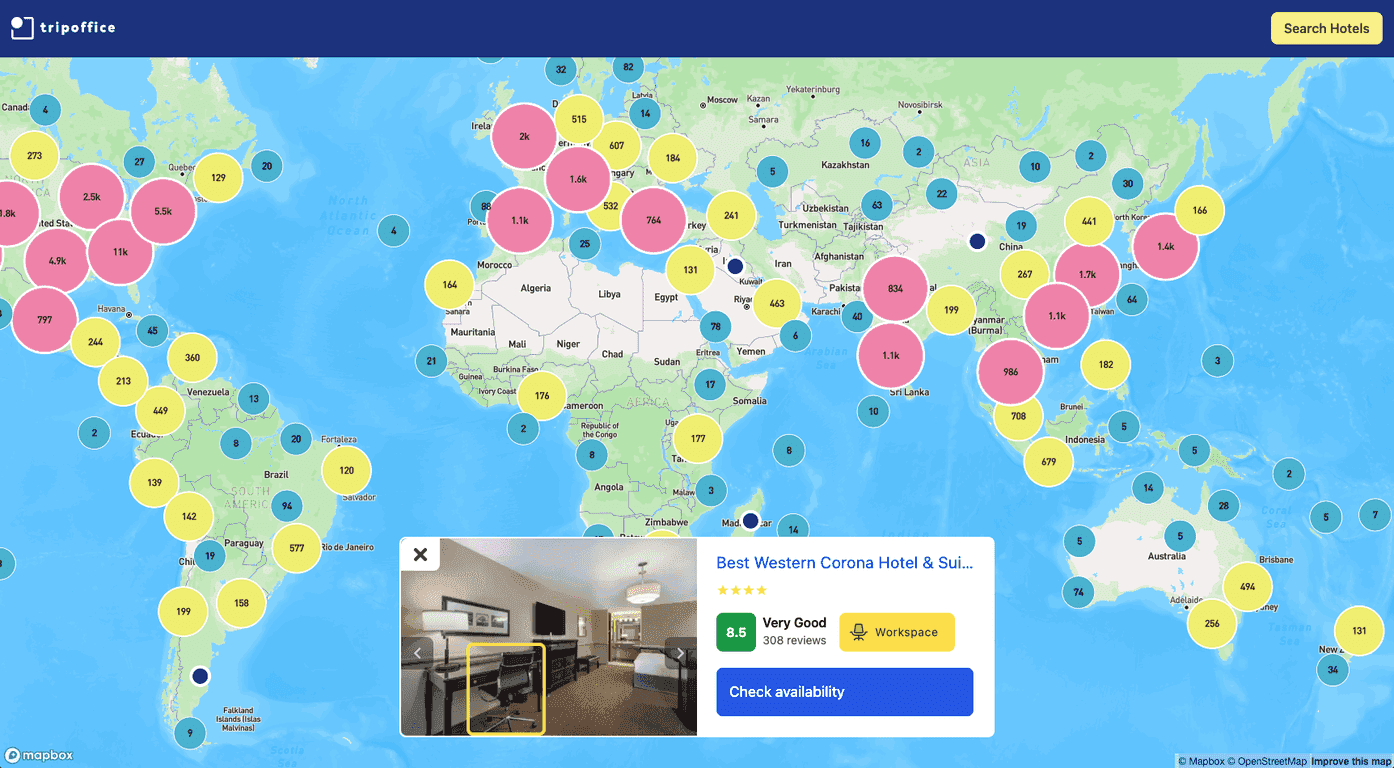
When I first checked it out, I liked that it’s not treating “work” as an afterthought. The listings are geared toward accommodations that include workspaces, and the site makes it pretty clear what you’re looking for. It also claims coverage across 120+ countries and 40,000 destinations, which is honestly useful if you’re the type who changes cities on a whim.

Tripoffice.Com

Another thing I noticed is the AI-assisted search. Instead of only showing “there’s a desk,” it focuses on ergonomic furniture setups—so you’re more likely to get a chair/desk combination that won’t have you hunched over by lunchtime. Is it perfect? No tool is. But it’s a better starting point than random “business-friendly” filters that barely mean anything.

TripOffice.com Review (What It’s Like to Use)

TripOffice.com is basically an accommodation search tool, but with a specific angle: it’s trying to match you with places that support actual work setups. That means you’re not stuck filtering through hundreds of listings that “might work” if you’re willing to work from your bed or a tiny table.

In my experience, the biggest win is when you’re planning a trip where work is non-negotiable—like if you’ve got meetings, deliverables, or you just need a reliable desk setup for 6–8 hours a day. It’s also helpful when you’re bouncing between time zones and don’t want to waste time hunting for something suitable once you land.

TripOffice.com also lists properties like hotels, apartments, and villas, so you’re not limited to one style of stay. If you prefer apartments for longer stretches (or villas if you’re traveling with someone), that variety matters.

Key Features I Look For in a Remote-Work Booking Site

  1. Large listings database — TripOffice.com mentions 200,000+ listings, which gives you more chances to find something that actually fits your needs.
  2. Workspace-focused accommodation search — you can search for places with workspace availability, which is the whole point for remote workers.
  3. AI-assisted ergonomic search — the AI element is aimed at helping you find setups with ergonomic furniture, not just “a place to sit.”
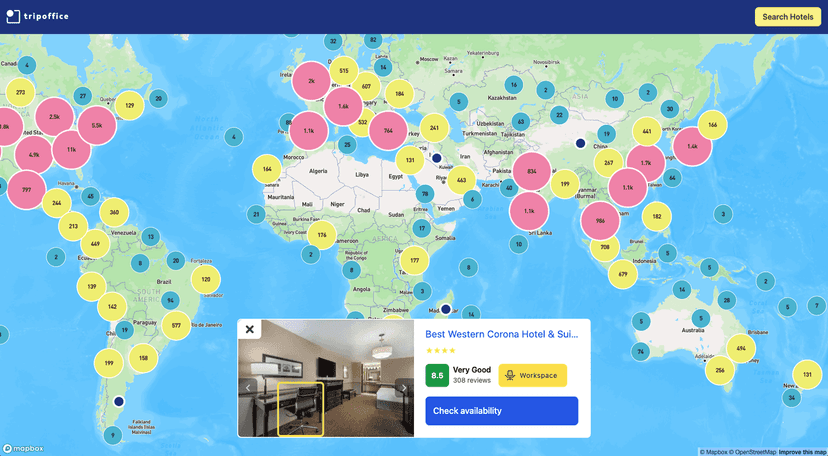
  4. Map view — I like using maps when I’m trying to stay near cafes, coworking spaces, or transit. Seeing options geographically is faster than scrolling endlessly.
  5. Simple interface — the site doesn’t feel overly complicated. I can usually narrow things down without spending 30 minutes clicking around.

If you’re the kind of person who cares about the details—like chair comfort, desk height, or whether you can spread out a second monitor—this is the area where TripOffice.com tries to stand out.

Pros and Cons (Honest Take)

Pros

  • More relevant options for remote work than generic travel sites. The workspace angle is baked in, not tacked on.
  • Easy to navigate. I didn’t feel like I needed a tutorial to get a workable shortlist.
  • Global coverage, with availability across multiple countries and destinations (useful if your itinerary changes).
  • Ergonomic focus. That’s a big deal if you’ve ever tried to work at a kitchen table for a full week.

Cons

  • Pricing plans aren’t clearly laid out. There aren’t obvious subscription tiers or a pricing page that tells you what you’ll pay up front. You basically search and see prices based on your dates.
  • Not every property will qualify. Because it’s filtered around workspace criteria, you may find fewer options in some locations than you’d get on a broader marketplace.

One more thing I’d flag: even with workspace filters, you should still read the listing details carefully. “Workspace available” can mean different things depending on the property.

Pricing Plans: How Costs Work on TripOffice.com

TripOffice.com doesn’t present traditional “pricing plans” like a subscription service. Instead, you select your dates and preferences, and you’ll see pricing for the accommodations that match.

In practice, that means:

  • Prices can swing a lot depending on the destination and season.
  • Accommodation type matters (hotel vs. apartment vs. villa).
  • Booking timing matters. If you’re flexible, you may find better rates by adjusting dates by a few days.

My advice? Don’t just look at the headline price. If you’re paying more for a better workspace, compare the total value: location, the type of desk/chair setup, and whether the property is actually suited for long work sessions.

Wrap up

Overall, I think TripOffice.com is a solid option if you’re a digital nomad or remote worker who wants more than “Wi-Fi and vibes.” The big strengths are the workspace-focused listings, the AI-assisted ergonomic search, and the fact that it’s built for people who work while traveling.

Just go in knowing that pricing isn’t presented as a simple set of plans—you’ll be comparing prices per booking. Still, with the wide selection across lots of destinations, it’s worth checking when you’re planning your next work trip and you don’t want to gamble on your setup.

Promote TripOffice.com

Stefan

Stefan

Stefan is the founder of Automateed. A content creator at heart, swimming through SAAS waters, and trying to make new AI apps available to fellow entrepreneurs.

Related Posts

Rierino Review – Simplifying Digital Innovation

Rierino Review – Simplifying Digital Innovation

Rierino promises to boost digital transformation efforts

Stefan
myNameGenius Review – Discover the Perfect Name

myNameGenius Review – Discover the Perfect Name

an invaluable resource for parents and individuals

Stefan
Harmoniq AI Review – Your Perfect Playlist Creator

Harmoniq AI Review – Your Perfect Playlist Creator

personalized playlists based on mood and vibe

Stefan

Create Your AI Book in 10 Minutes