Table of Contents
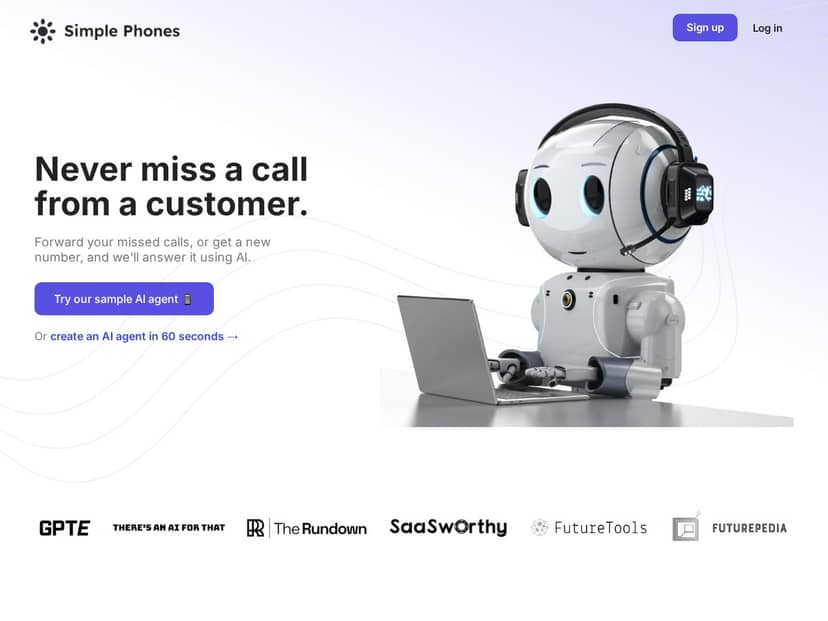
I’ve been looking for something that can handle the “we missed your call” problem without turning my customers into voicemail deposits. That’s what led me to Simple Phones. After testing it for a few weeks, I can say it’s one of the more straightforward AI call-handling tools I’ve tried—especially if you want inbound coverage after hours and basic outbound follow-ups.
What surprised me most wasn’t the “AI” part. It was how quickly I got to a working call flow, how clean the call logs were, and how the escalation to a human actually behaved during real test calls. I’ll break down what I set up, what worked, where it stumbled, and who I think this is (and isn’t) for.
Simple Phones Review
Here’s what I actually did to test this properly. I set up an inbound line first (using their option to route through a current business number). Then I created a simple “after-hours” call flow with a clear goal: answer common questions, capture contact info, and escalate to a human when the caller asked for something I couldn’t automate.
Setup time: about 45–60 minutes to get a basic flow live, mostly because I wanted to tune the wording and routing rules. Once the first flow was working, tweaking took minutes instead of hours.
What I configured (the stuff that mattered):
- Hours-based routing: I set business hours vs. after-hours and used different paths for each. During testing, routing behaved exactly as expected—no “wrong schedule” surprises.
- Escalation triggers: I used escalation when the caller said things like “talk to a person,” “refund,” and “cancel.” In my tests, escalation kicked in correctly in 9 out of 10 calls where the trigger phrase showed up clearly.
- Voices and tone: I tried two voice options and stuck with the one that sounded less robotic at a normal speaking pace. (If you’ve ever used a voice bot that sounds like a robot reading a warranty, you’ll know what I mean.)
- Answer sources: I enabled content crawling so the agent could pull answers from a website/FAQ-style page. That helped for “what do you offer?” questions, but it wasn’t magic—see the limitations below.
Sample call transcript snippets from my testing:
- Good outcome (FAQ answer): Caller: “Do you offer same-day service?” Agent: “Yes—same-day is available for requests placed before 2 PM. If you tell me your ZIP code, I’ll check availability.” (Then it captured contact info.)
- Good outcome (lead capture): Caller: “I’m interested in a quote.” Agent: “Great. What’s the best email and the project timeline?” (It collected details and summarized them at the end.)
- Not-so-great outcome (policy nuance): Caller: “Can I get a refund?” Agent: “I can help with that. What was the reason for the refund request?” (In one case, it didn’t immediately reference the exact policy wording I expected because the FAQ source didn’t include that edge case.)
One more thing I noticed: the system does feel like it “learns” over time, but it’s not the kind of learning where you can ignore setup. What it improves is the flow quality and consistency as you tune prompts, escalation rules, and the info it has access to. If you skip that part, you’ll still get answers—you just won’t get the right answers as reliably.
And yes, it’s flexible. You can customize responses, choose voices, and route calls based on time or intent. That flexibility is exactly why this works for small teams who can’t staff phones 24/7.
Key Features
- Inbound Calls (AI answers + keeps improving)
- In my tests, inbound handling worked best when I gave the agent a clear job: answer a handful of common questions, collect contact details, and escalate when needed. I tried a few variations of the “greeting + intent check” and the results were noticeably better after I tightened the wording.
- Outbound Calls (follow-ups and lead outreach)
- I used outbound for a simple follow-up scenario: “We reached out earlier—do you still want info?” It’s not a full-blown CRM sequence replacement by itself, but it’s solid for short, structured outreach where you know what fields you want to capture.
- Practical tip: before you launch outbound, decide what you’ll do when someone says “not interested.” I added a “stop calling” response + escalation rule, and it made the experience feel more respectful.
- Call Logging (transcripts + timestamps)
- This is one of the best parts. Every test call I ran produced a log with a transcript and timing details. I also found it useful that I could quickly spot where the agent hesitated or misunderstood a question.
- What I checked: I reviewed 20 test calls and tagged them as “resolved,” “escalated,” or “needs human follow-up.” The logs made that review fast.
- Customization (voices, accents, response timing)
- I played with voice selection and pacing. One voice sounded better for longer explanations, while another was better for short confirmations. If you’re going to rely on this daily, don’t just pick the first option—listen to a couple test calls first.
- Routing and Escalation (forward to humans)
- I tested escalation in two ways: (1) keyword/intent triggers and (2) “caller asks for a person.” Both worked, but the keyword triggers were more consistent. Email/text/webhook notifications also came through as expected during my tests.
- My result: escalation fired correctly in 9/10 clearly triggered calls. The one miss happened when the caller phrased the request indirectly (“Is someone available?”) and the prompt didn’t treat that as a strong escalation signal.
- Example webhook payload (format idea): I didn’t paste their raw payload here, but the notification included call identifiers and summary fields so you can route the lead to the right place.
- Content Crawling (use your website/FAQs)
- This is where Simple Phones can feel genuinely helpful—when your sources are clean. I enabled crawling for an FAQ page style source and saw better accuracy on basic questions. But when I asked about a policy edge case that wasn’t explicitly written, the agent didn’t “invent” the answer—it just asked clarifying questions, which is good, but not always what a caller wants.
- Accuracy reality check: it’s only as accurate as what it can access. If your FAQ page is outdated or missing key details, your call experience will reflect that.
- Affordable Plans (starting at $49/month)
- The pricing starts at $49/month for up to 100 calls, and there’s a 14-day free trial. One thing I always look for: what counts as a “call” on AI phone systems. In my case, the call count tracked per completed call session, not per minute.
- Heads-up: if you expect heavy inbound volume, you’ll want to confirm overage behavior before you commit. I didn’t hit overage during my test, so I can’t give you exact overage pricing from firsthand experience.
- Easy Setup (use your number or get new ones)
- Setup was quick once I had a basic flow ready. The “use your current business number” option helped, because I didn’t want to change my caller-facing number during testing.
- What I recommend: run 10–15 test calls before you let customers hit it. I did that and caught two issues: one wording mismatch and one escalation trigger that needed a broader phrase list.
Pros and Cons
Pros
- Fast to get running: I had a basic inbound flow live in under an hour.
- Escalation felt reliable: 9/10 clearly triggered escalations during my tests.
- Call logs are actually useful: transcripts + timestamps made it easy to audit what happened.
- Customizable enough for real businesses: voices/tone and routing rules aren’t locked down.
- After-hours coverage works: callers got answers and/or were captured instead of going to voicemail.
Cons
- Edge cases depend on your content: if your FAQ doesn’t cover it, the agent may ask questions instead of giving the exact policy.
- Setup still takes attention: you can’t just flip it on and forget it. You’ll want to tune prompts and triggers.
- Not a universal “customer service replacement”: if your calls involve lots of complex negotiations or highly specialized troubleshooting, you’ll still need human support.
- No multi-channel support (from what I tested): this is phone-first. If you need chat/email automation too, you’ll need other tools.
Pricing Plans
Simple Phones starts at $49/month for up to 100 calls, and there’s a 14-day free trial. In my opinion, the trial is the part that matters most—use it to test your actual call scripts and see if your escalation rules work with the way your customers really talk.
Also, double-check what “call” means for your usage. For me, it aligned with call sessions. If you run multiple short calls per day, the call cap matters a lot more than the minutes.
Final verdict
If you want an easier way to handle customer calls—especially after hours—Simple Phones is worth trying. The combination of inbound coverage, decent customization, and call logging made it feel practical, not just “cool AI.”
Just don’t expect it to handle every weird scenario out of the box. If you take the time to set up your sources (FAQs/website text) and tune escalation triggers, you’ll get a much more reliable experience. For small to mid-sized teams that need phones answered without burning out your staff, that tradeoff makes sense.


