Table of Contents
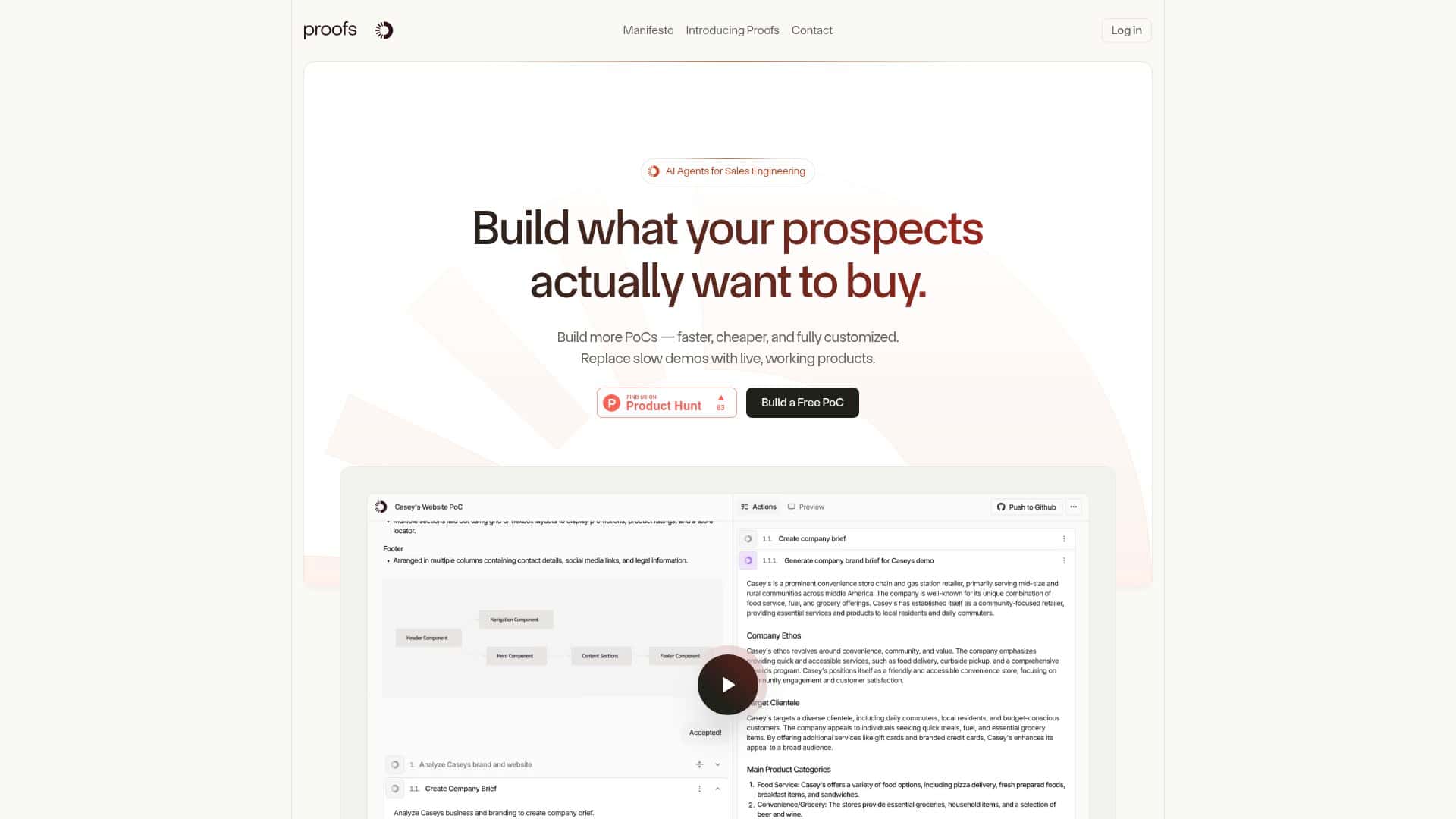
Proof-of-concept (PoC) work can be brutal. You’re trying to impress a prospect this week, but your “quick demo” turns into a multi-week engineering project. That’s exactly what Proofs.io is aiming to fix—generate tailored, deployable PoCs faster using AI.
I tested Proofs.io end-to-end to see how realistic the promise is: How fast is it, how customizable are the outputs, and what kind of “cleanup” work do you still end up doing? Below is what I noticed after running a few iterations and trying to get from idea → usable demo without the usual back-and-forth.
Proofs Review: How Fast It Really Gets You to a Usable PoC
Here’s the honest version: Proofs.io is best when you already know what you want the demo to do, and you can describe it clearly. The platform then turns that into a working app you can open, click, and (importantly) deploy.
My workflow (what I actually did)
- 1) Pick the PoC goal: I started with a sales-oriented use case—something that needs a UI, a simple data model, and at least one “real” interaction (not just a static landing page).
- 2) Choose a stack: I tested with a modern web setup (React/Next.js style). The point wasn’t to prove every framework—just to see whether the output feels deployable right away.
- 3) Provide branding + content: I fed in basic brand details (name, colors, and a couple of example product fields). This is where the “custom” part shows up—your demo doesn’t look like a generic template.
- 4) Add integrations/data requirements: I included a couple of integration-style requirements (think “API-backed” screens and a simple pipeline for sample data). This is where you’ll want to be specific.
- 5) Connect GitHub: Once connected, Proofs.io generated code into a repository and gave progress updates while it built.
- 6) Deploy/preview: I checked the preview URL that came out of the build process, then iterated based on what didn’t match my spec.
Time-to-first usable output
In my test, I got to a live, fully functional PoC in a few hours. That’s the part that surprised me most—because the “weeks” comparison is real when you’re doing this manually. Could it be faster or slower depending on scope? Sure. But the overall experience felt like: idea in → demo running the same day rather than waiting for a full sprint.
What the generated PoC included (practical examples)
- Example A: Prospect-facing demo with interactive data
I asked for an app that lets a user view a set of items, filter them, and open a detail view. The output included a working UI flow (list → detail) with sample data wired through the app so it wasn’t just pretty screens. - Example B: “Admin-ish” setup screen
I requested a simple configuration area where you can update fields that affect what the demo shows. What I noticed: the UI surfaced those controls, but some edge-case validation needed manual tightening (more on that in the limitations). - Example C: Integration-style behavior (API + data pipeline)
I specified that certain pages should act like they’re backed by an API. The app behaved like a real integration rather than a mocked placeholder, which made the demo feel credible during a sales conversation.
Where it stumbled (and what I changed)
Proofs.io is strong, but it’s not magic. On more nuanced requirements—like very specific validation rules, unusual workflow states, or “only do X when Y is true” logic—the AI sometimes missed details. When that happened, I didn’t scrap the project. I iterated: I tightened the prompt with exact conditions and clarified what should happen in each state. After that, the output improved noticeably.
So, is it user-friendly? Yes—at least compared to starting from scratch. But if your PoC spec is vague, you’ll get vague results. Garbage in, garbage out still applies. The good news: Proofs.io makes the iteration loop fast enough that fixing those gaps doesn’t derail you.
Key Features That Matter for PoC Work
- AI-Powered Development (agents that actually build)
In practice, this isn’t “generate a screenshot.” It’s closer to: describe the app, and the system produces functioning frontend + backend pieces and the glue in between. In my testing, the app behaved like a real project you could run. - Full-Stack Support for modern stacks
The platform supports common setups (React/Next.js style, Shopify Hydrogen, APIs, and data pipelines). I focused on a web stack, but the important takeaway is that it tries to generate more than UI—there’s usually real wiring behind the screens. - Personalized customization (branding + demo content)
This is where the PoC stops looking generic. I used brand name + color details and included example product fields. The UI reflected those inputs instead of staying “placeholder-y.” - Speed and efficiency
The “weeks to hours” claim is believable based on my experience with time-to-first usable preview. If your team needs demos for multiple prospects, that time compression matters. - GitHub integration with deployable code
This is a big deal for teams that don’t want to copy/paste random output. In my test, the GitHub workflow produced code that looked structured enough to deploy, and I could iterate without rebuilding from scratch. - Iterative improvement
The system learns from feedback across projects. I didn’t try to quantify learning performance with a formal study, but I did notice that clearer prompts led to better results on subsequent runs. - Scalability for multiple PoC requests
If you’re doing many demos per month, the platform’s approach helps reduce repetitive work. You’re not starting every PoC from zero.
Pros and Cons (Based on What I Hit in Testing)
Pros
- Fast turnaround: In my test, I reached a live PoC preview in a few hours, not days or weeks.
- Deployable output: It’s not just a mock. The generated app felt like real code you could build on.
- Customization is practical: Branding and demo content actually show up in the UI, which helps when you’re pitching to prospects.
- GitHub makes it easier to collaborate: You can review code, keep history, and iterate like a normal dev workflow.
- Good for sales/pre-sales demos: If your main goal is “show something credible, quickly,” Proofs.io fits that use case well.
Cons
- Nuanced requirements can slip: Complex logic, edge-case validation, and very specific workflow rules sometimes need manual prompt refinement.
- Automation has limits: The more “custom product behavior” you request, the more you’ll likely spend time correcting generated details.
- Not a full replacement for engineering: It reduces the heavy lifting, but you still own the final quality bar—especially for anything compliance-sensitive.
- Closed-source platform: If you’re hoping to customize the generator itself or inspect everything under the hood, that’s not the vibe here.
Pricing Plans: What You Should Expect (and How Costs Usually Show Up)
Proofs.io includes a free trial so you can build a PoC and see how the workflow feels before committing. As of now, I didn’t see a fully detailed public price list for paid plans.
That said, when you’re evaluating cost, the real drivers tend to be pretty consistent across AI build tools:
- Compute and build frequency (how many generations/iterations you run)
- Team seats (number of users who can create/manage PoCs)
- Usage limits (how many PoCs or builds you can run per period)
- Integration complexity (some stacks and integrations can increase build time or require more refinement)
If you’re trying to estimate ROI, I’d do a simple comparison: how many PoCs would your team normally produce manually in a month, and how many hours would that take? Then compare that to the time you save after accounting for a bit of iteration (which is normal—no tool gets everything perfect on the first try).
So… Who Should Use Proofs.io (and Who Might Not)?
In my view, Proofs.io is a strong fit if you need fast, branded, deployable PoCs for sales conversations and you can describe the requirements clearly. It’s especially useful when you want to move quickly without tying up a whole engineering team.
On the other hand, if your PoC spec is highly custom with lots of tricky edge cases—think “we need this exact workflow and exact validation logic with strict compliance constraints”—you should expect some manual tightening. It’s still helpful, but it won’t magically remove all engineering responsibility.
After testing it, the biggest takeaway is simple: Proofs.io makes PoC creation feel like an iteration loop instead of a long project. When you’re trying to win deals with demos, that difference is huge.


