Table of Contents
If you’ve ever tried to keep a test suite healthy while the app changes every week, you already know the pain: tests drift, flaky failures pile up, and suddenly you’re spending more time fixing automation than building it. That’s why I was interested in Kane AI by LambdaTest. It’s positioned as an AI-powered end-to-end testing agent, and the big promise is simple—help teams create, manage, and debug tests faster using natural language.
In my experience, the “natural language” part is what makes or breaks tools like this. If it just talks the talk but can’t translate actions into reliable steps, it’s not going to replace real engineering work. What I liked about KaneAI is that it leans into practical workflows: you can describe what you want, it helps generate steps, and then you can refine things without feeling locked out if you’re not an expert coder.
It also has a two-way editing approach—meaning the instructions and the code can stay in sync as you iterate. That matters because most teams don’t just write tests once and forget them. We update selectors, adjust logic, and tweak assertions constantly. Anything that reduces the “rebuild from scratch” feeling is worth paying attention to.
Kane AI Review
KaneAI is built around an idea I really wish more teams would adopt: treat test creation like an iterative conversation, not a blank-editor chore. Instead of starting with a pile of boilerplate, you describe the flow (login, add to cart, submit a form, etc.) and KaneAI helps turn that into test steps.
One feature I found especially practical is smart show-me mode. Rather than trying to perfectly write the steps up front, you can perform the actions and let the tool translate them into instructions. If you’ve ever watched a teammate struggle to translate “click the button, wait for the modal, then verify the message” into actual selectors and assertions, you’ll see why this is useful.
It’s also designed for teams that don’t want to choose between “AI-generated tests” and “real maintainable automation.” The two-way test editing is a big deal here. You’re not just generating code and hoping for the best—you can adjust the instructions, update the code, and keep everything aligned as the UI changes.
Now, let me be honest: AI-generated tests won’t magically fix flaky locators if your app’s DOM is chaotic or your waits are inconsistent. What KaneAI can do is reduce the time it takes to get to a test you can iterate on. But you’ll still want good testing hygiene—stable selectors, sensible assertions, and realistic test data.
Key Features
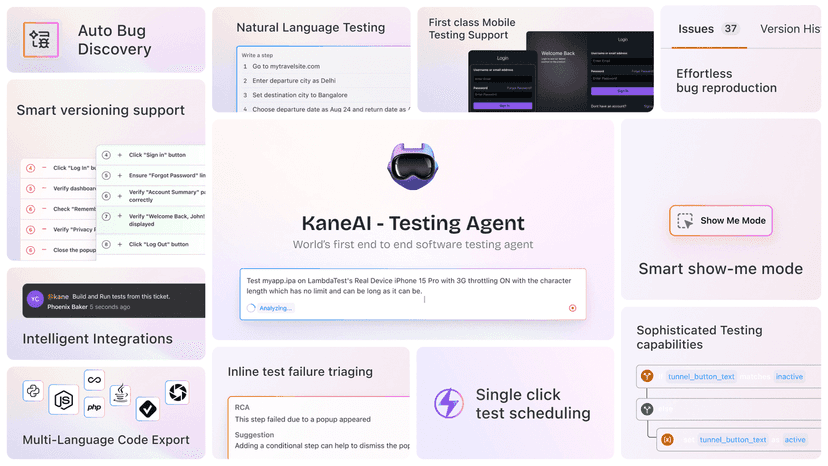
- Test Generation & Evolution using natural language - Tell it what you want tested, and it helps create the steps. In practice, this speeds up the “first draft” phase a lot.
- Multi-Language Code Export - Export tests to major programming languages, so you’re not forced into one stack. This is important if your team already has standards around JavaScript/TypeScript, Python, Java, etc.
- Intelligent Test Planner - Automatically generates steps and helps structure the flow. I like this because it reduces the blank-page effect.
- Smart Show-Me Mode - Create test instructions from user actions. It’s great for capturing what “good” looks like when you don’t want to write every step manually.
- Sophisticated Testing Capabilities - Handles more complex conditions (the kind of stuff that usually requires manual logic and careful assertions).
- 2-Way Test Editing - Keeps instructions and code synchronized, so maintenance doesn’t turn into a constant rewrite.
- Integration with Jira, Slack, and GitHub - Useful if you want failures and updates to flow into your normal dev workflow instead of living in a separate testing bubble.
- Easy Test Scheduling - Schedule tests with a single click, which is exactly what teams want when they’re trying to run smoke/regression on a cadence.
Pros and Cons
Pros
- Faster test creation with natural language. You get a starting point quickly, and then you refine.
- Good fit for mixed-skill teams. If someone’s not a test automation wizard, they can still contribute meaningful steps and logic.
- Two-way editing helps maintenance. In real projects, this matters more than people expect—especially when UIs change every sprint.
- Integrations are practical (Jira, Slack, GitHub). It’s easier to act on failures when they land where your team already works.
- Scheduling is straightforward. If you’re running smoke tests daily and regression weekly, this kind of “just set it up” experience is a win.
Cons
- There can be a learning curve if your team is new to AI-assisted workflows. You’ll need a bit of time to learn how to write clear prompts/instructions and how to review what it generates.
- Customization isn’t always as flexible as fully manual automation. If your test suite has highly specialized patterns, you may still end up doing more hand-tuning than you’d like.
- AI doesn’t replace good testing fundamentals. If your app is unstable, selectors are brittle, or test data is inconsistent, you’ll still see flaky results.
Pricing Plans
Pricing for KaneAI isn’t listed in the content I reviewed, so I can’t give you exact numbers here. What I’d do is check the LambdaTest Kane AI page for the most up-to-date options. If you want to evaluate it before committing, look for any private beta signup—those can be the fastest way to test it with your own flows.
Quick tip: when you’re evaluating pricing, don’t just compare cost per month. Compare how many hours you save on test creation and maintenance. If KaneAI helps your team stop rewriting tests every time the UI shifts, that ROI can show up pretty quickly.
Wrap up
Overall, I think KaneAI is a strong option if your biggest headache is getting tests written quickly and keeping them maintainable. The natural language approach, smart show-me mode, and two-way editing are the kinds of features that can genuinely reduce friction—especially for teams that have a mix of automation skill levels.
If you’re curious, I’d recommend trying it on a couple of real workflows first (login + one core transaction flow is a good starting point). Then judge it based on something practical: how long it takes to get a reliable test, how easy it is to update when the UI changes, and whether the results fit your team’s process.
Go check the website for pricing and availability, and see if the beta (if offered) lines up with what you need right now.
Promote Kane AI



