Table of Contents
If you’ve ever stared at an email draft thinking, “This is fine… but it doesn’t sound like me in a professional setting,” you’re not alone. I run into this all the time—especially when I’m switching between texting-style writing and something that needs to land in a meeting, a client email, or a report.
That’s exactly why I tried Jargonize. The basic idea is simple: paste in casual language, and it rewrites it into a more polished, corporate-ready tone. It’s positioned as a text transformation tool for emails, reports, and presentations—so I focused on those use cases while testing it.
Jargonize Review: Does it actually make you sound more professional?
Here’s how I’d describe Jargonize after using it: it’s built for quick tone cleanups. You paste in something casual (or slightly messy), and it rewrites it into something that looks like it belongs in a work email.
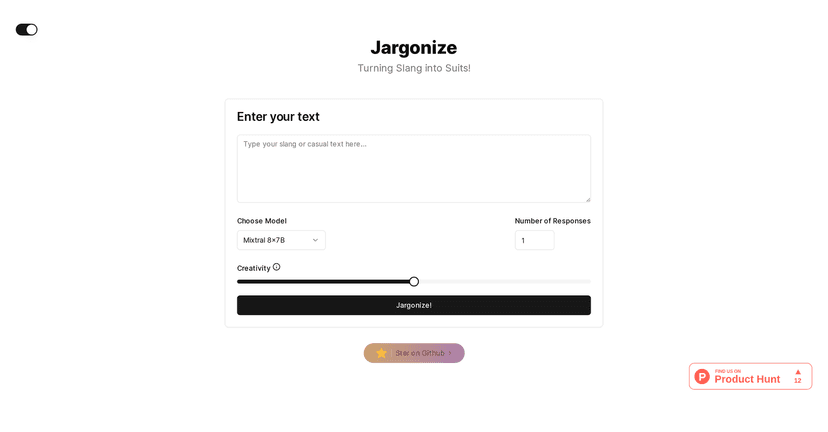
What I noticed immediately is that the interface feels straightforward. There’s a text input area, and then you can adjust how the rewrite comes out. It doesn’t feel like you’re wrestling with settings—more like you’re giving the tool a nudge and letting it do the heavy lifting.
In my experience, the biggest win is when you’re writing something that’s technically correct but sounds too informal. For example, a message like “Hey, just checking in—let me know what you think” can get rewritten into something more polished like “I’m following up regarding the matter outlined above. Please share your feedback when convenient.” That’s the kind of transformation Jargonize is aiming for.
That said, it’s not magic. If your original text is vague, the rewrite can end up sounding polished but still unclear. So I’d treat it like a drafting assistant—not a replacement for your judgment.
Key Features I’d use (and why)
- Text input area for casual or slang text
If you’ve got a paragraph you’d normally shorten or rewrite manually, you can drop it in here and let Jargonize handle the tone shift. - Multiple transformation models
I like that you can switch models instead of getting one “house style” every time. Depending on the model, the output can feel more formal, more neutral, or more variation-focused. - One to three varied responses
Instead of forcing you to pick a single rewrite, you can compare options. In practice, having up to three versions helps when you’re choosing between “too stiff” and “just right.” - Creativity slider
This is useful when you want the rewrite to be more natural versus more conservative. If you push it too far, you might get wording that feels a bit too “generated,” so I usually keep it moderate. - Interactive, user-friendly interface
No complicated workflow. I didn’t feel like I needed a tutorial to get results, which matters when you’re trying to write fast.
Pros and Cons from a real-user perspective
Pros
- It’s good at tone conversion. If your main problem is “this sounds too casual,” Jargonize generally fixes that.
- Customization options actually affect the output. The transformation models and creativity slider aren’t just decoration—you can see differences.
- Multiple variations help you pick a better version. When you’re sending an email and want the safest wording, having 2–3 options is a big deal.
Cons
- Effectiveness depends on how complex your text is. Short messages usually come out cleaner. Longer, dense paragraphs may need a second pass from you.
- You’re capped at a maximum of three responses. Sometimes I want more than three angles—especially for proposals or detailed status updates—but you’ll have to choose from what it gives you.
Pricing Plans: what I found (and what I didn’t)
I couldn’t find specific pricing details for Jargonize in the information provided here. So I can’t honestly tell you “it costs $X/month” without guessing.
My advice: check the official Jargonize website and look for subscription tiers or usage limits, because tools like this often change pricing based on credits, model access, or response limits.
Wrap up
If you’re trying to sound more professional without rewriting everything from scratch, Jargonize can be genuinely helpful. It’s best for quick tone upgrades—emails, reports, and presentation notes where your content is already solid, but your wording needs a more corporate feel.
Just don’t rely on it blindly. If your original message is unclear, the rewrite may polish the wording while keeping the same problem. And with the response limit, you may occasionally want more options than it offers.
Overall though? It’s worth a try if you’re constantly cleaning up informal drafts before sending them out.
Promote Automateed