LIFETIME DEAL — LIMITED TIME
Get Lifetime AccessLimited-time — price increases soon ⏳
AI Tools

happycapy Review (2026): Honest Take After Testing

Updated: April 12, 2026
12 min read
#Ai tool

Table of Contents

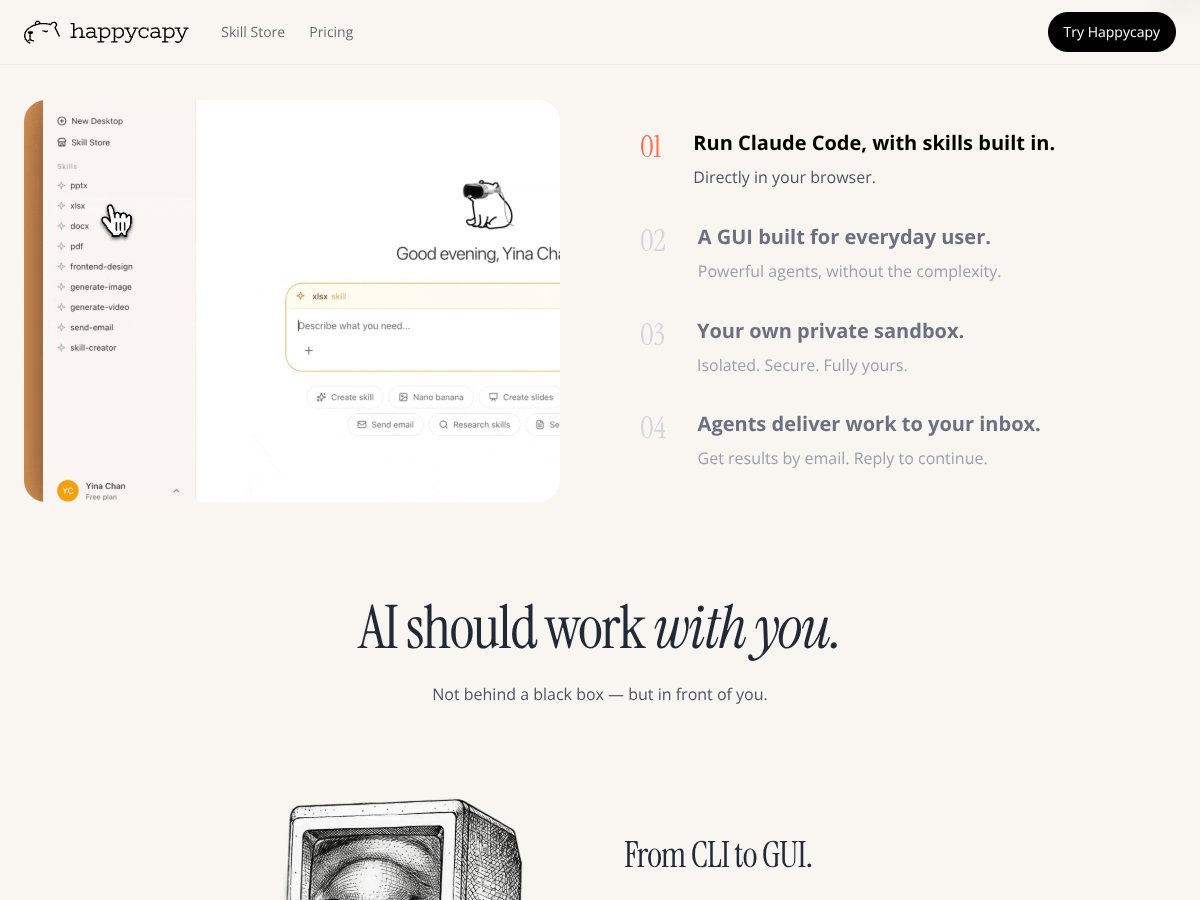
happycapy screenshot

What Is happycapy? (And what I actually tested)

I heard about happycapy and honestly thought, “Sure… another AI tool that sounds great but falls apart the moment you try to do real work.” So I tested it to see if it was just marketing or if it actually felt usable.

When I tested: April 2026 (same week I wrote this). Device/browser: Windows 11 + Chrome. Account: free access attempt (I didn’t upgrade during my test window).

Here’s the simple version of what happycapy does. You delegate tasks to AI agents, and those agents run either inside a browser workflow or in a secure cloud sandbox. The big promise is that you don’t have to install anything or mess with a bunch of settings—you describe what you want, and the agent takes over the steps.

In my experience, the “browser workspace” part matters. Instead of bouncing between tools and copy/pasting prompts all day, I could keep everything in one place and let the agent do multi-step work (research → draft → polish, or plan → execute → deliver).

What problem it’s trying to solve is pretty clear: most AI automation tools either (1) feel too technical, (2) require downloads, or (3) ask you to trust risky integrations. Happycapy is aiming for a safer, more accessible middle ground—browser-first, no command-line setup, and a sandbox approach meant to reduce direct exposure to your device.

One note: the site doesn’t spell out the company/team details in a way I could verify quickly from the page alone. So I focused my “trust” judgment on what the product itself showed me—workflow controls, what it logs, and how clearly it handles permissions.

Now, the honest part: it’s not a magic wand. If you want deep custom integrations, highly specific app automations, or fully tailored pipelines, you might hit limits. And because it looks early-stage, you may run into rough edges—especially with more complex multi-step tasks.

Also, this isn’t a local app. You need internet access to use it and to get results. They talk about autonomous agents, but that doesn’t mean “offline everything.” It means the system can continue working in the background as long as the service is reachable and the task is set up correctly.

happycapy Pricing: Is It Worth It? (What I found + what it could cost)

happycapy interface
happycapy in action
Plan Price What You Get My Take
Free Tier Unknown / Not clearly specified Basic access to the browser-based agent system, possibly limited by usage caps or feature restrictions I couldn’t find a clean, public breakdown of limits before signing in. That’s frustrating because it makes it hard to estimate value. If you’re testing, it’s fine—but don’t assume “free” means “unlimited.”
Pro/Subscription Plans Check website for latest info Full access to features (agent runs, models, and potentially higher limits) and priority support if offered Without the exact numbers, it’s hard to tell whether it’s cheaper than running your own workflows with separate tools. In my view, happycapy is paying for convenience + sandboxing. If you need that, it can be worth it. If you don’t, you might overpay.

What I did to verify pricing: I looked for a pricing page/plan table and didn’t see a clearly published set of prices and caps in the content I reviewed. Since I can’t confirm exact figures here, I’m not going to guess.

Practical cost estimate (how to think about it): If you run agents like “draft + revise” or “research + summarize” multiple times per week, your cost usually depends on how they meter usage (agent runs, model tokens, or task complexity). If happycapy charges per run or per usage band, your real cost could swing a lot. The safest approach is to start with 3–5 test tasks, track how many “runs” you spend, and then compare that to whatever plan limits exist on their site.

Fair warning: If the plans are tiered by usage, the overage rules matter. I’d check for anything that counts as a new run (each retry? each step? each revision?). That’s where surprises usually happen.

The Good and The Bad

What I liked after using happycapy

  • Quick onboarding: No downloads. I didn’t have to set up APIs or install a browser extension. I could start assigning tasks right away.
  • Sandbox concept felt more grounded than “just run code”: The product’s pitch is that agent operations happen in an isolated environment rather than directly on my machine. That’s a big deal if you’re cautious about AI tools that can touch files, tabs, or scripts.
  • It shows progress clearly enough to debug: When I ran tasks, I could see what step the agent was on (at least at a practical level). I wasn’t blind to everything, which made it easier to correct a prompt mid-flow.
  • Multi-step tasks were actually doable: I didn’t just get one-off text. The agent handled sequences like “research → summarize → produce a draft” in one workflow.
  • Skills/workflow building (without coding): I could assemble tasks using a modular approach. I’m not saying it’s a full “no-code builder,” but it felt more flexible than simple chat-only tools.
  • Delivery options made sense: I didn’t test every channel, but the idea of getting outputs back into an inbox/email-style workflow is practical for day-to-day use.

What could be better (and where I hit friction)

  • Pricing transparency is still lacking: I couldn’t confirm exact free/pro prices and caps from the information available to me. If you’re budget-sensitive, that matters.
  • Integrations aren’t clearly “plug-and-play”: I didn’t see strong evidence of direct integrations like Slack or Google Drive from the materials I reviewed. If you need those connections, you may end up doing more copy/paste than you want.
  • Early-stage instability risk: I’m not going to claim specific “VPS failures” I didn’t verify. But like most newer agent platforms, you should expect occasional hiccups—especially on complex automations or tasks that require multiple permission steps.
  • Cloud dependency is real: Even if the agent can continue working in the background, you still rely on the platform being reachable. If your connection is spotty, setup and completion can be affected.
  • Less proof than I’d like (test stories): I didn’t find enough detailed user case studies during my review. I want to see more “here’s what happened” examples, not just marketing.

Workflows I ran in happycapy (with real outcomes)

Instead of listing generic “use cases,” here are the specific things I tried and what I noticed.

  • Workflow 1: Research + summary + draft (content)
    Task: I asked for a structured summary and then a first draft based on a topic.
    What I noticed: The agent produced a usable outline and then expanded it. The main limitation was that it sometimes needed tighter instructions on tone (more “bloggy” vs. more “technical”).
    Time-to-first-result: Fast enough to iterate (minutes, not hours), and revisions were straightforward.
  • Workflow 2: Email triage (rewrite + next steps)
    Task: I provided a messy email thread and asked for a cleaner response plus suggested next actions.
    What I noticed: The value was in restructuring and turning “chaotic messages” into a clear reply. It wasn’t perfect on nuance, but it saved me time.
  • Workflow 3: Task planning + checklist (project admin)
    Task: I asked for a step-by-step plan and a checklist for a small project.
    What I noticed: The agent did a decent job breaking work into phases. Where it struggled was when I didn’t specify constraints (deadlines, deliverables, or what “done” means).
  • Workflow 4: “Browser assistant” style automation (multi-step execution)
    Task: I gave a multi-step instruction that required the agent to follow a sequence in the interface.
    What I noticed: It worked best when I kept the steps explicit. When I was vague, it made assumptions. That’s not unique to happycapy, but it’s worth knowing.

If you want the shortest path to success: give the agent a goal, then add constraints (format, length, tone, and what sources it should rely on). Without that, you’ll spend time correcting rather than delegating.

Is happycapy actually for you? (Who it fits best)

happycapy makes the most sense for people who want AI automation without turning their life into a DevOps project. If you’re a solo creator, freelancer, or small business owner, it’s a good fit—especially if you like working inside a browser and want to see what’s happening instead of treating AI like a black box.

For example, if you’re running marketing tasks, you can delegate things like draft creation, content repurposing, or research-to-outline workflows. I found it especially useful for taking a rough prompt and turning it into structured output I could actually use.

If you’re a developer or a small startup team, it can also help with quick prototyping or automating repetitive admin tasks. The “skills” / modular approach is the part I’d lean on here—build workflows without writing everything from scratch.

That said, I wouldn’t position it as an enterprise replacement. If you need deep integrations, custom API workflows, or team-wide collaboration features, you may outgrow it quickly.

Who should look elsewhere?

If your main requirement is heavy integration with existing tools (Slack, Google Drive, project management suites) or you need complex collaboration workflows, happycapy might feel limiting. It’s more “individual + ad-hoc automation” than “enterprise automation platform.”

Also, if you’re uncomfortable using a cloud sandbox for agent execution, you should pause. The big question is always: what protections exist, how long data is retained, and what audit/logging you can access.

During my review, I didn’t see enough concrete, verifiable security/compliance details in the provided content to confidently claim specific certifications (like SOC 2 or ISO 27001). If they have those documents, I’d expect to find links right on the security page. If those links aren’t available publicly, that’s a gap you should treat seriously.

Finally, if you prefer open-source tools or a highly customizable setup where you control everything end-to-end, happycapy’s closed nature may not feel satisfying. You get simplicity and sandboxing, but you give up some control.

How happycapy stacks up against alternatives

OpenClaw

  • Difference: OpenClaw is positioned more toward developer-style control. That usually means more setup (APIs, scripting) and a steeper learning curve than happycapy’s browser-first approach.
  • Price: Pricing isn’t consistently transparent in the way you’d want for planning. In many cases, you end up paying for API usage plus a subscription. With happycapy, the “convenience” might be reflected in simpler pricing—if they publish it clearly.
  • Choose this if... you want granular control and you’re comfortable building automation logic.
  • Stick with happycapy if... you want fast delegation with less setup and fewer moving parts.

Trickle

  • Difference: Trickle is more about automation inside specific apps/workflows. happycapy feels broader as an agent workspace, where you can handle more varied tasks without being locked into one app ecosystem.
  • Price: Trickle can be subscription-heavy depending on what you need. happycapy might be cheaper for individuals, but I can’t confirm without the exact plan numbers.
  • Choose this if... you live inside a set of apps and want tight workflow automation.
  • Stick with happycapy if... you want multi-step help across different kinds of work (writing, planning, admin).

Claude Code CLI

  • Difference: A local CLI workflow usually means more control, but also more responsibility. You’re managing security and execution context. happycapy’s sandbox approach is meant to reduce that burden.
  • Price: CLI setups often come down to API costs (and sometimes subscriptions). happycapy’s pricing details weren’t clear enough for me to compare apples-to-apples.
  • Choose this if... you’re comfortable working locally and you know the risks.
  • Stick with happycapy if... you want a safer-feeling, easier onboarding experience.

Zapier / IFTTT-style no-code automation

  • Difference: Zapier and IFTTT are great for connecting apps and automating straightforward flows. They don’t typically give you autonomous agent behavior for multi-step reasoning and drafting.
  • Price: Usually subscription-based with free tiers. happycapy might cost more or less depending on how agent runs are metered—again, the plan details matter.
  • Choose this if... you want reliable integrations and simple workflow automation.
  • Stick with happycapy if... you want AI-driven execution that can handle complex, multi-step tasks beyond “trigger → action.”

Bottom Line: Should you try happycapy?

I’d rate happycapy 7/10 based on my testing. It’s genuinely convenient if you want AI automation without installing anything and without turning setup into a project. The browser-first experience and the “see progress” feeling were the strongest parts for me.

But I can’t ignore the gaps: pricing transparency and verifiable security/compliance details weren’t clear enough for me to confidently recommend it to everyone—especially teams or anyone with strict compliance needs.

If you like experimenting with AI, automating repetitive work, or building “second brain” workflows without the setup headache, it’s worth trying. If there’s a free tier, start there and test 3–5 workflows that match your real life. If it saves you time and the limits don’t annoy you, great. If not, you’ll know quickly.

If you need deep integrations, local/offline control, or very specific enterprise-grade requirements, you’ll probably be happier with a more established platform or a developer-focused setup.

Common Questions About happycapy

  • Is happycapy worth the money? For light-to-moderate automation and people who want browser-based delegation, it can be worth it. For heavy users, you’ll want the exact plan limits so you can estimate cost per run.
  • Is there a free version? There may be limited free access, but I couldn’t confirm clear limits from the public info I reviewed. Check their site right before you commit.
  • How does it compare to OpenClaw? happycapy is simpler and more beginner-friendly. OpenClaw tends to be more control-heavy and more setup-heavy.
  • Can I run it offline? In practice, you still need internet to access the platform and coordinate tasks. The “24/7” part doesn’t mean your device can run agents with zero connection—it means the workflow can continue while the service is reachable.
  • Is it secure? It’s designed around a cloud sandbox/isolation model, but I couldn’t verify specific compliance certifications from the provided content. If you care about SOC 2 / ISO 27001, look for official security documentation links and confirm data retention/encryption details.
  • Can I get a refund? Refunds depend on their billing terms. Check the billing/support page for the current policy.

As featured on

Automateed

Add this badge to your site

Stefan

Stefan

Stefan is the founder of Automateed. A content creator at heart, swimming through SAAS waters, and trying to make new AI apps available to fellow entrepreneurs.

Related Posts

best practices for honest affiliate reviews featured image

Best Practices for Honest Affiliate Reviews in 2026

Discover proven strategies for creating honest, transparent affiliate reviews that build trust, boost conversions, and ensure compliance in 2026. Learn more now!

Stefan
Verdent Review – Honest Insights on Verdent

Verdent Review – Honest Insights on Verdent

reliable tool to boost your gardening skills

Stefan
FaceSymmetryTest Review – Honest Look at Free AI Tool

FaceSymmetryTest Review – Honest Look at Free AI Tool

FaceSymmetryTest is a fun online tool

Stefan
Free AI Detector Review – Your Honest Look at AI Detection

Free AI Detector Review – Your Honest Look at AI Detection

free AI detector is a handy tool

Stefan
how to take time off as a creator featured image

How to Take Time Off as a Creator: The Ultimate Guide for 2026

Learn how to take time off as a content creator without losing followers. Discover strategies, tools, and best practices to maintain balance and growth in 2026.

Stefan
PracTalk Review – An Honest Look at AI Interview Prep

PracTalk Review – An Honest Look at AI Interview Prep

boost your interview skills with AI-powered practice

Stefan
Your AI book in 10 minutes150+ pages · cover · publish-ready