Table of Contents
Keeping up with code changes is one of those things that sounds simple… until you’re the one trying to explain why a feature broke on Tuesday. Git Digest is aimed at teams that want regular updates without turning every day into a stand-up marathon. In my experience, the biggest pain isn’t even “not knowing”—it’s knowing too late, or having to scan through commit history and PR threads when you’re busy.
I liked the idea of getting a digest-style email that highlights what changed, not just a raw dump of commits. And if you’re working with a team, the multi-user setup matters because it’s not just you reading updates—it’s everyone in the org who needs context. The pitch also includes code safety/privacy, which is a real concern for leadership and founders who don’t want sensitive code floating around unnecessarily.
Git Digest Review: What It Does (and What I’d Watch For)
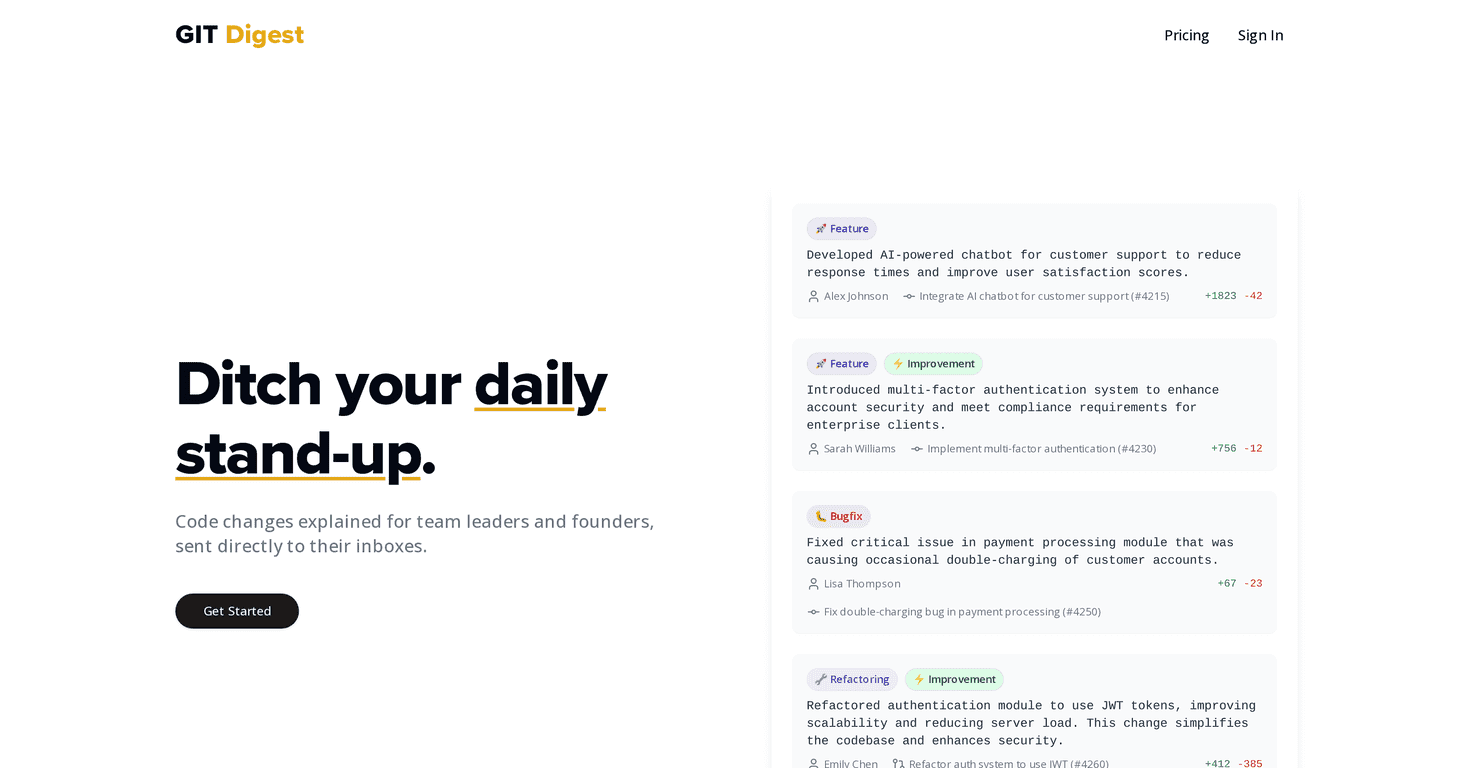
Git Digest is built for teams who want a steady stream of project updates without everyone digging through Git logs. The core idea is simple: it generates AI-powered summaries of code changes and sends them out as email digests. That means fewer “Can you share the diff?” messages and fewer days where people miss important work.
What I noticed right away is that this kind of tool works best when your team already has decent commit/PR habits. If commit messages are vague (“stuff”, “fix”), the digest will have less to work with. If your team is relatively consistent—clear titles, meaningful PR descriptions—then the digest becomes genuinely useful as a quick status check.
Also, the multi-user organization angle is a big deal. Instead of relying on one person to forward updates, you can get the same digest context to multiple stakeholders. That’s especially helpful for founders, product managers, and lead engineers who don’t want to live in the repo all day.
Key Features
- AI-powered code summaries — It turns commits/changes into readable explanations so people can scan what matters instead of hunting through history.
- Email digests — Updates arrive in your inbox on a regular cadence (so you’re not relying on someone remembering to post in Slack).
- Multi-user organization accounts — Your team can share the same update stream without duplicating effort or creating “who got the message?” chaos.
- Code safety and privacy focus — The service is positioned around not storing user code, which is the kind of reassurance teams ask about early.
Pros and Cons
Pros
- Less meeting fatigue: When digests are good, you can cut down on daily stand-ups for status-only updates. I still think you need live meetings for decisions, but “FYI” updates become way easier.
- Faster onboarding for non-engineers: Product and leadership can catch up in minutes. Instead of “What did you change?” you get a digest that points to the gist.
- Shared context across the team: Multiple users seeing the same digest reduces miscommunication. Fewer “I didn’t know that shipped” moments.
- Privacy-minded approach: The “no code stored” positioning is a strong selling point for teams that worry about compliance or internal IP.
Cons
- It won’t replace nuanced discussions: If you need deep technical reasoning, tradeoffs, or debate, an email digest can’t capture that. It’s a summary, not a design doc.
- Summary quality depends on inputs: If PRs are poorly written or changes are messy, the digest can sound generic or miss the “why”. In my experience, AI tools are only as good as the context you feed them.
Pricing Plans
For detailed pricing, check the Git Digest pricing page here: https://gitdigest.ai/pricing. I’m not listing numbers in this review because the page may change, and I don’t want you relying on outdated info.
If you’re evaluating cost, here’s what I’d compare against the plan options: how many repos you can digest, how many users get included, and whether the digest cadence (daily/weekly) fits how your team actually ships. Those small details can make the difference between “worth it” and “we’re paying but nobody reads it.”
Wrap up
Overall, Git Digest feels like a practical way to keep teams aligned when code changes move fast. The biggest win is turning Git activity into something people can actually read—especially when you’re trying to reduce status meetings and keep leadership in the loop. Just don’t expect it to replace real technical conversations, and make sure your team’s PR/commit hygiene is decent so the summaries stay meaningful.
Promote Git Digest




