Table of Contents
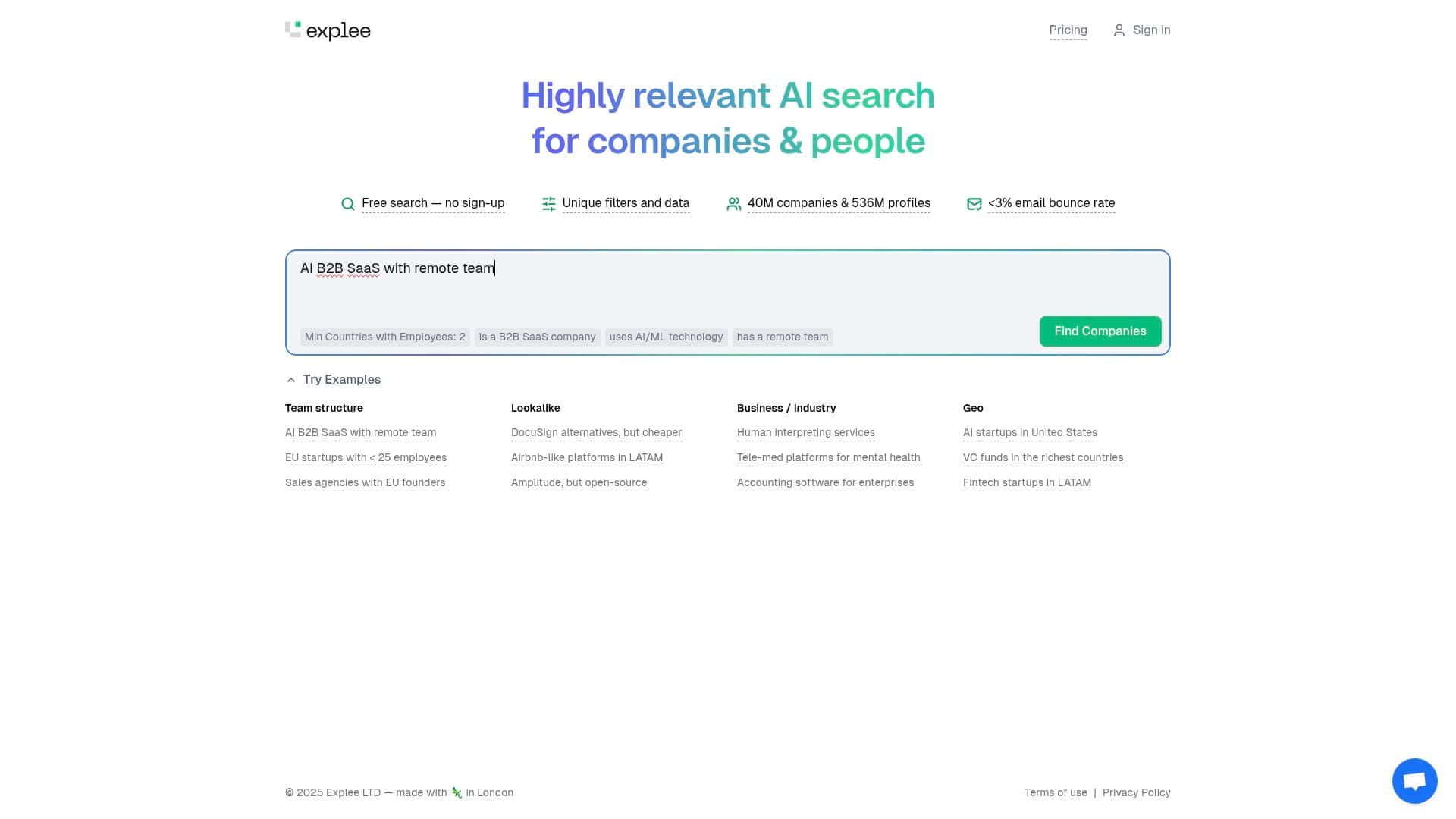
If you’re trying to find business leads that actually match what you’re looking for (instead of endless “maybe” contacts), Explee is worth a look. The pitch is simple: use semantic search so you can describe what you want in plain language, and the results should come back more relevant than keyword-only searching.
In practice, that’s exactly the problem I wanted to test. I’m used to lead tools where you end up rewriting the same query 10 different ways just to get a decent list. So I spent time in Explee trying to pull leads based on intent—industry, location, company size, and the kind of role I cared about—then checked whether the “AI suggestions” actually improved relevance or just made the interface feel smarter.
Explee Review
What I tested (and what I was looking for)
I didn’t just click around. I tried to replicate a real lead discovery workflow: start broad enough to get options, then tighten the results until I’d feel comfortable exporting a shortlist for outreach.
Here’s the “intent” I used while testing:
- I wanted specific industries (not just generic company names).
- I wanted clear geo targeting (so results weren’t scattered across everywhere).
- I wanted company size ranges that match how sales teams actually prospect.
- And I wanted to see whether Explee’s semantic search and AI-powered suggestions improved relevance without me constantly rewriting queries.
Database size: the first thing you’ll notice
Explee claims access to 40 million companies and over 536 million profiles. Even without running a huge batch of tests, you can feel what “big database” means—results show up quickly, and you’re not stuck staring at “0 matches” after you specify something like a niche region or company size.
Semantic search + AI suggestions: did it actually help?
In my experience, this is where Explee is either genuinely useful or just a fancy interface. The key is whether the AI suggestions change the results in a meaningful way.
Example 1: I started with a plain-language query
I entered a search request that was closer to how a person would describe a target than how a database query works. Then I watched what the AI suggestions offered and what happened when I applied them.
What I noticed:
- The suggestions didn’t just repeat my keywords. They nudged the search toward the types of companies and roles that fit the intent.
- When I selected a suggestion, the results became more consistent with the “who” and “where” I was aiming for.
- Instead of the usual “keyword mismatch” problem, I saw fewer irrelevant entries after using the suggestions.
Example 2: I tightened filters after the semantic search
Semantic search got me into the right universe. Filters are what made it usable for outreach.
What I did:
- Ran the search to get an initial set of leads.
- Used the available filtering options to narrow by industry, region, and company size.
- Checked whether the results stayed relevant or “drifted” away from my intent.
In my test, the filters worked in a way that felt additive (like refining, not resetting). That matters—because if filters fight the semantic layer, you end up doing double work.
Filters: detailed, but not always “instantly obvious”
Explee’s filters are described as detailed, and I agree. You can narrow down results pretty aggressively. Still, I’ll be honest: if you’re new to lead research tools, you might need a minute to figure out which filters actually matter for your outreach.
For me, the quickest wins were:
- Setting a clear location/region early (otherwise you waste time scanning).
- Using company size to avoid lists packed with teams that don’t match your offer.
- Keeping the industry filter aligned with the problem you’re trying to solve.
Free search access: good for sampling
Explee includes a free search option with no sign-up required to start. That’s a practical advantage. I used it to validate whether the results felt relevant before worrying about upgrades.
One limitation I hit: the free experience is great for discovery, but it doesn’t necessarily tell you everything you need for a full outreach workflow (more on that in the pricing section).
Key Features
- Free Search: No sign-up required to get started
- Unique Filters and Data: Detailed options for refined searches (industry, region, company size, and more)
- Extensive Database: Access to 40 million companies and 536 million profiles
- AI-Powered Suggestions: Helps refine results based on how you describe your target
- Email deliverability claim: “Low Email Bounce Rate: Less than 3%” is listed as a feature, but I didn’t see a public methodology or third-party verification in the material I reviewed
Pros and Cons
Pros
- Fast to try: The free search makes it easy to test relevance before committing.
- Semantic search feels practical: It helps you get closer to the right target without constantly rewording keywords.
- Filters are strong: When you know what you’re looking for, you can tighten results quickly.
- AI suggestions can improve relevance: In my testing, applying suggestions reduced obvious mismatches after the initial search.
- Huge coverage: The scale (40M companies / 536M profiles) shows up as more variety in results.
Cons
- Pricing for premium features isn’t transparent: If you’re budgeting, you’ll likely need to contact them to understand costs.
- Free vs paid capabilities aren’t clearly mapped: I couldn’t confirm what you get in upgrades (exports, credits, limits, integrations, etc.) from public info alone.
- Learning curve for “best filters”: The filters are detailed, but figuring out which ones matter most takes a bit of trial and error.
- Deliverability metric needs sourcing: The “less than 3% bounce rate” claim is attractive, but I didn’t find methodology or verification in what was provided.
Pricing Plans
Explee offers a free search option, which is helpful for testing fit. But premium pricing details (plan tiers, limits, and feature differences) aren’t clearly listed publicly.
If you’re evaluating Explee for sales or marketing, this is the part you shouldn’t skip. Before you commit, I’d ask them directly:
- How pricing is structured (monthly/annual, per-seat, or usage-based)
- Whether there are export limits (CSV limits, number of leads per export, etc.)
- Whether there are search/credit limits on paid plans
- What’s included for email-related features (if any)
- Whether there are integrations (CRM sync, Zapier/Make, outreach tools, etc.)
Because without those specifics, it’s hard to compare Explee fairly to alternatives—especially if your workflow depends on exporting clean lead lists consistently.
What I’d recommend if you try Explee
- Start with one real target: Don’t test with vague ideas. Use a specific industry + location + company size so you can judge relevance quickly.
- Use AI suggestions, then verify: Apply a suggestion, then scan a handful of results to confirm the matches are genuinely on-target.
- Filter early: If location or company size is a must-have, set it before you get too deep.
- Track what changes: If you can, note how many results feel “usable” before and after suggestions/filters. That’s the fastest way to see if it’s saving you time.
Wrap up
Explee is a solid semantic search option for lead discovery—especially if you want to move faster than keyword-only tools. The free search makes it easy to test relevance, and the combination of semantic search, AI suggestions, and detailed filters is where the value shows up.
The main thing holding it back for me is the lack of clear public pricing and plan details. If you’re serious about outreach workflows (exports, limits, deliverability expectations), you’ll want to confirm what paid features actually include before you decide.


