Table of Contents
I’ve rewritten the same email way too many times—fixing one sentence, then realizing the tone is off in the next. That’s why I ended up testing editGPT. It’s an AI writing assistant that focuses on proofreading and editing, and what I liked most is that it doesn’t just spit out a “final answer.” It helps you improve what you already wrote.
In my experience, the biggest win is speed. You paste text, and you get suggestions right away—grammar fixes, clearer wording, and style tweaks. I also noticed the interface is pretty straightforward. If you’re not super techy, you still won’t feel lost. And yes, it supports multiple languages (so it’s not just for English-only writers).
editGPT Review: Does It Actually Improve Your Writing?
Let me be honest: I’m picky about edits. I don’t want a tool that “rewrites” everything into something generic. What I noticed with editGPT is that it’s built around editing your existing text—proofreading, tightening sentences, and suggesting better phrasing where it counts.
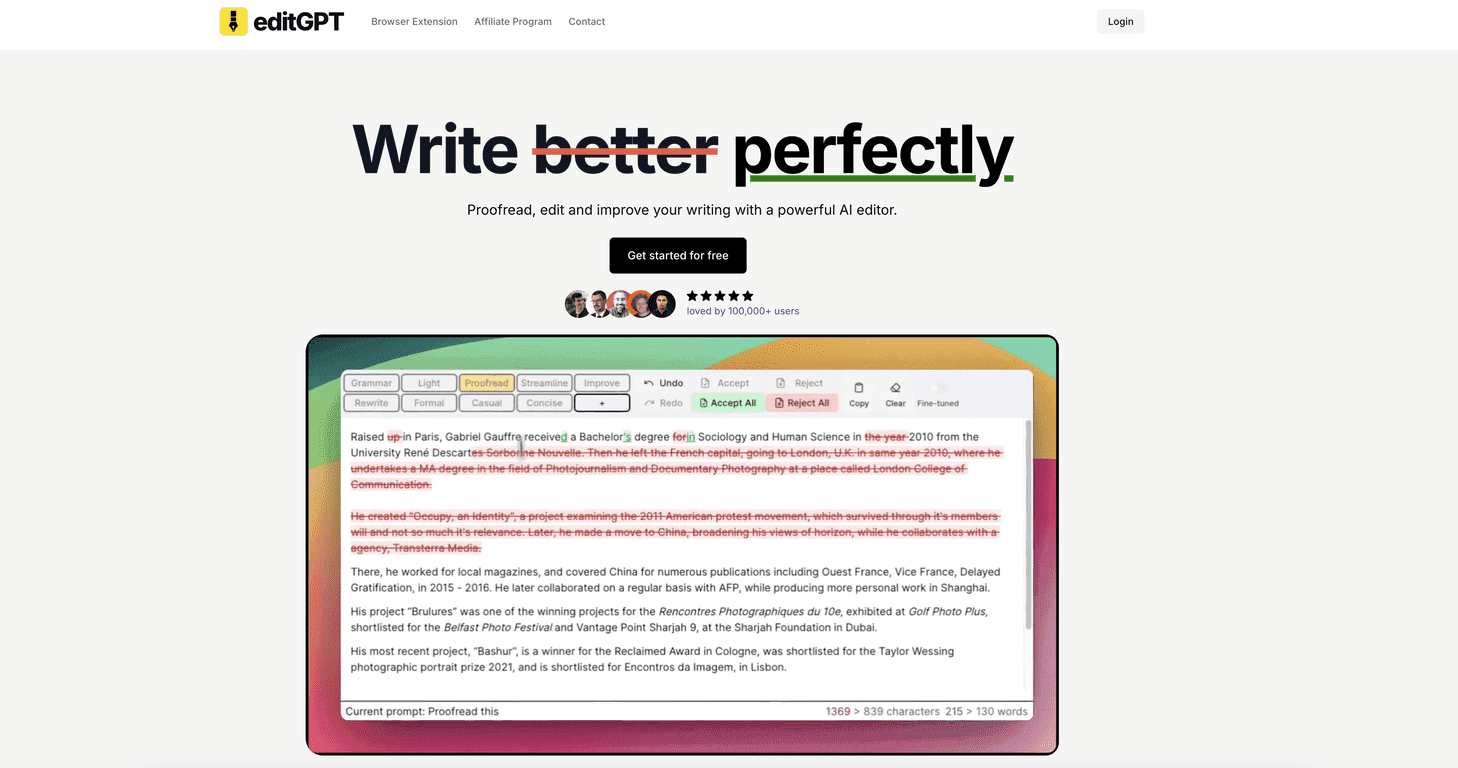
As I worked through a few drafts (a short email, a work update, and a longer paragraph), the suggestions felt practical. The app highlights issues and offers changes you can apply, which is way more useful than getting one big rewrite you have to compare line-by-line.
It’s also the kind of tool you can use casually. You don’t need to know grammar rules perfectly to benefit. Still, if you do care about tone—professional, friendly, firm, etc.—it gives you options to steer the edits.
Key Features I Tested (and What They’re Good For)
- Proofreading & Editing — grammar and style corrections that help clean up the stuff you don’t always catch on a reread.
- Multi-language Support — automatic detection for 80+ languages. When I switched languages, it didn’t feel like I had to “set it up” every time.
- Custom Prompting — you can nudge the editing style/tonality. This is useful when you want the same message but with a different vibe.
- Project Management — better for longer content and multiple revisions. I can see this being handy for blog drafts, reports, and documents with iterative changes.
- Microsoft Word Integration — import/export while preserving changes. If you already live in Word, this matters more than people think.
- Real-time Suggestions Panel — tips show up while you write, which cuts down the “save → review → repeat” cycle.
- Rich Text Formatting — keeps formatting like bold and italics. That’s a small detail, but it saves time when you’re working on formatted docs.
- Privacy-focused approach — the tool is positioned to keep your data private. I always recommend you still review privacy settings, but it’s a good sign.
Pros and Cons (Straight From My Use)
Pros
- Easy to use — I didn’t have to watch a tutorial to get started.
- Free plan is actually usable — good for casual editing and quick proofreading.
- Updates seem consistent — the product feels like it’s being improved, not abandoned.
- Large user base — editGPT claims 100,000+ users, which usually means fewer “orphaned” features.
- Pricing is straightforward — plans are easy to understand, and the tiers match different writing volumes.
Cons
- Free plan word limit — it’s limited to 10,000 words/month. If you write a lot, you’ll hit it fast.
- Advanced features are paid — some of the deeper tools only show up on Pro/Elite.
- AI suggestions aren’t always “perfect” — in a couple cases, the wording got a little too formal or changed the meaning slightly. I still accepted the edits that improved clarity, and rejected the ones that sounded off.
Pricing Plans: What You Get at Each Level
Here’s the breakdown as I understand it:
- Free Plan — $0/month: 10,000 words/month with basic features.
- Pro Plan — $10/month (discounted from $15): 200,000 words/month. This is where it starts to make sense for long-form editing.
- Elite Plan — $25/month (discounted from $30): 1,000,000 words/month, plus batch editing and advanced features.
I also like that existing customers won’t see price increases, and subscriptions can be canceled any time. That’s the kind of policy I prefer—no surprise “gotchas” later.
Wrap up
If you want a writing assistant that focuses on proofreading and real edits (not just rewriting for the sake of it), editGPT is worth trying. It’s especially helpful when you’re polishing emails, refining blog paragraphs, or cleaning up documents in Word. Just remember: like any AI tool, you should still review the suggestions—sometimes it’ll improve clarity, and sometimes it’ll nudge your tone a bit too far.
If you’re looking for better writing without spending hours manually hunting grammar and style issues, give editGPT a shot. I think you’ll notice the difference pretty quickly.
Promote editGPT



