LIFETIME DEAL — LIMITED TIME
Get Lifetime AccessLimited-time — price increases soon ⏳
AI Tools

EchoTalent Review – Discover Your Dream Job Faster

Updated: April 20, 2026
7 min read
#Ai tool#jobsearch

Table of Contents

I’ve spent more nights than I’d like to admit tweaking my resume at 1 a.m., only to submit it to yet another job that clearly never looked at it. That’s why I tried EchoTalent—to see if AI could actually make the job search feel less chaotic and more targeted.

Echotalent

Table of Contents

EchoTalent Review: What I Actually Did (and What I Notice)

First thing: EchoTalent doesn’t feel like one of those “AI platforms” that’s all hype and no flow. The setup is pretty straightforward, and I like that you’re not forced to be a tech person to get results.

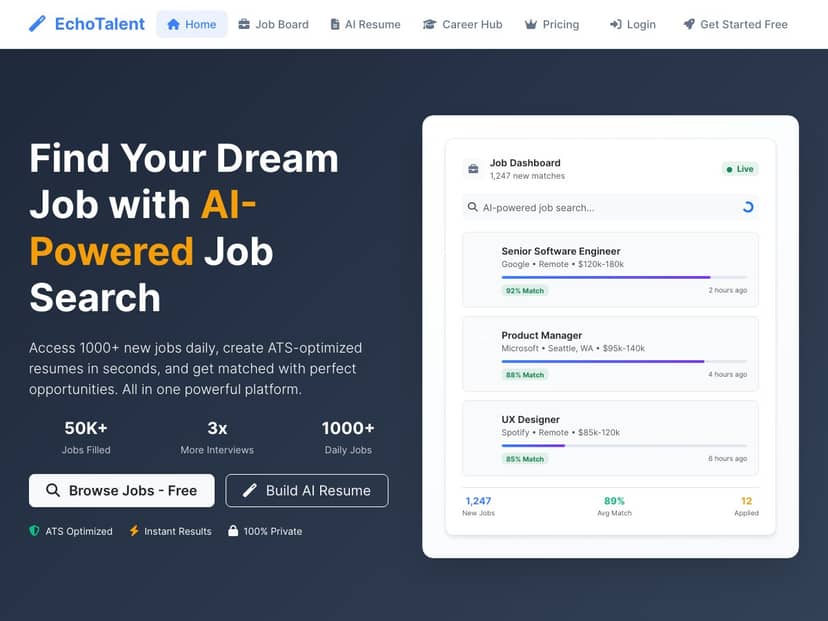
My test setup (so you can judge the claims): I signed up and added my resume plus my LinkedIn profile. The goal was simple—get job matches that felt relevant, generate an ATS-friendly resume version, and see if the platform’s job feed actually stays fresh.

Step 1: Upload resume + connect LinkedIn
In my case, the upload process was quick. Once my documents were in, the AI started pulling together an overview of my skills and experience. What I noticed is that it didn’t just spit out generic “you’re a great fit” messaging—it tried to align what I had with roles in the feed.

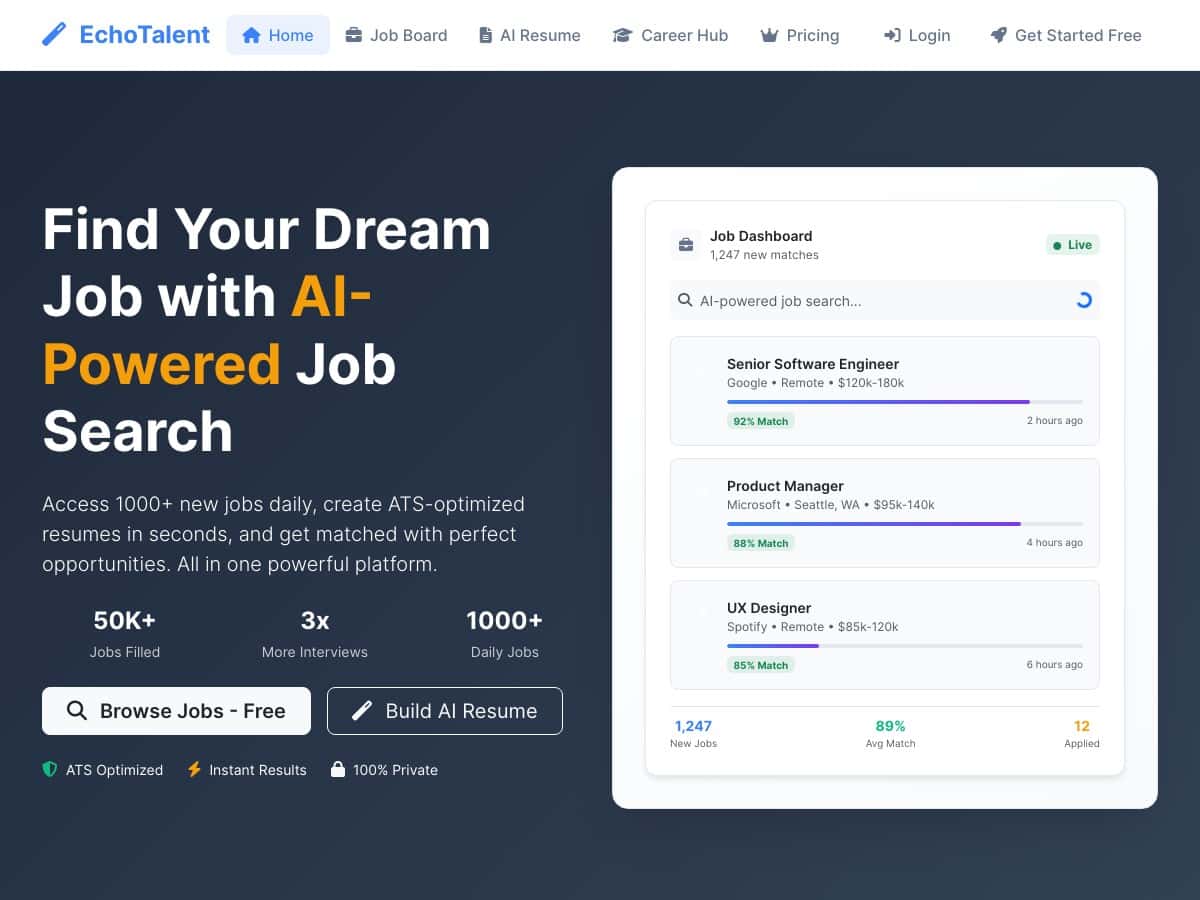
Step 2: Check the Smart Job Board feed
The job board is the heart of the experience. EchoTalent shows a large set of listings and claims these are filtered for relevance. I found the feed helpful because it reduced the time I usually spend scrolling through roles that are clearly off-target.

Step 3: Use the AI Resume Builder for specific applications
This is where I paid attention. I generated an ATS-optimized resume version and then compared it to what I’d normally submit (my “standard” resume). The main difference I noticed was formatting consistency—clean headings, less weird spacing, and a structure that looks like it would survive ATS parsing.

Step 4: Track applications and follow up
I also used the application tracking area to monitor where I was in the process. The follow-up reminders were one of those “small but real” features. If you’ve ever lost track of which company you applied to two weeks ago, you know why that matters.

What I liked most: EchoTalent made the workflow feel tighter. Instead of jumping between random tabs (job board here, resume tweaks there, spreadsheet somewhere else), it kept the process in one place.

One honest limitation: AI can’t replace your judgment. Even when the resume output looks ATS-friendly, you still have to make sure the content is accurate to your actual experience. I wouldn’t submit everything blindly—quick review is still necessary.

Echotalent

Key Features (How They Work in Practice)

  • Smart Job Board (daily listings + relevance filtering)
    What it does: EchoTalent pulls in a large number of roles and filters them based on your profile.
    What you need to use it: a resume and/or LinkedIn info so the AI has something to match against.
    What I noticed: the feed felt more focused than typical “browse everything” job sites. I could spend less time rejecting obvious mismatches.
  • AI Resume Builder (ATS-optimized output)
    What it does: generates resume versions intended for ATS readability and tailored phrasing.
    What you need: your base resume and the job you’re targeting (so it can adapt the content).
    Example of what to expect: cleaner section structure and job-relevant wording. I didn’t see “magic” in the sense of inventing experience—more like it reorganized and rewrote to better match the application.
  • Perfect Job Matching (fit based on skills + experience)
    What it does: it tries to rank roles based on how your background lines up.
    What I noticed: matching was most useful when I was applying to roles close to my actual background. If I went too far outside my lane, the recommendations got less convincing.
  • Application Tracking (ongoing pipeline + reminders)
    What it does: keeps your active applications organized and nudges you to follow up.
    Why it matters: job searching is messy. Anything that prevents “Did I apply to that already?” is a win.
  • Real-time Job Activity Feed
    What it does: shows activity happening on the platform.
    My take: it’s helpful for staying aware of what’s going on, but I wouldn’t rely on it alone as your main system—use it alongside your own notes.
  • LinkedIn Post Enhancement
    What it does: helps craft posts for your professional network.
    What to test: try it with one role you’re targeting and see if the tone matches your voice. In my experience, you’ll still want to edit for authenticity.
  • Career Path Mapping
    What it does: visualizes potential next steps and highlights skill gaps.
    How I used it: I treated it like a planning tool, not a guarantee. If it suggests a gap, that’s a useful prompt for what to learn next.
  • Easy sign-up + free basic access
    What it does: lets you start without committing immediately.
    Practical tip: use the free tier to run a small “before/after” test—generate one tailored resume version and apply to 3 roles you genuinely want. Then compare how relevant the matches feel.

Pros and Cons (Test-Based, Not Just Marketing)

Pros

  • Cleaner ATS-friendly formatting: the resume output looked more structured than my usual drafts, with fewer formatting issues that can trip up ATS systems.
  • Faster job discovery: the relevance filtering meant I spent less time weeding out roles that didn’t match my background.
  • Better follow-through: application tracking and reminders helped me stay organized instead of relying on memory.
  • Useful extra tools: career mapping and LinkedIn post help are genuinely practical if you’re active on networking.

Cons

  • Not everything is available for free: advanced features appear to be part of premium plans, so you may hit limits depending on how aggressive your application volume is.
  • AI still needs your review: you can’t treat the generated resume as “submit-ready” without checking accuracy and wording.
  • Best fit for experienced candidates: the matching and resume tailoring felt strongest when my background was clear and consistent. If you’re brand new to the field, you may need to do extra work to make your profile detailed enough for strong matches.

Pricing Plans (What I Could Confirm)

I can’t reliably quote exact plan names and feature differences from inside the product UI without pulling the live pricing page at the time of writing. What I can say from the information provided here is that EchoTalent has a free tier and premium options.

What the post claims about pricing: premium pricing “varies depending on the plan,” with some options “around $12.93 per month.”

Important note: prices can change. If you want to be sure you’re seeing the same numbers I saw, check the official pricing page linked from the signup flow on EchoTalent before committing.

Decision tip before you pay: try the free plan long enough to do this quick experiment: generate 1 tailored resume, apply to 3 roles you’re genuinely qualified for, and rate each match yourself (e.g., “high / medium / low relevance”). If the relevance is consistently high, premium is more likely to be worth it.

Wrap-Up: Should You Try EchoTalent?

EchoTalent works best when you want a more guided job search—matching plus resume tailoring plus tracking in one place. If you’re the type who’s already applying seriously and you want to cut down the time spent rewriting and reformatting, it’s a solid option to test.

Just don’t expect AI to do the final thinking for you. I’d still review the resume output carefully and make sure your experience reads like you. If that’s something you’re willing to do, EchoTalent can make the process feel a lot less stressful—and a lot more organized.

Stefan

Stefan

Stefan is the founder of Automateed. A content creator at heart, swimming through SAAS waters, and trying to make new AI apps available to fellow entrepreneurs.

Related Posts

chine meilleure imprimante featured image

Chine Meilleure Imprimante : Guide 2026 des Fournisseurs et Technologies

Découvrez la meilleure imprimante chinoise en 2026 : types, fournisseurs, technologies, prix et conseils pour choisir la solution adaptée à vos besoins. Lisez notre guide complet !

Stefan
is lisa crowne a real person featured image

Is Lisa Crowne a Real Person? Uncovering the Truth About Daisy Jones & The Six

Discover whether Lisa Crowne is a real person or fictional character from Daisy Jones & The Six. Get expert insights, episode details, and practical tips.

Stefan
are quotes public domain featured image

Are Quotes Public Domain: Complete Guide

Learn everything about are quotes public domain. Complete guide with practical examples, expert tips, and actionable strategies.

Stefan

Create Your AI Book in 10 Minutes