Table of Contents
If you’re juggling clients, tasks, follow-ups, and the usual “wait, what was the last update?” moments, you already know how quickly everything gets messy. ClienTask caught my eye because it’s positioned as a simple client management + task tool. So I spent some time testing it—real workflows, not just clicking around—and here’s what I noticed.
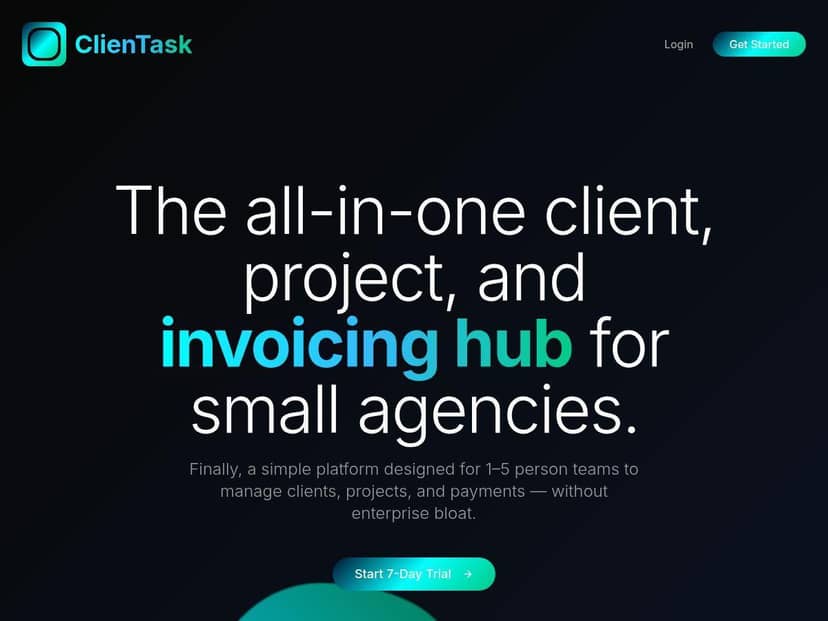
ClienTask Review
I tested ClienTask over a couple of sessions (about a week of on-and-off use). My goal was simple: can I create a client, keep contacts organized, assign tasks, and actually track progress without hunting through screens?
Here’s the workflow I ran:
- Created two client profiles and added a couple of contacts under each one.
- Set up tasks for each client (roughly 3–5 tasks per client), then assigned them to the right person.
- Used task status changes as I went (for example, moving items forward as if I were waiting on approvals vs. actively working).
- Checked the reporting/analytics area to see what it surfaces and whether it’s actually useful or just “nice to have.”
In my experience, the UI is the strongest part. It’s clean and pretty hard to get lost in. Once you’re inside a client profile, it’s straightforward to add items and keep context. The onboarding also felt smooth—at least enough that I could set up my test client data without needing a “how does this work?” tutorial.
But I’ll be honest: I ran into a problem that matters if you’re evaluating tools for a team. There isn’t enough public detail about the core feature set and how integrations actually work. I don’t want to guess whether something is supported until I’m already committed. I’d really like to see a clearer feature list (and ideally a demo) that spells out what you get, how it behaves, and what’s included in each plan.
So what’s the verdict? If you want something simple for client + task organization and you’re okay verifying the details yourself, ClienTask can be a decent starting point. If you need a mature system with well-documented integrations, reporting depth, and transparent pricing, you’ll likely want to compare more before you decide.
Key Features
Let me break down what I looked for and what I found.
1) Client management (profiles and contacts)
ClienTask organizes work around client profiles, which is exactly what I want when multiple people are involved. I could add contacts and keep the client context attached to tasks. The main win here is that you don’t have to maintain separate spreadsheets for “who’s who” and “what’s next.”
Example use case: I set up one client for “Website Redesign” and another for “Ongoing Marketing.” Each had its own set of contacts and task list, so when I switched context, the information didn’t feel scattered.
2) Task tracking and assignment
Task assignment is the heart of this tool. I was able to create tasks and assign them to people, then come back later and update progress. The interface makes it easy to see what’s in motion vs. what’s still pending.
Example use case: For one client, I created tasks like “Kickoff call notes,” “First draft,” and “Client review.” As I moved through the process, I could keep everything tied to that client instead of losing track in a general project board.
3) Status, organization, and templates (what I could verify)
ClienTask supports task statuses and a clean way to keep tasks organized. One thing I’d like to see more clearly documented is whether there are task templates (or reusable workflows) and how granular permissions are if you’re working with a team.
What I noticed: It’s easy to set up tasks manually. If you’re hoping for “set it once and reuse the same workflow every time,” you’ll want to confirm whether templates and automation are available before you commit.
4) Reporting and analytics dashboard
The analytics area is there, and it’s meant to help you understand engagement/progress. In my test, I could see enough to know it’s not completely empty—but I didn’t see the kind of deep, filterable reporting I personally expect from more established tools.
What I looked for in reports:
- Task counts by status (e.g., Open / In Progress / Done)
- Progress per client (so you can spot who’s stuck)
- Date-based views (what was updated this week vs last month)
If you’re evaluating ClienTask for reporting-heavy work (agency account management, recurring client cycles, or anything with weekly KPI reviews), I’d treat the analytics as “promising” until you confirm the exact reports and filters.
5) Integrations (what’s unclear and what to verify)
ClienTask mentions integrations, but the public info I found didn’t give me a confident list of tools or explain setup steps. In a perfect world, I’d expect clarity like: “Native integration with X, Y, Z,” plus a short guide for connecting accounts.
Here’s what you should specifically verify before choosing:
- Which integrations are native vs. available through a third party (like Zapier-style connectors)
- Whether two-way sync exists (e.g., tasks created in ClienTask show up in your calendar, and updates flow back)
- Limitations (rate limits, which fields sync, how attachments are handled)
If you rely on tools like Google Calendar, Slack, HubSpot, or Zapier, don’t assume they’re covered—ask for the exact integration list and a quick demo of the setup.
Pros and Cons
Pros
- Easy, friendly interface—I didn’t feel like I was fighting the UI to do basic tasks.
- Client-first organization—profiles and tasks stay connected, which reduces “where did I put that?” moments.
- Task assignment is straightforward—good for solo users and small teams that need visibility.
- Analytics exist—useful as a starting point if you want basic progress visibility.
Cons
- Feature details aren’t clearly documented publicly—I had to “figure it out” more than I’d like.
- Integrations aren’t specific enough—you’ll want an exact list and real setup examples.
- Reporting depth may be limited (at least based on what’s easy to confirm from available info).
- Support/update transparency isn’t obvious—if you’re running client work, that matters.
Pricing Plans
Here’s the part that slowed me down: pricing details aren’t clearly posted. I didn’t see a public pricing page with tiers and costs. So instead of guessing, I recommend treating pricing as a “confirm during demo” item.
In terms of what to expect from similar client/task management tools, many tiered offerings typically price based on users and feature level. You might see anything from a low monthly cost for small setups to much higher pricing for teams and advanced features—but I wouldn’t use a rough range as your decision maker here since ClienTask’s actual structure isn’t confirmed publicly.
What to request (specific checklist):
- Pricing for your expected # of users
- Whether integrations are included in the base plan or only on higher tiers
- Data export options (CSV, API, or full backups)
- Support details (email vs chat, onboarding help, response times/SLA)
- A short walkthrough of the analytics reports and what filters are available
- Confirmed integration list (names + setup steps)
Quick email/script you can copy:
Hi ClienTask team—I'm evaluating your client management + task tool. Can you share: (1) current pricing tiers and what’s included per tier, (2) the exact integration list (native vs third-party) and a couple of setup examples, (3) what reporting/analytics reports are available and what filters exist, and (4) data export options (CSV/API) plus onboarding/support details? Thanks!
Wrap up
ClienTask feels like a solid, simple option for client and task organization—especially if you like clean screens and straightforward workflows. My main hesitation is the lack of public, verifiable detail: integrations, deeper reporting, and pricing aren’t transparent enough for me to confidently recommend it without a demo.
If you’re a freelancer or a small team and you want something easy to get running quickly, it’s worth a look. Just make sure you ask the questions above so you’re not paying for surprises later.