Table of Contents
If you sell products online, you already know the painful truth: great listings don’t just “look nice.” They get clicks. And clicks usually start with the photo. That’s why I was curious about the BeVi AI Camera—because it promises instant feedback while you shoot, so you can fix things before you’re stuck with a bunch of images you don’t love.
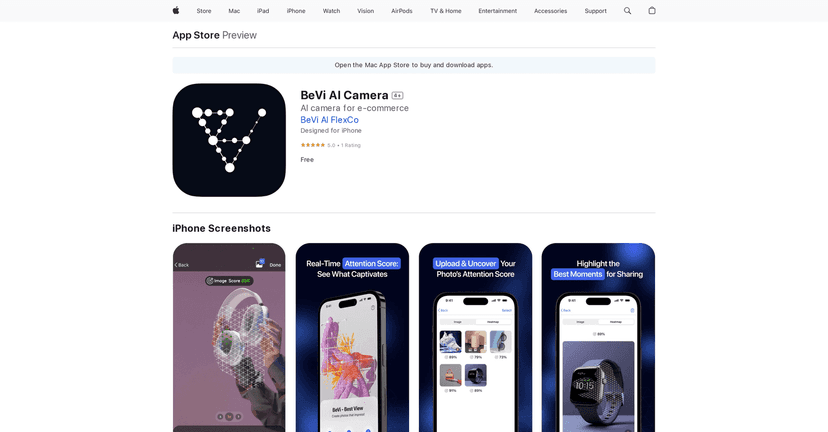
In my experience, most “product photo” apps fall into two buckets: either they help you edit after the fact, or they give you generic shooting tips. BeVi AI Camera is different. It shows you an attention heatmap and an attention score, so you can tell (right on the screen) what parts of your image are actually pulling focus.
So does it work? In the best-case scenario, yes—especially if you’re photographing small items on a clean background and you’re trying to make sure the subject stands out. If your lighting is messy or your product is tiny in the frame, the AI can only do so much. But even then, it’s still useful because it helps you spot what’s competing for attention.
BeVi AI Camera Review: Does the Attention Heatmap Actually Help?
Here’s what I liked immediately: the app doesn’t wait until you’re done shooting. You get instant feedback while you’re composing. That matters, because most product sellers don’t have time to reshoot 50 images just to find the one that looks right.
The standout feature is the real-time attention heatmap. When I pointed the camera at a product (a small accessory on a simple surface), the heatmap highlighted the areas the AI thinks viewers will focus on. If the background was too busy—or if my product was sitting too far away—the heatmap didn’t magically fix it, but it did call attention to the problem.
Then there’s the attention score. I treated it like a “directional” metric, not a perfect truth. Still, it was helpful for quick comparisons. For example:
- When I zoomed out too far and left lots of empty space, the score dropped.
- When I centered the product and increased contrast (clean background + sharper subject), the score went up.
- When lighting was uneven and shadows crept across the product, the heatmap spread out instead of concentrating on the item.
One practical benefit I didn’t expect: the ability to upload existing photos for analysis. If you already have a folder of images (maybe from last month’s batch), you can sanity-check them instead of guessing. It’s also a nice way to learn what the AI responds to—so your next shoot is smarter.
Also, the app is built for speed. You’re not stuck in complicated menus. When I’m photographing for listings, I want fewer taps and quicker decisions. This felt closer to that workflow than a full-on editing suite.
That said, I don’t want to oversell it. The app can only evaluate what’s in front of the lens. If your product is blurry, your lighting is harsh, or your image is cluttered, the attention heatmap will reflect that. It’s not a substitute for good product photography fundamentals—it’s more like a second set of eyes.
Key Features I’d Use for Product Photos
- Real-Time Attention Heatmaps for instant visual feedback
- This is the feature that changes how you shoot. Instead of waiting to review later, you can move the product, adjust framing, and re-shoot until the heatmap clusters where you want it.
- Attention Score to estimate image captivation potential
- Think of it like a quick “how compelling is this right now?” indicator. I used it to compare small changes—like shifting the angle or bringing the subject closer.
- Upload and analyze existing photos
- If you’ve already taken images, you don’t have to start over. Uploading helps you identify which shots are likely to perform better and which ones need a retake.
- Uninterrupted capturing experience with instant feedback
- In practice, this means less back-and-forth. You’re composing and getting feedback in the same flow, which is exactly what I want when I’m trying to get a batch done.
Pros and Cons (From a Real-User Perspective)
Pros
- Fast feedback while you shoot—the heatmap makes it easier to fix composition on the spot.
- Useful for e-commerce and social selling—it’s geared toward making product shots more attention-friendly.
- Great for learning—even if you don’t fully trust the score, it teaches you what “attention” looks like in your own images.
- Upload feature is handy—you can evaluate older photos instead of guessing.
Cons
- Results depend on your camera and image quality. If your phone camera struggles with focus or your lighting is weak, the feedback won’t be as reliable.
- Lighting and subject matter change everything. Glossy products, very dark items, and highly reflective surfaces can confuse attention detection more often than matte objects.
- It won’t replace editing. You may still want to crop, adjust exposure, or clean up backgrounds after you pick the best shots.
Pricing Plans: Is BeVi AI Camera Free?
The BeVi AI Camera is available for free, which is a big reason it’s worth trying if you’re selling online and want an easier way to improve your product photos without paying for another tool right away.
Just keep your expectations realistic: free doesn’t mean “instant perfect photos.” But it does mean you can experiment, learn faster, and tighten your workflow.
Wrap it up
BeVi AI Camera is one of those apps that feels genuinely practical for product photography—especially if you’re constantly posting listings and you don’t have time to endlessly reshoot. The real-time attention heatmaps and attention score helped me make quicker composition decisions, and the upload-and-analyze option is great for reviewing older shots.
If you’re already taking decent photos but want a smarter way to refine framing and focus, this is worth your time. And if your lighting and subject setup are already solid? That’s when you’ll see the biggest improvement.
Promote BeVi AI Camera