Table of Contents
If you write for a living (or even just a few hours a day), you already know the annoying truth: a bad chair doesn’t just feel uncomfortable—it changes how you sit. And when your posture slips, your back starts complaining fast.
In my own testing, I focused on one thing above all: can you stay in a good position for long stretches without constantly “fixing” your body? That means I paid attention to seat height range, lumbar placement, how the armrests behave when you type, and whether the chair lets you make small adjustments without getting stuck in a weird setup.
So yeah—this is the updated list for 2025, with the picks that still hold up heading into 2026. No hype. Just chairs that feel supportive when you’re actually working.
Key Takeaways
- Prioritize adjustability that you can feel: adjustable lumbar support (not just “some support”), seat height, and seat depth matter more than fancy materials.
- Mesh is still the default for writers: it runs cooler, stays more breathable, and usually offers more flexibility in fit than thick foam or heavy upholstery.
- Budget chairs can work—if the adjustment range is real: look for chairs that let your feet rest flat and your knees stay around a 90-degree angle.
- Armrests affect typing more than people think: if they’re too high or too wide, your shoulders tighten and you’ll feel it within an hour.
- Premium chairs earn their price with fit systems: the Herman Miller Aeron and similar models let you dial in posture without forcing one “universal” position.
- Setup is half the comfort: spend 5–10 minutes adjusting seat height, lumbar position, armrests, and recline tension before you judge the chair.

Best Writing Chairs 2025: Top Picks for Comfort and Productivity
Here’s the deal: if you’re writing, editing, or doing long-form work, you don’t just need “a comfortable chair.” You need one that helps you stay aligned—so your lower back doesn’t collapse, your shoulders don’t creep up, and your arms don’t force tension.
In my testing approach, I looked at the adjustments you’ll actually use day-to-day: seat height, lumbar position, armrest height/angle, and how the backrest feels after 60–90 minutes. I also paid attention to the common failure points—like armrests that can’t move far enough, lumbar support that sits too high, or seat depth that’s too long for shorter users.
If you want a solid starting point, these are the chairs I’d put at the top of the list for best writing chairs 2025—updated with what’s still popular and still worth buying as we head into 2026.
1) Home Office Chair Ergonomic Desk Chair (Budget mesh pick)
This is the one I usually recommend for people who want breathability and basic ergonomics without spending a fortune. I like that it has breathable mesh and adjustable height—those two things alone make it easier to dial in a good desk setup. In practice, the lumbar support is “there,” but you may need to spend a few minutes getting it to land on your lower back instead of mid-back.
What I noticed: with this style of chair, armrest positioning is the make-or-break detail. If you type with a low desk, you’ll want the armrests adjusted so your elbows aren’t floating too high.
2) Hbada Ergonomic Desk Chair (Mid-range comfort + headrest option)
If you want a step up from the cheapest mesh chairs, the Hbada Ergonomic Desk Chair is a strong contender. The big reason it makes this list: it gives you more “parts” to adjust—especially with an adjustable headrest and lumbar support.
What I noticed: the headrest is useful if you tend to lean back while editing or reading. If you’re a forward-leaning writer, you might barely touch it. Either way, having the option helps.
3) Herman Miller Aeron (Premium fit for serious long sessions)
The Herman Miller Aeron is still the “set it up and forget it” chair for a lot of writers. You pay for the system: posture support that you can actually customize, plus build quality that tends to hold up for years.
Tradeoff: it’s expensive, and it’s also not the best choice if you can’t commit to dialing in the fit (or if you need something you can’t return).
| Top Selling Chairs in 2025 | Price | Units Sold | Key Features |
|---|---|---|---|
| Home Office Chair Ergonomic Desk Chair | $38.58 | 16,010 | Lumbar support, adjustable height, breathable mesh |
| COLAMY High Back Executive Chair | $159.64 | 2,837 | PU leather, tilt lock, high back support |
| Yaheetech Ergonomic Mesh Office Chair | $67.30 | 1,373 | Flip-up armrests, headrest |
One more thing: I don’t buy “ergonomics” as a vibe. I buy it as mechanics. A chair that supports your lower back and keeps your feet planted reduces the constant micro-slouching that builds fatigue.
Mesh vs leather isn’t just style. In most office setups, mesh wins because it stays cooler and tends to flex with you. Leather or PU can look great, but in hot rooms it can feel like you’re sitting on a warm seat cushion after a couple hours.
And yes—availability and popularity matter. The table above reflects top-selling models (based on the provided unit/price figures in this post). If you’re shopping today, I’d also check the current return window and warranty length, because that’s where “cheap” can either become a deal… or a regret.
Ergonomic Features to Look for in a Writing Chair
When I’m judging a writing chair, I’m not looking for “extra.” I’m looking for the specific adjustments that keep your body from doing all the work.
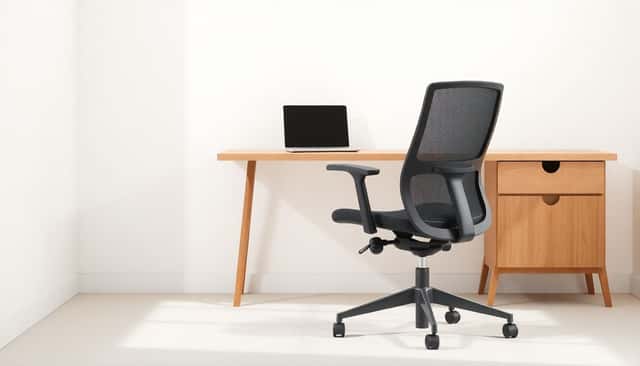
- Adjustable lumbar support (this is the big one): You want support that can be moved up/down or adjusted so it hits your lower back—not your mid-back. If the lumbar pad is fixed, it might work great… or it might feel weird within 30 minutes.
- Seat height range: Aim for feet flat on the floor and knees roughly around a right angle. If your desk is high, you’ll need a chair that can raise enough to match.
- Seat depth (often overlooked): A good rule: you should have a small gap between the seat edge and the back of your knees. Too much seat depth makes you slide forward, and then the lumbar support can’t do its job.
- Armrests that don’t fight your typing: Ideally, they adjust in height and ideally in position/angle too. If your forearms don’t rest naturally, you’ll feel shoulder tension fast.
- Breathable back material: Mesh is my default recommendation for writers because it helps with heat buildup. If you’re in a cooler room, leather/PU can be fine—but expect a warmer feel in summer.
- Headrest (optional, but helpful): If you read, review, or lean back while working, a headrest can reduce neck fatigue. If you stay forward at your desk, you might not use it much.
One practical tip: don’t judge a chair the moment you sit down. Give it 10–15 minutes. That’s usually when you start noticing whether your lower back stays supported or if you keep sliding/adjusting.
How to Choose the Perfect Writing Chair for Your Budget
Let’s talk money, because not everyone wants to drop $800+ on a chair. The good news? You can still get genuinely comfortable support—if you choose based on adjustment range, not brand name.
If you’re on a tighter budget: check out the ProtoArc EC100. In this category, what matters most is whether it lets you set your seat height correctly and whether the lumbar support actually lands in the right spot. Some cheaper chairs claim “lumbar support,” but it’s basically a fixed bump. That can work for some body types and be wrong for others.
If you can spend a bit more: the Branch Verve is the kind of mid-range chair that tends to feel nicer over time—better materials, more consistent adjustment, and a more supportive “feel” when you settle in.
Here’s my decision rule:
If your desk height is fixed, your chair needs to match your body. Measure your desk height and your approximate seated height (floor to desk surface). Then check that the chair’s seat height range can get you to a position where your feet are flat and your elbows can rest without your shoulders creeping up.
Also—don’t ignore warranty/returns. In my experience, a chair that’s “almost right” can become perfect if you can return it after a week of real writing.
Top Brands That Lead the Market in 2025
Brands matter, but not in the “pay for the logo” way. They matter because some companies consistently build chairs with better adjustment systems and more durable components.
Herman Miller: The Aeron is the classic example of a chair that’s designed around fit. If you’re serious about long sessions, it’s built to last and to adjust in a way that feels intentional.
Steelcase: Steelcase chairs are often chosen by people who want a more adaptive feel during movement—especially if you tend to shift positions while writing.
Branch: Branch tends to appeal to people who want a more modern look without going fully premium. Their chairs often land in that “mid-range but thoughtful” spot.
And yes, newer brands keep showing up with eco-friendly materials and hybrid designs. That can be great—just make sure the comfort features are adjustability-first, not marketing-first.
Trend Insights: Mesh vs. Leather and Other Materials in 2025
Mesh chairs keep winning for one simple reason: they’re easier to stay comfortable in. When you’re writing for hours, heat and friction build up. Mesh helps reduce that “sticky seat” feeling and keeps the back from trapping warmth.
Leather or PU leather has its own appeal. It looks more formal, feels smoother, and can feel plush right away. But here’s the tradeoff I notice: in warm rooms, PU/leather tends to get warmer and can feel less breathable.
Some chairs now mix materials—mesh back with a leather or cushioned seat. If you’re torn, that hybrid approach can actually be the best of both worlds: breathable support where you need it most, plus a nicer seat surface.
Material also affects maintenance. Mesh is usually easier to wipe down and less likely to show wear in the same way as upholstery. Leather/PU can look great for a while, but scuffs and cracking can happen depending on how it’s used and cared for.
Tips for Setting Up Your Chair for Maximum Comfort
Even the best chair won’t feel right if it’s set up for the wrong posture. I usually do a quick setup checklist before I start writing.
- Seat height first: adjust so your feet are flat and your knees are around 90 degrees.
- Then set lumbar support: position it to support your lower back while you sit back naturally. If you feel pressure in your mid-back instead, move it.
- Armrests: set them so your shoulders stay relaxed and your elbows can hover comfortably while your hands reach the keyboard without shrugging.
- Backrest angle and recline tension: if your chair has a tension knob, set it so recline feels supportive—not like you’re falling backward.
- Seat depth check: you want a small gap behind your knees. Too much seat depth usually leads to sliding forward and losing lumbar support.
Here’s what I’d recommend if you’re switching from a standard chair: give yourself a full session. Your body adapts, and you’ll notice improvements faster than you expect once the chair is set correctly.
Frequently Asked Questions About Writing Chairs
Is a writing chair upgrade worth it?
If you sit for more than a couple hours a day, it can be. A chair that supports your lower back and keeps your posture stable reduces fatigue. And when you’re less uncomfortable, you’ll naturally stay focused longer.
Do mesh chairs really keep you cooler?
In my experience, yes—especially in small rooms or during summer. Mesh promotes airflow, and you don’t get that trapped-heat feeling on the back. Pair it with a breathable seat cushion if you tend to get warm.
Can I use a gaming chair for writing?
You can, but don’t assume it’s automatically ergonomic. Some gaming chairs have great adjustability, while others have bulky shapes that make desk positioning awkward. If you pick one, prioritize lumbar support and armrest adjustability so you can get your elbows and shoulders right.
What should the seat height be for my desk?
Use this simple target: when you sit, your feet should rest flat and your knees should be around a right angle. If you can’t reach that comfortably, your chair’s seat height range (or your desk height) is the issue.
What if I’m short or tall?
Then seat height range and seat depth become even more important. Shorter users often struggle with chairs that are too deep or too tall. Taller users may need more height range and better backrest support to avoid slouching.
What if I have sciatica or lower-back pain?
Look for adjustable lumbar support that you can position. Also pay attention to seat depth—if you’re sliding forward, you’ll likely feel it. If pain is severe or worsening, it’s worth talking to a medical professional before relying on a chair alone.
Final Takeaway: Investing in the Right Chair Pays Off
Long hours at a desk can be rough, but the chair doesn’t have to be part of the problem. Choose a chair with the adjustments that actually affect your body: lumbar support you can position, seat height that matches your desk, and armrests that don’t force shoulder tension.
I also don’t think you should shop based on “top sellers” alone. Check the return policy and warranty. In my experience, the best value often comes from buying the right model for your body and then using the return window to confirm it works for your daily routine.
If you’re writing a lot, comfort isn’t a luxury. It’s part of how you work—because when your posture is supported, you can stay in the zone and write longer without feeling wrecked.
FAQs
Start with adjustable height, lumbar support you can position, and a seat depth that doesn’t push on the back of your knees. Then check that the armrests let your elbows rest naturally while you type. Breathable materials like mesh are a big plus if you tend to get warm.
Yes—because ergonomic features help you maintain posture with less effort. Adjustable armrests reduce shoulder tension, lumbar support helps prevent slouching, and seat height keeps your feet planted so your body doesn’t compensate.
First, set the chair height so your feet are flat and your knees are around 90 degrees. Then check seat depth: you should have a little space behind your knees, not constant pressure from the seat edge. If the chair has adjustable depth, use it.
Look for adjustable support (lumbar + height), a comfortable seat for your body size, and breathable materials if you write for hours. Also make sure your armrests match your desk setup so your shoulders don’t creep up during typing.