Table of Contents
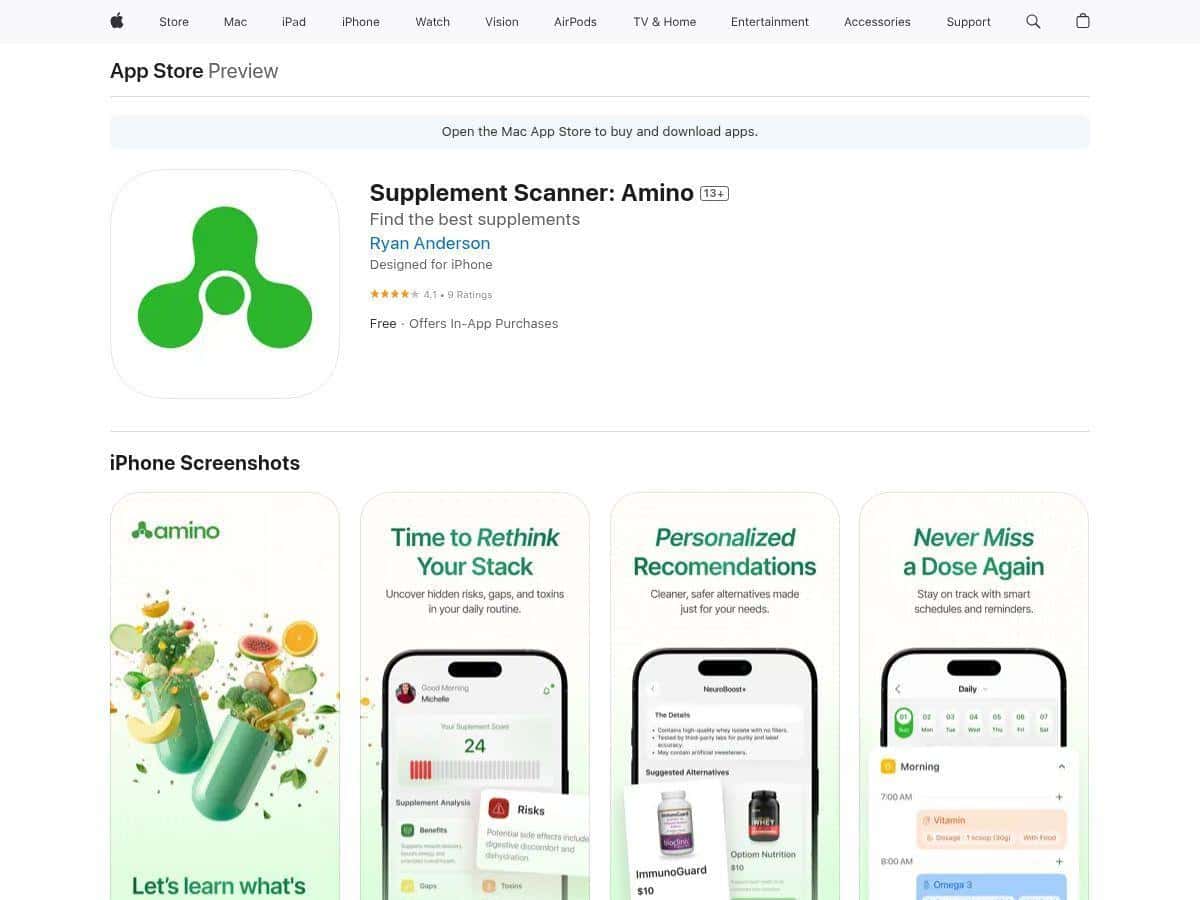
Supplements are one of those things that sound straightforward… until you actually start reading labels. That’s where Amino comes in. It’s basically a supplement scanner + tracker, meant to help you check ingredients fast, see if anything looks “off,” and then log what you take so you don’t accidentally stack the same stuff twice.
For this review, I used Amino for 3 weeks (from 2026-03-20 to 2026-04-10) on iPhone 14 Pro, iOS 16.7. I scanned 12 supplement labels and tracked 8 of them consistently. I’m not claiming it’s a medical device or that it “knows” your body—what I care about is whether it helps you make better, more informed choices in the real world. Here’s what I noticed.
Amino Review: what I scanned, what it flagged, and if it matched reality
Let me be blunt: the “scanner” is the whole point. If it can’t read labels reliably or the results are vague, you won’t use it for long. In my testing, Amino was fast—most scans took me under 10 seconds from opening the scan screen to seeing results (assuming the label was clear and not smudged). The bigger question was what those results actually meant.
How the scoring felt in practice
Amino shows what it calls safety and effectiveness-style scoring (the exact wording can vary by screen). What I liked is that it doesn’t just throw a single number at you. It breaks down ingredients and highlights things that may be a problem—either because there’s limited evidence for effectiveness, or because the ingredient raises safety/quality questions depending on dose and typical use.
Now, here’s the limitation I ran into: I didn’t see a full “here are every studies and thresholds” view on the main result card. It’s more like a summarized research-backed assessment. So when it flags something, you still need to use common sense and—if it’s a serious concern—confirm with a clinician or trusted references.
Examples from my scans
These are three of the scans I remember most clearly (and yes, I cross-checked the ingredients against reputable label facts and general supplement guidance):
- Pre-workout (caffeine + “proprietary blend”): Amino flagged the proprietary blend setup as a transparency issue. The safety/effectiveness score wasn’t “panic,” but it was clearly more cautious than it was for single-ingredient products. What I noticed: it wasn’t just caffeine—it was the fact I couldn’t easily verify doses from the label.
- Magnesium glycinate: This one looked pretty clean in Amino. The score wasn’t perfect (nothing ever is), but it didn’t throw red flags. In my experience, this matched how magnesium forms are generally discussed—glycinate is often considered a reasonable option for tolerability.
- “Sleep support” blend (melatonin + herbs): Amino generally treated it as a “use with care” category. It didn’t tell me “never take this,” but it did highlight that the blend approach can make dosing and evidence quality harder to judge. I also noticed it pushed me to think about overlap if I was already taking something else for sleep.
Tracking: the part that surprised me
Scanning is cool, but tracking is what actually changes behavior. Amino’s logging makes it easier to spot overlap—like when two products both contain the same stimulant, or when you’re stacking magnesium + “calming” products with overlapping minerals.
In my use, the tracking screen was simple enough that I kept coming back to it. I didn’t have to babysit it. If you’re the type who buys supplements “for later” and forgets what’s already in your routine, this is where Amino starts earning its keep.
What it didn’t do (and why that matters)
I want to call this out because it’s where expectations can get weird. Amino isn’t a substitute for medical advice, and it won’t know your personal contraindications (med interactions, pregnancy, kidney issues, etc.). Also, because I couldn’t find a fully transparent “here’s the exact research threshold and citations in one click” view during my scans, I wouldn’t treat the scores like a definitive verdict.
Still—if you’re trying to reduce guesswork, it’s genuinely helpful. It turned “I hope this is fine” into “Oh—this ingredient is the reason I should be cautious.” That’s valuable.
Key Features: what Amino actually gives you
- Instant supplement label scan for ingredient safety and flagging
- Ingredient-level breakdown instead of just one generic rating
- Safety + effectiveness-style scoring based on research summaries
- Cleaner swap suggestions when a product looks questionable (based on what Amino’s database knows)
- Routine tracking so you can log supplements and avoid unnecessary overlap
- Fast, simple UI that doesn’t require you to be a supplement expert
- Cross-device sync via Google or Apple account (so your list doesn’t vanish when you switch phones)
- Personalized analysis flow that makes it easier to revisit what you scanned
Pros and Cons (from my actual usage)
Pros
- Easy to use—scanning and logging felt frictionless, even when I wasn’t in “research mode.”
- Ingredient flags are useful—the app points at the “why,” not just a vague warning.
- Helps you avoid overlap—tracking made it more obvious when two products were doing the same job.
- Good for label readers—if you care about transparency, Amino’s caution around proprietary blends stood out to me.
- Clean interface—navigation is straightforward, and I didn’t feel lost digging for basics.
Cons
- Privacy + account sign-in: Amino pushes sign-in for sync. I didn’t personally run a deep privacy audit inside the app, but it’s a fair concern if you hate tying health data to an account.
- Subscription cost for advanced features: Amino Pro is listed at $49.99. If you only want occasional scans, the free version might feel limiting.
- Platform availability: In my testing, I used iOS. I couldn’t confirm Android availability from the material I reviewed, so double-check before buying time.
- Database transparency isn’t super clear: I didn’t see a simple “here’s our coverage” number, so you may occasionally get less detailed results for niche products.
Pricing Plans: what you’ll likely pay
Amino is available as a free download with optional in-app purchases. The main paid tier is Amino Pro at $49.99, which is where you typically expect deeper insights and more advanced scanning/tracking features.
One practical tip: before you subscribe, test your most-used products first. Scan a few things you already take—if the results you get in the free tier are enough, you might not need Pro. If you’re constantly buying new supplements, Pro may be worth it because you’ll use the app more often.
Who Amino is best for (and who should skip it)
- Great fit: people who take multiple categories (like pre-workout + sleep + daily vitamins) and want help reducing overlap.
- Great fit: anyone who actually reads labels but still feels overwhelmed by ingredient lists.
- Use caution / consider alternatives: if you’re looking for medical-grade guidance or need personalized interaction checks (Amino isn’t that).
- Skip (or test first): if you don’t want to create an account for sync or you’re uncomfortable with how supplement data might be handled.
Wrap it up
Amino is one of those apps that feels genuinely built for real supplement routines—not just curiosity. In my testing, the scanner was quick, the ingredient flags were the most useful part, and the tracking helped me catch overlap I would’ve missed otherwise. Just don’t treat the scores like a medical verdict, and make sure you’re comfortable with the account/sync side of things—especially if privacy matters a lot to you. If you want a faster way to sanity-check supplements before you commit, Amino earns a spot on my “use regularly” list.