Table of Contents
I’ve been testing developer tools that promise “easy AI integration,” and honestly, most of them fall apart the moment you try to wire everything together. Allapi.ai feels different. It’s built for developers and startup teams who want to connect AI models, add plugins, and start building without spending days on glue code.
What I liked right away is the overall workflow: you can explore models, try things in an interactive playground, and then move toward real API usage. If you’ve ever bounced between docs, SDKs, and model-specific quirks, you’ll probably appreciate that approach.
Allapi.ai Review
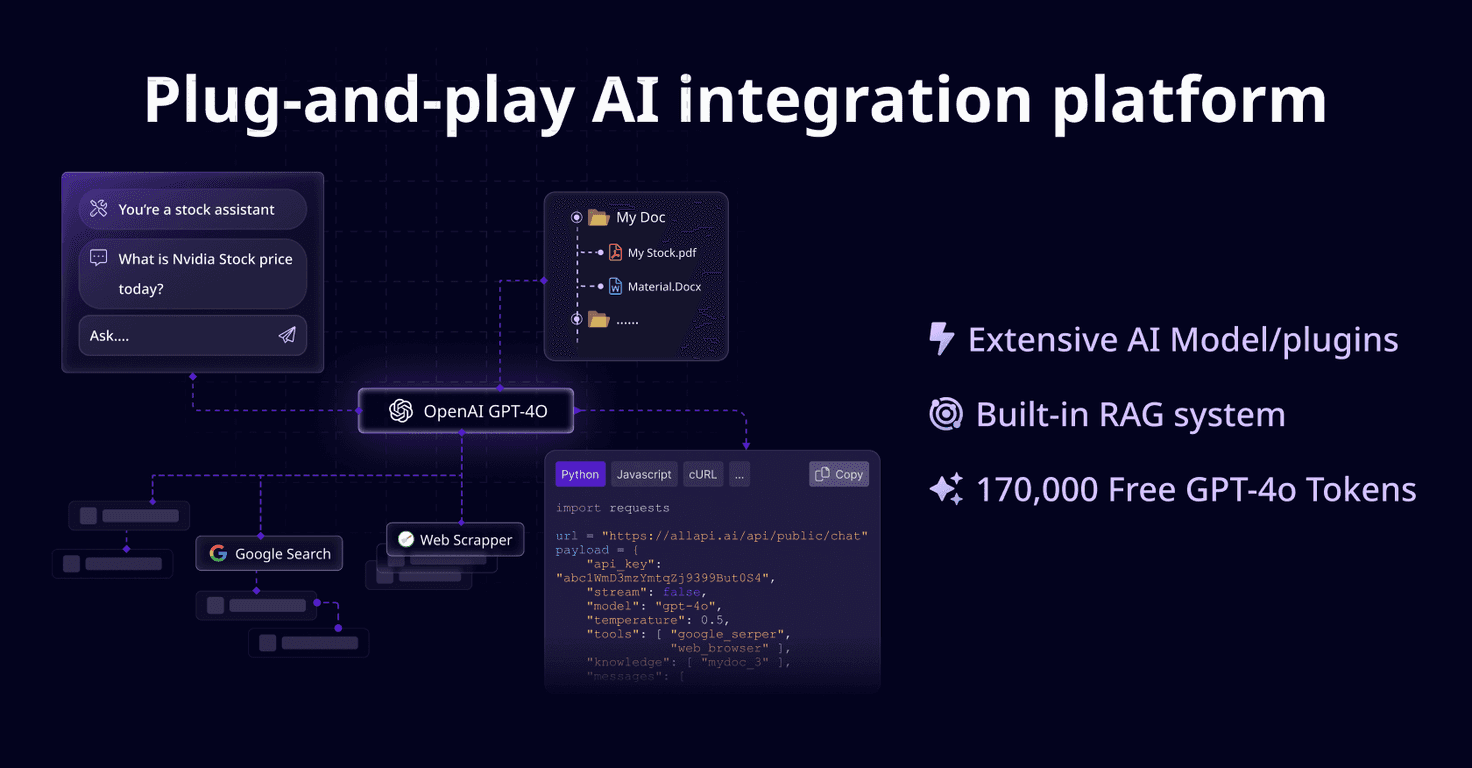
Allapi.ai is a platform aimed at making AI integration feel less like a science project and more like normal development. The big pitch is simple: you get access to 10+ AI models (including OpenAI’s GPT-4) and you can switch between them without rebuilding your entire stack.
In my experience, model switching is where teams usually get stuck. Different providers often mean different request formats, different response shapes, and different “gotchas” when you’re trying to keep your app consistent. Allapi.ai tries to solve that by giving you a unified dev environment.
Another part I actually paid attention to: the plugin library (25+ plugins). It’s not just “here are some models.” It includes practical building blocks like media-related capabilities and data management workflows. I tested ideas that normally require extra APIs or custom scripts, and the plugin approach shortened the path from “idea” to “working endpoint.”
Then there’s the intelligent code assistant. This is one of those features that can either save time or be mostly fluff—so I tried it on a couple of common integration tasks. What I noticed is that it doesn’t just spit random code; it tends to give snippets that are closer to what you’d actually paste into a project. If you’re working fast (or you’re a small team wearing multiple hats), shaving off even a few hours per feature adds up.
If you’re the type who likes to validate output before you touch code, you’ll probably like the interactive playground. Instead of guessing how an endpoint will behave, you can test it and iterate. That’s especially useful when you’re tuning prompts, checking tool behavior, or validating that your parameters are correct.
Allapi.ai also mentions an advanced RAG system for secure access to real data, with privacy in mind. I can’t verify every security detail from a marketing page alone, but the focus on “real data access” is the right direction if your app needs retrieval instead of pure chat completions.
Finally, the platform is positioned as developer-friendly, with clear documentation and multi-language support. That matters more than people think. When onboarding is smooth, you spend less time fighting setup and more time building.
Key Features
- Integration of 10+ AI models like GPT-4 and Claude series
- 25+ plugins for common app needs (media creation, data management, and more)
- Unified documentation so you’re not bouncing across model/provider docs every time
- Intelligent code assistant that helps generate personalized code snippets
- Interactive playground to test APIs before you commit to implementation
- Advanced RAG system aimed at secure access to real data
- Developer-friendly environment with support and multi-language guidance
Pros and Cons
Pros
- Faster integration — the platform claims up to 80% less time spent integrating models and features. In practice, the unified workflow does feel like it reduces repeated setup.
- Model variety — having 10+ models available means you can experiment without rewriting everything.
- Plugin ecosystem — 25+ plugins can cover a lot of “non-model” work that usually slows teams down.
- Free beta tokens — you get 170,000 GPT-4 tokens to explore. That’s enough to prototype a few endpoints and run real tests.
- Onboarding is straightforward — the docs and structure make it easier to start building quickly.
Cons
- It’s still beta — features can change, and you may hit limitations compared to a fully mature platform.
- New platform = adjustment time — if your team is used to a specific provider SDK or a certain integration style, you’ll need a bit of time to adapt to Allapi.ai’s approach.
Pricing Plans
Allapi.ai is currently in beta, and early access includes 170,000 free GPT-4 tokens so you can test the workflow without immediately worrying about cost. As for full pricing, detailed information for the non-beta version isn’t listed here yet.
What I’d recommend as a practical next step: use the beta tokens to build a small “proof of value” feature—something like a retrieval-based endpoint (RAG) or a plugin-powered media workflow—then compare the effort and output quality against your current setup.
Wrap up
Allapi.ai is one of the more developer-oriented “AI integration” platforms I’ve seen lately. It’s not trying to replace your whole engineering stack—it’s trying to remove friction when you’re connecting models, adding plugins, and testing APIs quickly. If you’re building an AI feature and you don’t want to spend your week wrestling with integration details, it’s worth trying during the beta phase.
Just keep expectations realistic: since it’s still in beta, there may be rough edges and some workflows that take a little getting used to. Still, the combination of 10+ models, 25+ plugins, a playground, and a helpful code assistant makes it a solid option for teams that want to move faster.


