Table of Contents
If you’ve got a half-formed business idea, you already know the hard part isn’t dreaming up the concept—it’s turning it into something you can actually act on. That’s where Aidea comes in. In my experience, most “idea” tools stop at brainstorming. Aidea tries to push you forward with AI-generated guidance for planning, research, and decision-making.
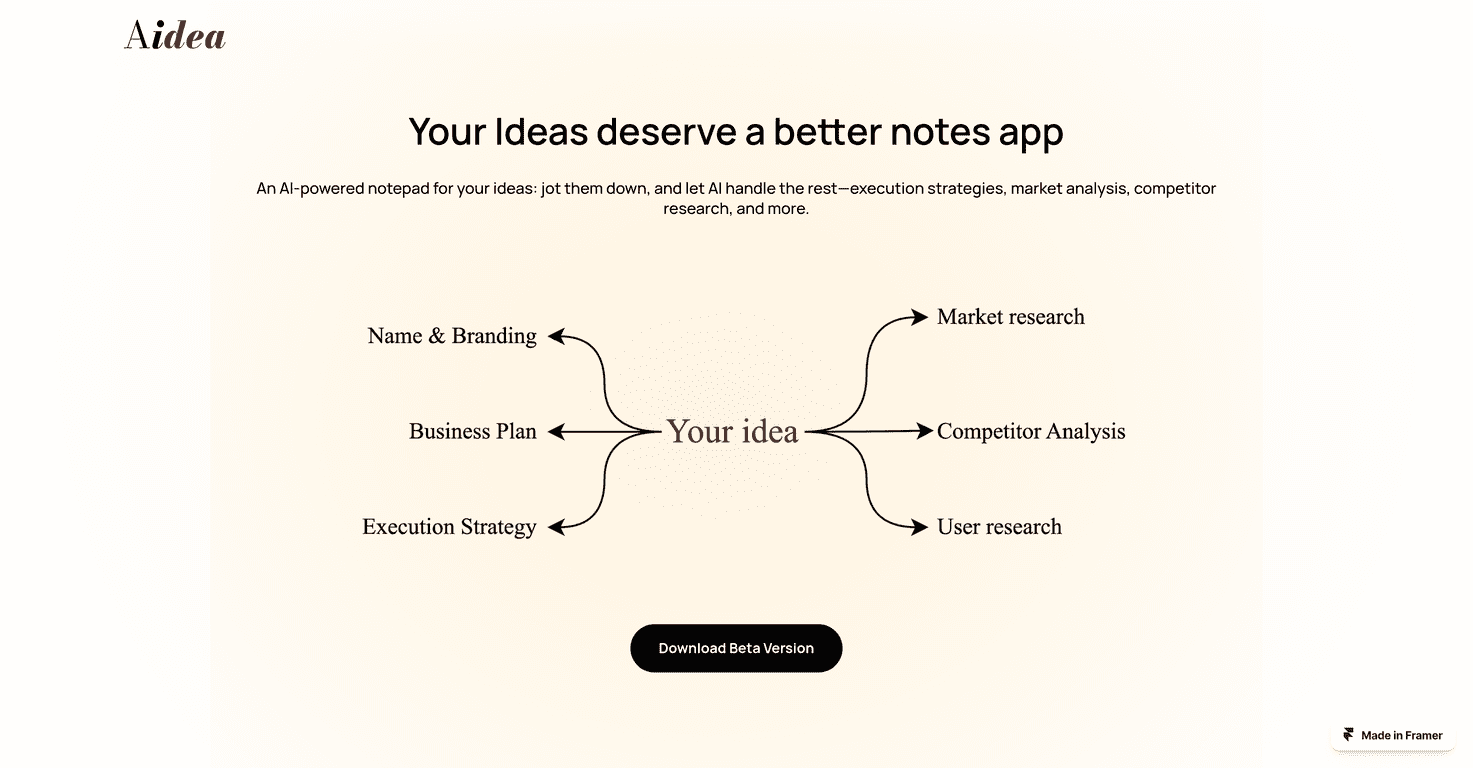
So what does it do, exactly? You can use it to draft things like a pitch deck, map out customer demographics, and work through monetization ideas. It also leans into market and competitor analysis so you’re not just guessing. The interface is meant to be straightforward—no wall of technical jargon, no confusing tabs that make you wonder if you’re using the right tool.
One thing I liked right away: the app doesn’t just hand you random text. It nudges you through steps that feel closer to how you’d build a plan in real life. You know—validate first, figure out your positioning, then think about how you’ll actually make money. It’s not glamorous, but it’s useful.
Aidea Review
Aidea is built for entrepreneurs who want help turning ideas into structured, actionable business plans. If you’re working on a startup, a side hustle, or even a new product line inside an existing business, it’s designed to cover the steps people usually get stuck on.
Here’s what stood out to me during testing:
- It keeps you moving. Instead of starting and stopping at “idea generation,” it pushes toward execution planning—like what to validate, how to think about customers, and how to shape the strategy.
- Market + competitor analysis is the centerpiece. The app’s pitch isn’t just “write a plan for me.” It tries to give you quick insights about what you’re up against and what the market might look like.
- Branding support is practical. Not just “be creative,” but actually suggesting directions you can use (like name and style prompts) so you’re not starting from a blank page.
Now, I’ll be honest: AI outputs are only as good as the inputs and the assumptions behind them. If you feed it a vague idea, you’ll get something vague back. But if you’re willing to refine your concept and answer follow-up questions, the results are much more usable.
Also, because it’s currently a beta, you may run into occasional rough edges. That’s not a dealbreaker for me, but it’s important to know going in—especially if you need something polished for a client or investor meeting tomorrow.
Key Features
These are the main tools Aidea highlights. I’m keeping the list close to what the app offers, but I’ll also tell you what each feature is useful for in real terms.
- Pitch Deck Creation for easier presentation prep
- Customer Identification with demographic-style insights to help you define who you’re targeting
- Branding Assistance with AI-powered style and name suggestions (handy when you’re stuck on branding basics)
- Execution Strategy that covers validation steps and guidance that can stretch toward “what next” decisions
- Monetization Insights to explore revenue models and pricing directions
- Market Analysis aimed at faster idea validation (so you can sanity-check demand)
- Competitor Analysis to pull out what rivals are doing and where you might differentiate
- User Research to help you think through trends and perspectives
If you’re wondering how this looks in practice, imagine you’re building a simple SaaS or a niche service. Aidea can help you go from “I think people want X” to “Here’s who might buy it, why they’d care, what alternatives exist, and how I’d position and monetize.” That’s the whole value—less spinning your wheels.
Pros and Cons
Pros
- Quick planning help. It’s built to turn rough ideas into structured notes and next steps fast.
- Multiple business areas covered. You’re not limited to just one task like “write a pitch.” It touches research, strategy, branding, and monetization.
- Beginner-friendly. The flow is easier to follow than many tools I’ve tried that feel aimed at power users.
- Good for first drafts. If you’re preparing something like a pitch deck or business plan outline, Aidea can cut down the time to get a solid starting point.
Cons
- Beta limitations. Since it’s in beta, you might see bugs, incomplete sections, or features that aren’t fully consistent yet.
- Platform availability. It’s currently positioned for iOS beta users, and Android support isn’t fully there yet (Android version is in the works).
- AI still needs your judgment. You’ll want to verify assumptions—especially around market sizing, customer fit, and competitor claims. Don’t blindly trust outputs.
Pricing Plans
At the moment, Aidea is available as a beta version for iOS users. Pricing details haven’t been clearly published yet, but early access is free during the beta period. If you’re considering trying it, I’d treat it like a “test drive” while it’s available—because beta experiences can change quickly.
Wrap up
Aidea is one of those tools that feels like it was made for the messy middle of entrepreneurship—the part where you’ve got an idea, but you need structure, research, and a plan you can actually execute. In my opinion, the strongest value is how it ties together pitch deck prep, market/competitor analysis, and execution strategy in one place.
Is it perfect? No. Being in beta means you should expect some limitations, and you’ll still need to bring your own thinking to the table. But if you want help turning a concept into a clearer plan without spending weeks researching from scratch, it’s definitely worth checking out.
Promote Aidea




