Table of Contents
If you’re trying to get more out of your ad spend, you’ve probably felt the same frustration I have: you tweak a campaign, it looks good for a day or two… and then performance just kind of drifts. That’s where AdsDog comes in.
In my experience, AdsDog is an advertising platform that’s aimed at helping you tighten targeting, test creatives faster, and actually understand what’s happening in your campaigns (instead of guessing). Below, I’ll walk through what it does, what I liked, what didn’t feel as polished, and how I’d think about the pricing if you’re evaluating it for your own business.
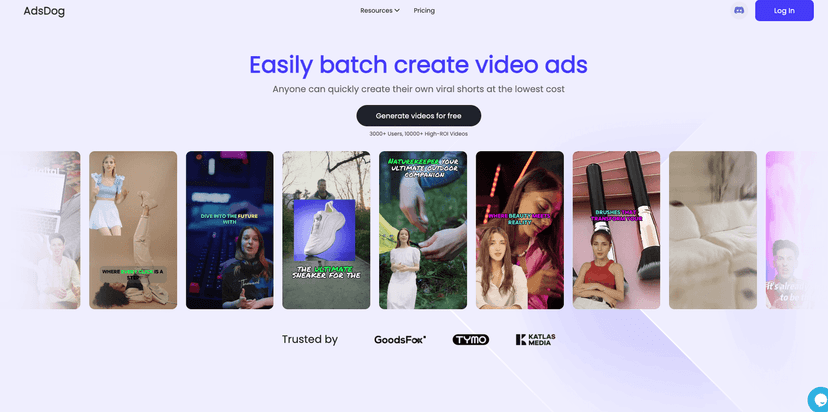
AdsDog Review: What It Looks Like to Use It
Let me start with the basics. AdsDog positions itself as an ad management and optimization tool. The pitch is simple: help you maximize ad performance and reach the right audience, without you having to babysit every campaign all day.
When I explored it, the first thing I noticed was that the dashboard is built for action. You’re not just staring at charts—you’re nudged toward things like audience targeting, creative testing, and performance reporting. And honestly, that’s what most of us want: fewer “what do I do now?” moments.
AdsDog also leans into analytics. That part matters because ad platforms can be deceptively noisy. You’ll see clicks, impressions, conversions… but without the right breakdowns, you still end up asking: which change actually moved the needle? AdsDog tries to answer that with reporting and optimization tools.
Key Features I’d Actually Use
- User-friendly dashboard for easy navigation
The interface is straightforward. I didn’t feel like I had to watch a 45-minute tutorial just to find the basics like campaign performance and reporting views. - Target audience segmentation
Instead of treating “everyone” as a single audience bucket, AdsDog helps you split audiences into segments. That’s especially useful when you’re running different angles (for example: retargeting visitors vs. cold prospecting). - Advanced analytics and reporting tools
This is where I’d spend my time. I like that it’s focused on the metrics you need to make decisions—so you can spot patterns like which segment is driving conversions and which one is just burning budget. - A/B testing for ad optimization
If you’ve ever reused the same ad for too long, you already know the pain. Testing lets you compare variants (like different headlines, images, or calls-to-action) so you’re not stuck guessing. - Integration with major social media platforms
This matters because you don’t want a tool that only works in theory. Integrations help keep your workflow connected to where your ads actually run.
Pros and Cons (Realistic Take)
Pros
- Beginners won’t feel completely lost
From what I saw, the layout is clean and the flow makes sense. You can get started without needing to be an ad expert. - Analytics that support decisions
I like when reporting helps you act. AdsDog’s analytics and reporting tools are built around performance insights, not just vanity metrics. - Customer support is a strong point
If you run into setup questions or campaign confusion, having responsive support can save hours. That’s been a big deal for me with any ad tool. - Cost-effective for small to medium businesses
If you’re not trying to run an enterprise-level operation, the pricing structure feels more approachable than some “big platform” alternatives.
Cons
- Lower tiers may limit what you can do
This is common with most tools, but it’s still worth calling out. If you’re serious about testing and deeper reporting, you may find yourself bumping into tier limits. - Advanced features take a bit of learning
It’s not hard, but it’s not instant either. If you want to get the most out of segmentation and optimization workflows, expect a short learning curve. - Occasional reporting glitches
Some users report occasional issues with reporting. I’d treat that as a “watch it” item—especially if you’re making daily budget decisions based on those numbers.
Pricing Plans: What You Should Know Before You Commit
AdsDog offers multiple pricing tiers, including a free basic plan, plus standard and premium options for businesses with bigger needs. The general idea is:
- Free basic plan: good for getting started, but expect limited features.
- Standard plan: aimed at small businesses that want more consistent optimization and reporting.
- Premium plan: built for larger teams that need expanded capabilities and deeper workflows.
One practical tip: before you upgrade, check which features you’ll actually use in your next 2–4 weeks. For example, if A/B testing and detailed reporting are your priority, don’t pay for “premium” just because it sounds better—confirm those specific tools are included at the tier you’re considering.
Detailed information on each tier can be found on their website, so you’ll want to verify the latest pricing and what’s included at each level.
Wrap up
AdsDog is the kind of advertising tool I like because it pushes you toward better decisions—targeting, testing, and reporting that helps you figure out what’s actually working. It’s not perfect (tier limits and occasional reporting hiccups are real considerations), but overall it feels like a solid option if you want to improve performance without turning ad management into a full-time job.
If you’re new to online ads, it’s approachable. If you’re already running campaigns and want a cleaner optimization workflow, it’s worth a close look. Either way, it’s one of those tools that can save time once you know where to focus.
Promote AdsDog




